
 The 2026 Drupal Business Survey is open. Your response will help shape the future of the Drupal business ecosystem.
Improvement of the export functions and components extension
You are browsing documentation for an older version of Drupal, which is not supported any longer, and the information may not be correct. See current documentation for Contributed modules
The new version of Patterns provides a set of enhancements to export automatically the configuration of a site. All the main components possess now automatic export capabilities, and depending on the type of component new options to export it are offered.
Two different use cases are distinguised:
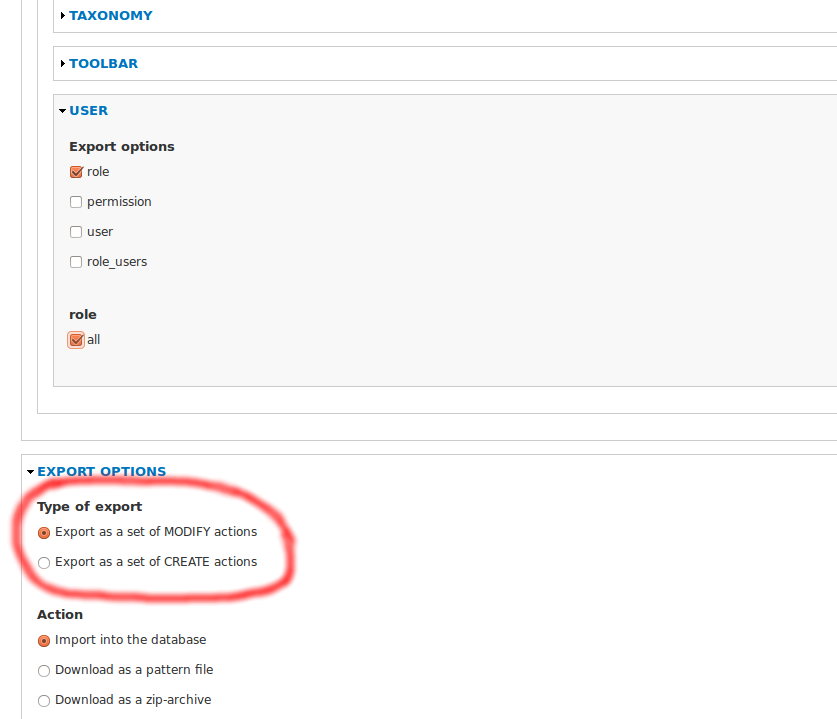
- Export the configuration as a pattern consisting of a set of CREATE actions which allows users the creation of patterns for “fresh installation” of certain feature,
- Export the configuration as a pattern consisting of a set of MODIFY actions which allows users the creation of patterns to override the current settings (e.g., to update the features developed in a testing site to a production site). The patterns generated ensure idempotency in the operations.
An analysis was performed in order to classify the required export configuration processes according to the semantic of the tag itself. For most of the components exporting the configuration as a set of CREATE or MODIFY actions makes sense semantically for both cases, but there are some exceptions, e.g., for the colour component only the MODIFY case makes sense, since it is always present in the system.
The table belows provides information about the supported export configuration processes for each tag.
| Component: tag / Process | CREATE actions | MODIFY actions |
|---|---|---|
| Menu: menu | X | X |
| Menu: menu_item | X | X |
| Block: block | X | X |
| Block: block_node_type | X | |
| Block: block_role | X | |
| Color: color | X | |
| Field: field | X | X |
| Field: instance | X | X |
| Content Type: content_type | X | X |
| Content Type: node | X | X |
| Taxonomy: vocabulary | X | X |
| Taxonomy: term | X | X |
| User: role | X | X |
| User: permission | X | |
| User: user | X | X |
| User: roles_user | X | |
| Pathauto: settings | X | |
| Pathauto: patterns | X | |
| Shortcut: shortcut_set | X | X |
| Shortcut: shortcut_link | X | X |
| Shortcut: shortcut_set_user | X | |
| System: variables | X | |
| System: modules | X | |
| System: theme | X | |
| Toolbar: toolbarrole | X |
A new option is displayed at admin/patterns/export to choose the kind of export process:
On the other hand, some of the components have been extended as well to provide a richer syntax and to divide some complex actions into a set of more basic ones keeping with the principles of modular design. E.g., the block component now offer especific tags for the settings related to the scope in terms of content type or role.
Help improve this page
You can:
- Log in, click Edit, and edit this page
- Log in, click Discuss, update the Page status value, and suggest an improvement
- Log in and create a Documentation issue with your suggestion
