

 Come together with the global Drupal community in Rotterdam, 28 Sept – 1 Oct 2026. Sessions, contribution, connection, and Early Bird savings until 8 June.
Thanks for the rules module, I could not live without it.
Is there any way to use a rules action to set an entity reference field to Null / Empty?
Any help would be hugely appreciated.
| Comment | File | Size | Author |
|---|---|---|---|
| #9 | one-action-blank.jpg | 77.33 KB | crutch |
| #9 | one-of-the-rules.jpg | 152.4 KB | crutch |
| #9 | rules-when-things-change.jpg | 119.97 KB | crutch |
| #9 | conditional-2.jpg | 125.53 KB | crutch |
| #9 | conditional-1.jpg | 45.55 KB | crutch |



Comments
Comment #1
kingswoodute commentedAhh, got it.
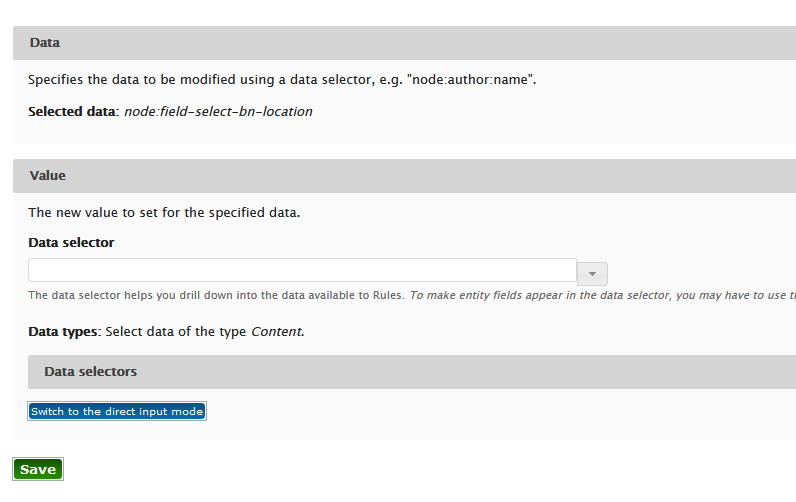
If anyone else runs into a problem doing this. The issue I had was that I was leaving the data selector blank and it was giving me an error message. BUT If you switch to the direct input mode and leave it blank it will work.
Have a great one.
Comment #2
geek-merlinSo fixed.
Comment #4
mkostir commentedI'd like to re-open this thread, as switching to direct input mode isn't a solution.
I am having the same issue when setting entity reference. However I can't use this workaround as the value being set (TARGET) is a value taken from another field (SOURCE)- hence changed dynamically.
As long as Source has any value, everything works as it is supposed to. But as soon as SOURCE is empty, it will raise this error:
Unable to modify data "fetched-from-entity:field-account-ref": Invalid data value given. Be sure it matches the required data type and format.
Any advice would be warmly welcome
Comment #5
geek-merlin@mkostir: it will help if you can write an idiot-proof step by step guide how to reproduce this.
Comment #6
crutch commentedI'll try, because this worked for me when using conditional fields that do not reset radios. This won't work with required fields though specifically when using conditional fields that are set as required.
Event
After updating existing content type of "Course"
Condition
+ Entity has field
Parameter: Entity: [node], Field: field_select_office_location (this is the entity reference field)
+ Data comparison
Parameter: Data to compare: [node:field-location-type], Data value: School Location (data value could be School Location or Office Location but when School location is chosen then the conditional field for Office should be set to null, otherwise a mis-clicked radio under Office will be remain selected and then show 2 locations on the node)
Actions
+ Set a data value
Parameter: Data: [node:field-select-office-location]
Data--- Selected data: node:field-select-office-location
Value---
The new value to set for the specified data.
Data selector = blank/empty do not enter anything
In my case I didn't have to switch to direct input mode and it saved with no errors and sets the value to null as expected.
Comment #7
tr commentedThere is no patch, so "Needs review" is the wrong status.
Comment #8
tr commentedComment #9
crutch commented