

 Come together with the global Drupal community in Rotterdam, 28 Sept – 1 Oct 2026. Sessions, contribution, connection, and Early Bird savings until 8 June.
i'm not sure if this is the correct place to ask this but perhaps you can point me in the right direction. i've been struggling with these issues for a while and haven't been able to get past them.
the first is, line breaks in plain text nodes don't seem to be interpretted in the body of the feed items. auto generated teasers look fine. i have tried using the standard full html input format as well as a simple custom format (along with a module which allows me to apply the new type to feed items only) which filters html and applies line breaks. i've tried reordering the filters with no luck. i'm using a standard garland theme with no custom tpl's.
the second problem is, if a feed includes a lot of html, the auto generated teasers tend to chop the html in bad places causing them to break the display. this problem must be quite common.
thanks for any direction you can provide.
| Comment | File | Size | Author |
|---|---|---|---|
| #2 | themeissue.png | 14.91 KB | ron collins |

Comments
Comment #1
Ashraf Amayreh commentedCould you provide the URL to the feed? Or if not possible, attach a sample here so I can take a quick look?
Comment #2
ron collins commentedproblem 1
this post is plain text only in the body: http://mostlywater.org/en_canada_alt_media_oon_edmonton_anarchist_bookfa...
you can see its teaser on the front page. the teaser formating looks fine. when editing, the body content in the form reflects the line breaks in the database. the problem is in the rendering layer.
if you want to see it with a default garland theme, you can create an account, log in and switch. but it looks the same.
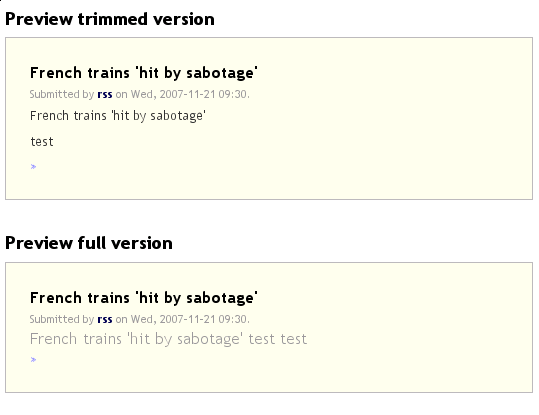
i have attached a screenshot of the preview of another feed item to show the comparison. in that node, each word "test" should appear on a new line.
problem 2
i have gotten around this problem for now by using a table view with the title only. no teaser. if you think there is something you might gain by looking at this, i can put it back temporarily for you.
this isn't the best example, but the teaser text can look like this:
<a href="/video/noam-chomsky-on-iran"><img src="http://coanews.org/sites/coanews.org/files/images/chomsky2.gif" alt="" title="" class="image thumbnail video_image_teaser" width="139" height="148" /></a><p>Are assumptions about Iran wrong?in this case, the paragraph marker isn't closed. not the end of the world. but when an image tag or anchor or div doesn't close, it can really make a mess of things.
if you need more access to see what's happening with either of these problems, let me know.
Comment #3
vito_swat commentedTo solve problem 2 check htmlcorrector module. It's a known bug in drupal and D6 will have htmlcorrector in core.
Comment #4
ron collins commentedthanks. issue 2 is much better. issue 1 is still a problem. any ideas where to dig further?
Comment #5
ron collins commentedmore info...
i noticed that aggregation_item nodes just don't acknowledge any of the input filter formatting. if i create a new input format using just the "URL filter" to convert url strings to links, there is no change in the output. no URL's are converted. they are simply printed as plain text.
isn't anyone else having this problem? has it never been reported before? i don't understand what is distinguishing these nodes from other node types on my system. the body is being stored in the node_revisions table just like other nodes so why should it be treated differently?
Comment #6
ron collins commentedunfortunately, i'm going to have to look at other aggregation options at this point. i can't just keep going with the formatting the way it is.
Comment #7
ron collins commentedthis seems related: http://drupal.org/node/201383
again, the lack of format filters only happens in the full node view. teasers are fine. if i edit the feed_items and insert html, it is interpreted correctly.
Comment #8
selectsplat commentedAny updates on issue#1?
Comment #9
selectsplat commentedGrrr.
Why was this thread deleted?
http://drupal.org/node/201383
Comment #10
Ashraf Amayreh commentedFixed, but I'm waiting to accumulate more bug fixes before creating a release.
Comment #11
Ashraf Amayreh commentedI'm thinking of creating a release by next Saturday the 22nd even if it's with this fix only. So that's when you can expect it.
Comment #12
selectsplat commentedOutstanding. Please be sure to include information on how to make a donation for your work. Is there any way you can post the code changes here so that I can apply them (I am a php hobbyist) before next week?
Thanks in advance either way.
Comment #13
Ashraf Amayreh commentedReplace the function aggregation_item_view with this one
I've tested it, but let me know how it works out for you.
I'll see if I can setup a donation system soon. Thanks for your kind offer.
Comment #14
JamoSmith commentedThis new code introduces a new issue. While fixing the problem it prevents Feed Item Body's from containing rich HTML, since this HTML will be filtered by the default Input Type (Filtered HTML). I am probably a minority to want to keep unfiltered HTML from the RSS feed, and I can always revert the aggregation_item_view function back to the old one. But, the solution to this issue would be to allow the Feed to define a default input type for the imported content.