The code responsible for this should be disabled from the "Property validation" module.
Please guys, just tell me if I my needs are insane.
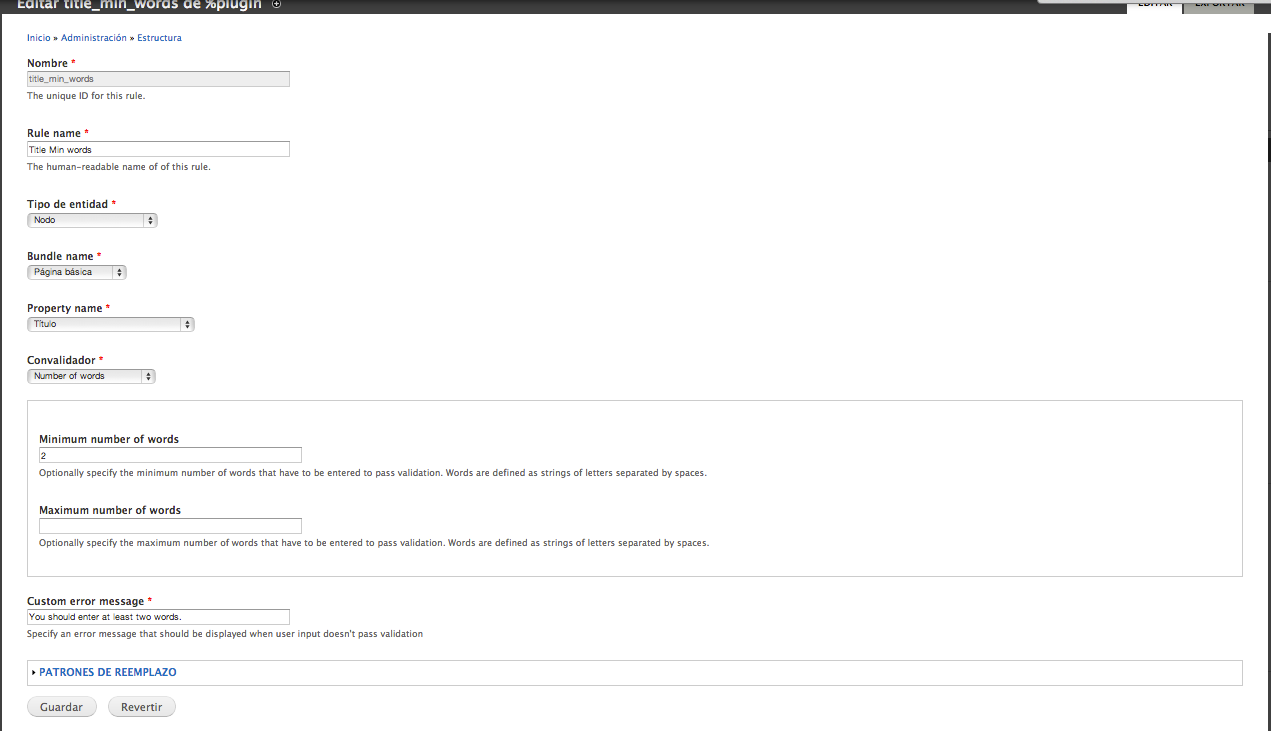
We needed to add some validation rules for some fields and "Field Validation" seems to be a good choice for that. But that statement was true up until we enabled "Property validation". This sub-module adds and enables a validation rule for all the existing content types that requires the title to have at least two words. It throws the message "You should enter at least two words."
Now, here are my questions ...
- Is it against some common good practices to have just one word and a node/page title?
- Are the following title being used on sites on internet? FAQ, Forum, Welcome, Home, Help, Support, Downloads, ... I can keep going all day
- Why is this rule enabled by default in the code instead of being disabled?
- Why isn't this rule exposed in the Rules UI so that someone can enable it or disable it at will? (But the bloody thing should be disable by default.)
I have a solution for it. Since "property validation" makes it possible to validate those things, and I quote "Since 7.x-2.1, we add another sub module property validation which could solve validation issues for property(non-field), such as title, Ubercat SKU, list_price" ... then why not let people simply add whatever validation they want for the title instead of deciding for them.
I had to disable the module for now. But I do need it. I didn't submit a patch because it would have been very simple and removed the function named property_validation_default_property_validation_rule() in the file property_validation.default_property_validation_rules.inc
I think that this is a blocker and should be fixed asap. I could help and submit a patch if you need a hand, but since I have never read about the rules API, than it might be more efficient in performing that task than myself.
Cheers


Comments
Comment #1
g089h515r806 commentedYou could disable it like that you disable a view.
Comment #2
asiby commentedI am not sure I understand. Under the Rules UI at /admin/config/workflow/rules, there is no visible trace of it. I poked everywhere in the admin interface, and there is really nothing.
I am checking at this moment what I could do to make it visible. I am sure that rules allows it. If I find it, I will make a patch. Until then, the module will remain disabled.
Comment #3
dwalker51 commentedThe place to look is in structure > Property Validation (there is also a field validation menu item, for doing fields), this has as a submenu "Add" and "Import". In it you will see an already created validation rule called title_min_words. See attached file, Change the minimum number of words to 1 or empty or you could click the option "bypass validation" or simply delete this validation rule. It seems this Rule only applies to the Basic Page content type.
Hope this solves your problem.
Comment #4
asiby commentedThank you dwalker51. It worked. I think it should have been disabled by default.
After seeing that, I am now wondering if this module is using the rules module at all? Is it?
Comment #5
dave reidAgreed. I would not have expected to have default validation rules on the body or title fields to be enabled by default. Further, the UI does not allow them to be easily disabled from the listing screen. You have to go and edit the individual rules to bypass validation.
Comment #6
dave reidComment #7
dave reid#1973958: UI should use the default CTools exportable UI so that rules can be disable/enabled is a blocker to this issue because right now there is not currently a way to disable or enable exported rules in the UI.
Comment #8
g089h515r806 commented1, User could disable it at admin/structure/field_validation which is based on Ctools Export UI.
2, Yes, it should be disabled by default, I did not know how to disable it when i first build it.
3, I have add your account to the project maintainers, and you could commit it by yourself now.
Comment #9
nevergoneI tested the #6 and works well! :)
Comment #10
gamesfrager commented#6 worked, thanks Dave. This patch should be applied to latest stable if possible.
Comment #11
g089h515r806 commentedcommited.