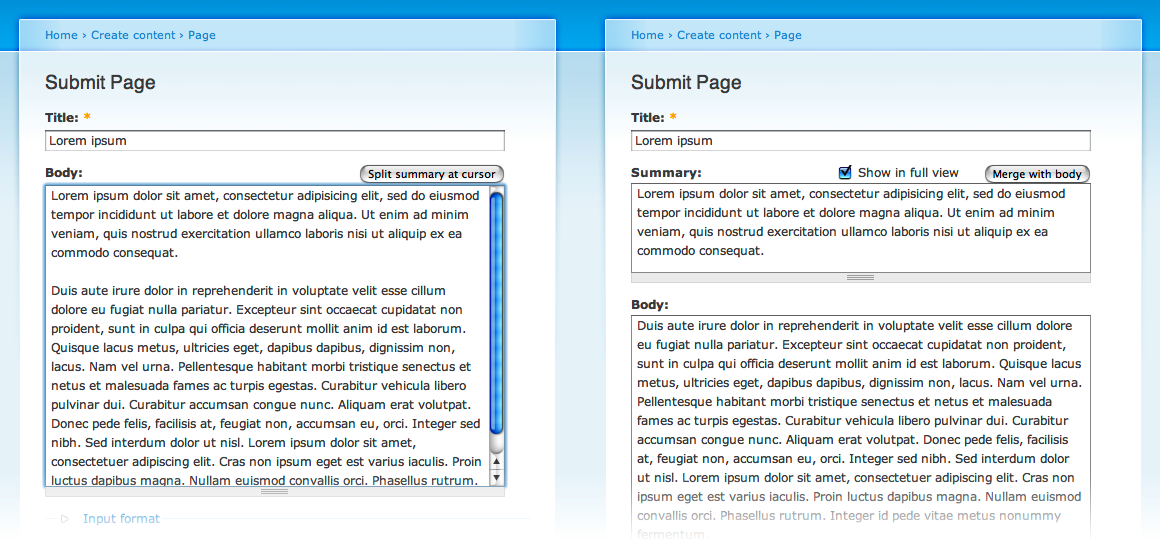
In D6 a new button was added to the node edit form. This button splits up the body input field into two fields; one with the contents before the cursor location, and one with the contents after the cursor location. See http://drupal.org/node/107061.
After much debate it was decided the label on the button would be "Split summary at cursor". When split up, a check box is visible "Show summary in full view". The rationale for using summary was that teaser would not be understood by first time users.
Though this is great new functionality, I believe the user-interface can be improved. I'm not yet completely sure how to do this though, just thinking out loud. I would like your input.
First a few facts:
- The concept of teaser is never explained, neither on the help pages nor in the handbooks.
- The button is labeled "Split summary at cursor". But it doesn't split the summary, it splits the body.
- Currently, after the split the summary/teaser field is labeled "Body", while the body has no label at all.
- Currently, if "Show summary in full view" is checked the teaser field acts like a teaser (or introduction). If unchecked it acts like a summary.
- In usability consistency is king.
Okay, now my opinion:
- Teaser should have
- a definition on the help page (/admin/help?)
- a description on node/add
- Use of words like teaser should be consistent throughout Drupal. Don't call it summary on one page, and teaser on another.
- What is a teaser anyway? Maybe this is an explanation:
Drupal has several ways of displaying nodes. One of them is page view, one of them is teaser view. In page view Drupal displays the whole node. In teaser view Drupal displays only the title and the teaser. You decide what the teaser contains:
- it can be empty, thus displaying nothing
- it may contain the first part of the body; either you decide which part, or Drupal can decide for you
- it may be a separate piece of text, e.g. containing a summary of the whole page
- The button label is confusing. Use "split off teaser at cursor" or "separate teaser at cursor" or "make text before cursor the teaser". I guess I prefer "separate teaser" as it suggests, well, a separate teaser ;-)
- The field labels should be correct. See ximo's mockup for how it should be.
- The checkbox label is confusing. With the field labels right you can avoid "summary" altogether (look at ximo's mockup).
- As an end-user I'm not interested in how stuff is stored. I'm interested in how it is displayed. If I see two fields I see two fields, not "a teaser that is part of the body".



Comments
Comment #1
gaele commentedAnother term: in preview mode the teaser is called "trimmed version".
Comment #2
gpk commentedAlso at /admin/content/node-settings we have "trimmed posts" and "trimmed version of a post".
Comment #3
gpk commentedComment #4
pancho1) I absolutely second gaele's opinion that this is far too unconsistent to be acceptable. We should stick to one term.
2) When the decision for using the term "summary" has been made, the linguistic differences between the different possible terms describing our summary/teaser have not been taken into account:
Therefore I hope we could open up this discussion again, as it is vital for the usability of D6.
Comment #5
gábor hojtsyPancho: in Drupal 6, a summary is not part of the text. A teaser is. Drupal 6 supports both summaries and teasers.
Comment #6
gaele commentedOn one hand I feel we are nitpicking, on the other I feel this is a usability issue, thus important.
My conclusion from #5: a teaser is a summary if "Show summary in full view" is unchecked. Hmm, confusing.
Comment #7
shunting commentedThis is not nitpicking.
A summary and the text are TWO things and can exist independently.
A teaser and the text are ONE thing -- the teaser flows into the text.
Many bloggers use teaser exactly as described to keep the front page bubbling with short posts -- One or two lines of teaser, then a "Read More" link to the full text, which is expected to include the teaser.
However, since the default for 'Show summary in full view' is unchecked, that breaks expected usability for many bloggers.
So there are two issues:
1. Teaser doesn't equal summary. These are two separate use cases.
2. The default use case, summary, breaks usability for bloggers.
My thought is to straighten out the structural and semantic issues, and the functionality issues, as follows:
1. Call the chunk 'o' text (whether summary or teaser) a "lead". That is the structure.
2. Set up a default on "Post Settings" with two values: (1) Treat Leads as Summaries; and (2) Treat Leads as Teasers (with explanation in descriptions). That is the semantics.
3. Set up a default on "Post Settings" for "Show summary in full view" where leads are summaries.
4. Do not show "Do not have the "Show summary in full view" if leads are teasers (teasers should always show), and show if leads are summaries.
5. Allow default override for both lead/summary treatment and showing lead as summary at Post level.
Does this approach meet all the requirements? If so, I might try my first patch. So far as I can tell, there's no new functionality, so it really is a patch.
Comment #8
gpk commentedAgree this is not nitpicking.
Many people would take the view that a teaser does not have to be the initial portion of the text. Hence the nodeteaser module for example which in essence allows the teaser to be a separate field -> more of a summary or abstract.
This is the only decent and relevant definition I could find: http://www.m-w.com/dictionary/teaser
I would prefer to have the term "teaser" used throughout (with suitable definition/explanations on the node edit page), and have "Show teaser in full view" checked by default where appropriate, as indeed it is. I think additional Post settings might be an over-complication.
However I appreciate that for many people the term "teaser" is itself confusing. It's just that "summary" is less accurate and hence ultimatlely more confusing. Just as "category" is not an adequte substitute for "taxonomy", we need the terminology "teaser" - but also need sufficient help and explanation for novices. Maybe a "?" help link with JS popup on hover, or something.
Essential reading on this debate: http://drupal.org/node/107061 and links therein. Also http://drupal.org/node/159981 is related.
Comment #9
shunting commentedgpk, you write:
I agree. That is the lead == summary camp (two portions).
I however -- and my small group blog with 8 writers and around 10,000 posts -- am in the lead == teaser camp (initial portion).
(Note: I come to subclassing lead into teaser and summary from long years of editing and production; it's not arbitrary ;-)
What gets me is having only one of the two use cases handled, and that one not mine (although all of D5) -- and then having to retrain my very non-technical writers, having past posts break, and (according to the other thread) more checkboxes and more inline documentation to read.
Can't we just allow reversion to the D5 method? From where I sit, the slider bar is neat, but the hassle of getting to that point just isn't worth it.
P.S. If the Summary really IS a separate thing, why not just make it a separate box and have done, like at Kos? I know it's late to bring this up....
Comment #10
shunting commentedMore here. I think these are requirements and conceptual issues, not coding ones. The coding is already amazing...
UPDATE Forgot to say... Most content creators who care about writing, as my bloggers do, are going to want to control their own breaks (and not rely on the automatic breaks).
Why? Because click through, which is measured, from the main page to the post page, can be affected by where the break is placed. For example, writing a question, followed by a break, makes many readers want to click through to the full page to get the answer! You don't get that level of control with automatic breaks. (And there are some writers who look at their stats in, say, Hall of Fame...)
Comment #11
gaele commentedThis is a discussion about concepts, both UI and coding concepts. We need names and definitions at several levels. Let me try.
Code:
- Quoting myself: "Drupal has several ways of displaying nodes. One of them is page view, one of them is teaser view. In page view Drupal displays the whole node. In teaser view Drupal displays only the title and the teaser." This chunk of text that Drupal shows is called teaser in Drupal developer lingo. We need a word for "that chunk of text that is shown in teaser view". Better keep it at "teaser".
- How is this "teaser" stored? As part of the body field, or as a separate field. How do you call it?
UI:
- How do you translate this generic concept which Drupal developers call "teaser" into something end-users will understand? Could we keep the term teaser? Or call it lead, or intro?
- We have several uses of the chunk of text, independent of the way it is stored. shunting sums it up nicely here: http://drupal.org/node/159981#comment-660725. I believe most people agree on the uses (though not necessarily on the labels).
Another important question is about teaser workflow:
- How do users perform actions on "teasers"? Do they often choose the teaser break themselves, or do they leave it to Drupal? Do they often switch between "summary" and other uses of the teaser? How is their node writing workflow? As gpk already said, http://drupal.org/node/107061 is essential reading. Still I think we need more end-user input like shunting's.
In my opinion this is not just a labeling issue, so it won't be solved before D7.
Comment #12
shunting commentedgaele @11 writes:
From my perspective, the D6 "teaser" implementation is, because of usability concerns, broken. So waiting 'til D7 is a problem...
Comment #13
gaele commentedComment #14
mshaver commentedHas this discussion moved to another post?
One other item I'd like to add to this discussion is the relationship between "Length of trimmed posts" on the "Post Settings" page and the actual length of the Summary, Teaser, Lead or whatever it ends up being called. It seems these should be a closely tied together. If as an admin I've defined these to be only 200 characters, then the field needs to only allow this many characters and display this to the end user. The way it affectively works now is that the trimmed post is set to Unlimited *if* you've set the "split summary at cursor" or you've manually set the teaser break in the body. I think it's fine to have this be the default behavior, but not for when an actual character limit is set.
Also, the mockup here improves the display by adding labels to "both" fields.
Comment #15
gaele commentedmshaver, could you open a new issue for this?
Regarding the mockup: yes, you are right. However, I believe Steven somewhere said this behavior is very difficult to program.
Comment #16
shunting commented"Summary, Teaser, Lead or whatever it ends up being called."
Well, these are actually three different editorial functions:
Summary: An abstract of the complete content of an article or post.
Lead: The introductory paragraph of an article or post -- often includes the "who,what,where,when, and why."
Teaser: Something that gets the reader to click the Read more link and read on.
Since summary and leads need to be complete in order to be readable, they probably shouldn't be automagically broken at all. The same probably does not apply to teaser. And then there are people who just don't care, and the break can happen where the machine makes it.
So what should happen IMHSO:
1. There should be a default setting checkbox for automagic breaks on the Post Settings page (does not now exist)
2. There should be a manual override on the post page itself (does exist).
Comment #17
alanburke commentedComment #18
alanburke commentedSo the world as moved on.
#372743: Body and teaser as fields
Teaser splitter is gone too.
I'm marking this as fixed, as things are much cleaner in D7 right now.
Comment #20
jenlamptonIt's not fixed.
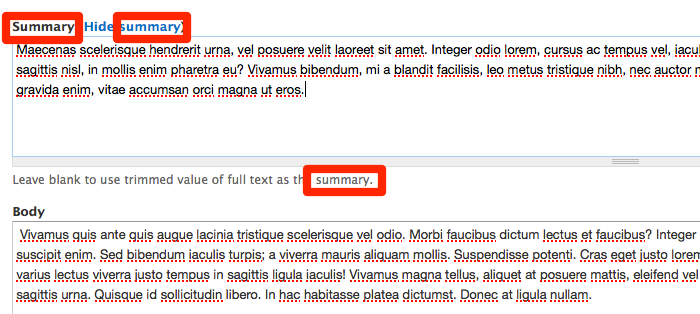
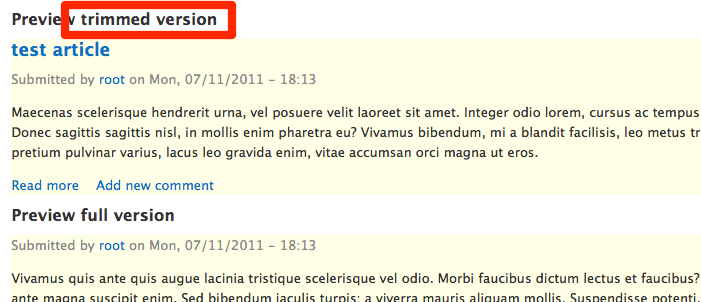
In Drupal 7 we still released with "Summary" appearing in the node edit form, and "Trimmed version" appearing in the preview. This is particularly confusing to people who are new to Drupal because they don't know what a "Summary" is yet - and when they are looking at a preview of their content, it doesn't help answer the question for them if it doesn't correctly label the summary as a summary.
I think we need to actually review the whole codebase for references to both of these strings, as well as "Teaser" and make sure we're consistent.
Node edit form

Preview of node
Comment #21
gaele commentedI guess "trimmed version" refers to the whole node. A trimmed version of the node contains the summary instead of the full body text. Perhaps we should make that more clear.
Comment #22
yoroy commentedTracking…
Comment #23
brightboldAnd then of course there's the "Summary or Trimmed" formatter, separate from the "Trimmed" formatter, where Trimmed refers to cutting off the field at field to a specified number of characters, whereas "summary or trimmed" uses the (manually entered) content of the summary field if available and the trimmed version if not. So in practice "summary" and "trimmed" mean two distinctly different things.
Comment #24
Taxoman commentedSubscribing
Comment #25
jenlamptonBumping up to D8. I think this is important enough that it can be back ported to D7 too, it still trips up a lot of students.
Comment #26
yoroy commentedMaybe the distinction made in #23 can be rephrased in the ui as a summary with a certain default behavior, similar to how you can set a default image for an image field. I too think this is important, it's part of understanding the concept of display modes. It would be good to make that a bit easier and rework this for clarity and consistency.
Comment #27
jenlamptonMaybe we can determine on a per-node basis if the "teaser" is using the "summary" field or if it was "trimmed" to a certain length, and use the appropriate language in the UI on the preview page. Perhaps *always* using the word "teaser" and also using summary/trimmed based on what actually happened?
Comment #28
colanHere's a crazy thought. What about dropping support for this entirely? Make it two separate fields. Has this been discussed anywhere? As far as I know, each field formatter can limit the output to a certain number of characters so a separate summary field can handle this independently, can it not?
I'm doing this for a project currently, two "Long text" fields, one for the summary and one for the body. It keeps things simple.
Comment #29
shunting commented#28 What about dropping support for this?
Cleanest solution yet. Of course, there is the issue of an upgrade path for all existing content from D6 onward, but your solution might even make that clean.
Comment #30
colanOn an upgrade, if any "Long text with summary" fields are seen, just divide them in two:
Comment #31
jenlamptonDo we have any idea about performance implications of adding a new field? if turning body into a field made drupal 10% slower, I'm worried making summary a new field might have the same implications - and if that's the case I'm completely against it.
It seems like making the UI *say* what it's actually doing is a small change, but changing what Drupal's actually doing should perhaps be discussed in another issue. :)
Comment #32
shunting commented#31 If summary becomes a field like any other, would the performance implications be identical to any other field that one might choose to add?
And if there is some functionality that the summary field alone was (like caching???), is there a reason that other fields should also not have the same option?
Comment #33
jenlampton@shunting can you create a new issue for turning the summary into it's own field? I think it's an interesting proposal, but should be discussed separately from updating the user interface text :)
Comment #34
colanMakes sense. This is more of a documentation issue, which should depend on it.
Comment #35
colanAnd here it is, folks: #1378350: Clean up the "Long text and summary" field
Please add your support! Let's get that out of the way first.
Comment #36
jenlamptonWe ran into this in the Google Usability study (participant 8), tagging appropriately.
Comment #37
bleen commentedFYI #35 points you to an issue that then points back to here ...
issueception
Comment #38
cweagansUpdating tags per http://drupal.org/node/1517250
Comment #40
krina.addweb commentedComment #41
yoroy commentedComment #52
pameeela commentedThis needs an issue summary update as many of the references are outdated (Split summary at cursor was only D6 I think). Also the 'Preview trimmed version' text is D7 only, in D8/9 you can select the view mode for preview.
So I'm not entirely sure what the D9 actions would be? As a result I'm not convinced it's a D9 bug, maybe if it gets set back to D7 it can be set back to a bug?
It has already been pointed out that 'Summary' and 'Trimmed' are two different things, as the 'Summary or Trimmed' formatter demonstrates (this displays either the summary, if set, or the trimmed body if not).
FWIW I love the summary input and use that formatter a lot. I don't agree that making a separate field is equivalent (or better) because it means you *have* to provide a value. The great thing about the summary field is it allows you to have the trimmed fallback, which works most of the time, but allows you to override it if needed.
Comment #56
pameeela commentedGoing to bite the bullet and close this, as I think it's too outdated to be useful. If anyone feels the current functionality needs modification for usability, it will be best to create a new issue with suggestions.