

Closed (duplicate)
Project:
CKEditor 4 - WYSIWYG HTML editor
Version:
7.x-1.12
Component:
User interface
Priority:
Normal
Category:
Support request
Assigned:
Unassigned
Reporter:
Created:
8 Mar 2013 at 16:20 UTC
Updated:
4 Apr 2013 at 15:39 UTC

Comments
Comment #1
tarausa commentedI am typing with one hand other in cast sorry about typos
Comment #2
tomaa-1 commentedHi,
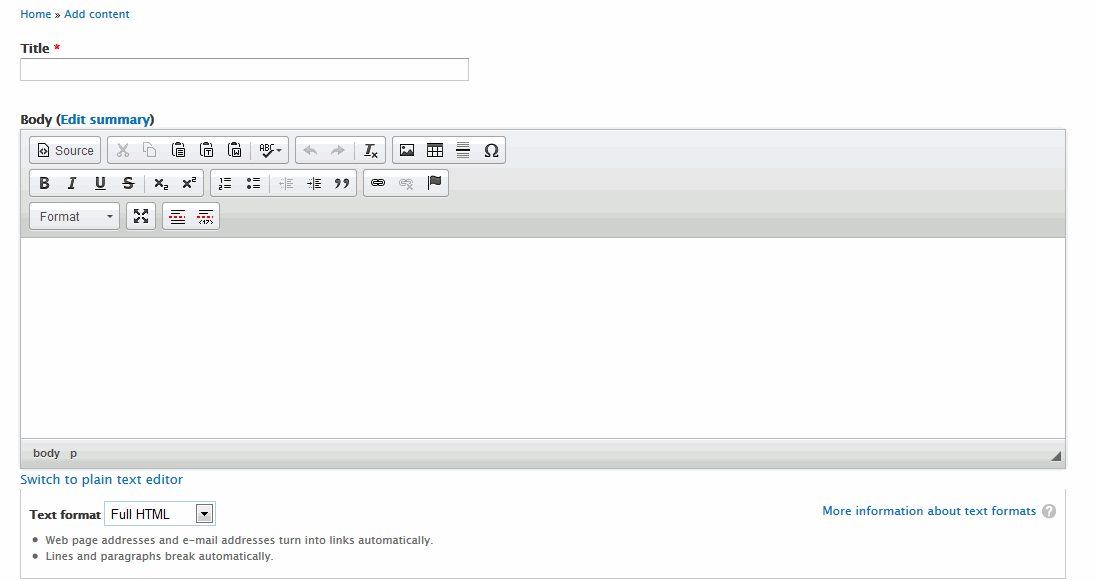
Please try to be a little bit more explicit in your description (title and body)! Because everything looks fine in your image, besides the fact that you have a limited amount of features.
Which I imagine is the object of your question.
If so you can check the toolbar settings here:
Configuration > CKEditor > Advanced (or Full) > Editor appearance > Toolbar > Full > Save
Hope this helps.
Comment #3
tarausa commentedThanks for your reply, that is correct I was looking for full features
I did Configuration > CKEditor > Advanced (or Full) > Editor appearance > Toolbar > Full > Save
and still the settings are the same
Comment #4
tomaa-1 commentedDid you get the full package on CKEditor website?
http://download.cksource.com/CKEditor/CKEditor/CKEditor%204.0.2/ckeditor...
Comment #5
tarausa commentedI reloaded this file and still no success.
Comment #6
stoked commentedHi,
New to Drupal, and I experienced the exact same issue. I ended up trying out various combinations of ckeditor and ckfinder and even reverted my Drupal install from 7.21 to 7.19 in some vain hope that was the issue. As it turned out ( I'm still playing with the combinations) the answer (to get the flash icon for example to display) was to go back to ckeditor 3.6.6 and ckfinder 4.0 - this worked for me. Just have to try with the Drupal 7.21 again and hope it keeps on working.
Hope this helps. A friend also mentioned something about jquery and ckeditor not working as well together - could be the ultimate reason.
Comment #7
wwalc commentedEverything is explained here