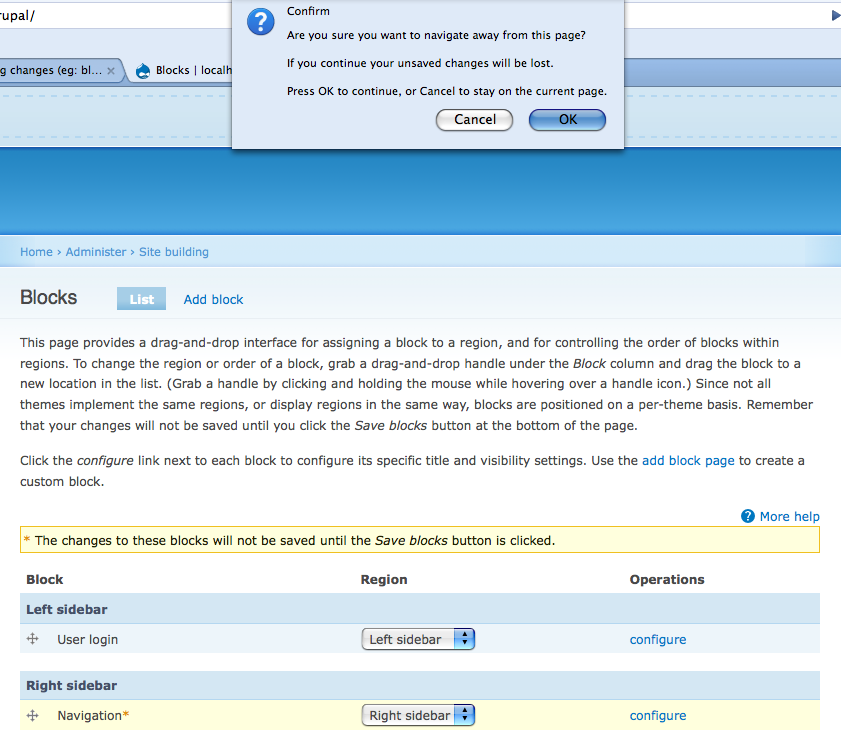
This patch fixes the usability issue where the user has unsaved changes on a page, and accidentally clicks a link or the back button and loses all of there changes. This patch uses the onBeforeUnload event to warn the user that they are about to lose their work, and gives them a chance to cancel. It currently just works on the blocks admin page, but would be easy to extend to other pages. onBeforeUnload works on Firefox, IE and Safari, but not Opera.
Note, this patch is much, much simpler that what I originally proposed over at: http://drupal.org/node/193311 (which remains a cool set of functionality, but is overkill to solve this particular problem). This patch is about 5 lines of code.


Comments
Comment #1
starbow commentedComment #2
catchNot sure if I'm missing something but I don't notice any changes with this patch applied.
Comment #3
catchYes I missed a hard browser refresh :(
Works fine on both IE7 and FF2. I think the message is a bit too verbose though.
How about "You are leaving this page without saving your changes. Are you sure you want to discard unsaved changes?"
Comment #4
starbow commentedYou don't yet a whole lot of control over have the onBeforeUnload event is handled (I think it is a reaction to the years of abusing the onUnload event to popup ads). All you can do is set part of the message:
I have changed the comments in the code to say this, shortened the default message to "If you continue your unsaved changes will be lost", and made the message an argument.
Comment #5
starbow commentedI made some improvements. I added in a behavior so that the popup does not get applied to forms that are loaded into the page with Ajax/Ahah. I pulled the two functions out of drupal.js into unsaved.js. And I applied the unsaved warning to the new drag and drop Menu administration page.
Comment #6
starbow commentedCleaned up comments and whitespace.
Comment #7
BioALIEN commentedSubscribe. I hope we can get this in for beta 3.
Comment #8
birdmanx35 commentedGot this error against HEAD:
$ patch -p0 < unbeforeunload_3.patch
(Stripping trailing CRs from patch.)
patching file misc/tabledrag.js
Hunk #1 succeeded at 441 (offset 28 lines).
(Stripping trailing CRs from patch.)
patching file includes/common.inc
Hunk #1 succeeded at 2205 (offset 170 lines).
(Stripping trailing CRs from patch.)
patching file misc/unsaved.js
patch: **** malformed patch at line 75:
Comment #9
starbow commentedIf I thought there was any chance of getting this into 6 I would reroll it.
Comment #10
panchoI fear this is out of discussion for D6. Let's focus on implementing this for D7.
Comment #11
paul.lovvik commentedI have created a new patch for D7.
Comment #12
R.Muilwijk commentedPatch is broken and gave me errors while trying to fix it fast.
Comment #13
paul.lovvik commentedRerolled the patch to accommodate the recent change to tabledrag.js.
Comment #14
R.Muilwijk commentedFancy :D
Working fine here (FF 2.0.0.14). The Block tests still run fine. Can some more people test it on other browsers?
Comment #15
paul.lovvik commentedI have tested several browsers that I have kicking around. Some work and others don't. The onbeforeunload event is not part of the official standard; it was invented by Microsoft and implemented by others.
These browsers work:
These browsers don't work:
Also, from experience I know that Safari has implemented the onbeforeunload event, so I don't expect any trouble there.
I think the bottom line is that the vast majority of users will have a better experience than before and the others will have an experience that is no worse.
Comment #16
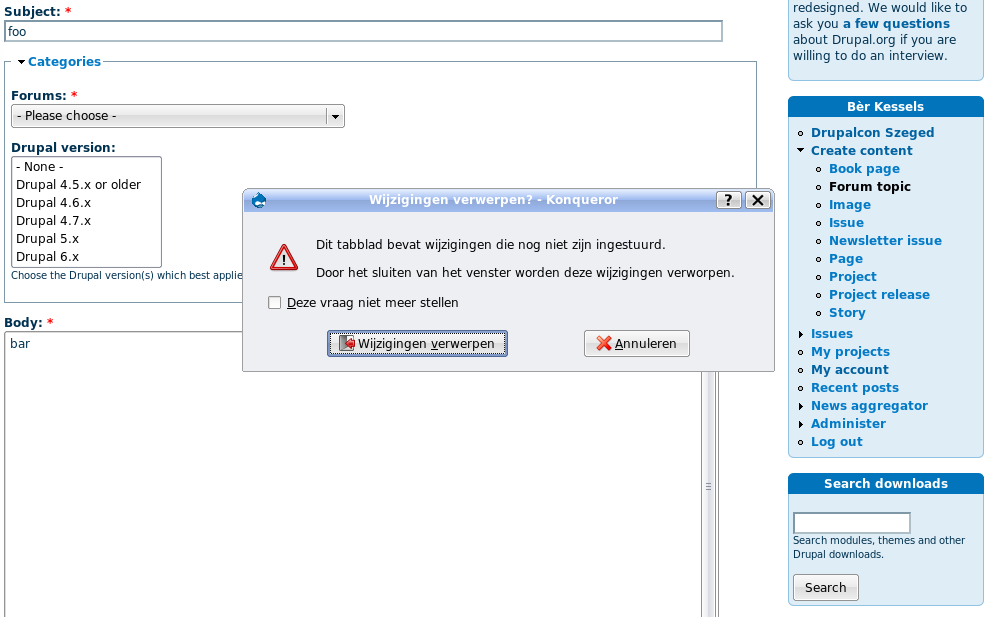
Bèr Kessels commentedThat konqueror is not supported is not a big problem, IMO. Konqueror is on of the few browsers that has this solved where it (IMHO) should be solved: in the client. See attached screenshot for how this is dealt (when closing a window); sorry for the Dutch locale.
Comment #17
eigentor commentedTo the message shown: As short is sweet, there might be still room for improvement:
"Your changes have not been saved.
Do you want to save now?"
Being able to save directly from the popup would be even nicer :) - and then (but this may be a bit much to ask - navigate further in the direction the user chose before the popup came up.
Comment #18
starbow commentedThis functionality actually exists in my popups module, which I am hoping to bring to Drupal 7.
Comment #19
robloachYeah, this might be something that's better achieved in contrib because it's not on every form that you want this to take place. It might actually be something that might do well in the Form API. Then you could perform a form_alter to change it if you wanted.
Comment #20
starbow commented@Rob: I think you misunderstood my previous comment. I was telling eigentor that the "ask to save" feature he was talking about was already available elsewhere. I continue to believe that one of the first rules of usability is "don't lose the users work", which Drupal 6 does quite regularly. I think this patch (or something like it), is important for Drupal 7 if we are serious about being kind to end users .
Comment #21
illuminaut commentedIt is my understanding that by having an unbeforeunload event handler in the page you prevent the page from being cached. That includes any Javascripts and server-side scripts. While this may be desirable for forms, this side-effect - if indeed true - needs to be considered.
Comment #22
ultimateboy commentedBriefly tested. Appears to work well.
Screenshot inlcuded for easy reference.
Comment #23
Bojhan commentedSo, why dont we give people the option to actaully save there changes? As that is likely what the user wants to do, they have to click cancel, and scroll to click save?
Comment #24
dman commentedIf this goes in, it better have an option to disable it pretty damn quick.
Option #3: Never show this pop-up again!
Unlike the target audience for this 'fix' I actually know how to drive a browser, and if I click Back or Refresh it's because I want it to behave like it's supposed to. When I leave a page without saving changes, it's almost always because I don't want to save the changes. People who have a habit of doing otherwise clearly have never used webmail, and are in need of educating.
The idea itself is not silly, and may even be a useful requirement in some deployments. I'm not objecting to the concept outright. I'd object to it getting in my way. If it can be done as a contrib option, that's where it belongs.
Comment #25
ultimateboy commentedI completely agree with dman's comment #24. Not only do I think that this should be a user option, as dman suggests, but I also think that it should be able to be turned on and off via site configuration. It should also be easy to overwrite the text, whether it be through a theme function or tpl file.
Comment #26
nigel commentedComment 24 has it right. It allows users to choose for themselves what behaviour they want, the first time they encounter a page with this behaviour.
I would suggest something like:
"This page has unsaved changes:
(X) Save changes
( ) Continue without saving
[X] Always do this when leaving the page"
( ) denotes radio button, [ ] denotes checkbox.
While the wording isn't necessarily the best, the general idea is there. It solves the usability problem for people who are currently having troubles with those pages forgetting their changes, and supports users like dman who understand how it works. The setting could also be part of a users's settings maybe?
I don't fully agree with comment 25 however - it shouldn't be settable at a site level, rather it should be settable at a user level, as many sites may have several admins all with different usage patterns.
Comment #27
paul.lovvik commentedThe onbeforeunload event provides an opportunity to display a message to the user indicating they may lose data if they navigate away from the webpage.
While you could certainly construct a custom warning message by creating dom elements and attaching them to the document, keep in mind that JavaScript is not multithreaded. Any events that are received during the execution of the onbeforeunload event handler are stored in the event queue and will not be immediately available while the thread of execution is in the event handler. Also, when the onbeforeunload event handler function exits the browser will either display a message (giving the choice of whether to cancel or continue to the user) or continue loading the new page (the next event will be the onunload event). Any custom dialog used here would not be very useful because we would never receive the events from the user's selections.
Therefore, the onbeforeunload event handler is not a viable opportunity to do a custom dialog. You can certainly save the information in a form, in a cookie, send it to the server, etc. But for the browsers that support onbeforeunload, the behavior is fairly hard coded. The browser constructs a message from the text that you optionally provide combined with its own hardcoded message and the user chooses to continue or cancel.
My point is that we cannot change that dialog. We can display a bit of text in the dialog, but we can't prevent the browser from putting its own explanatory text in the dialog. And we can't display our own dialog to handle that particular event. There are limits to this event that we aren't going to be able to get around.
The suggestion that we could provide a way for the user to indicate that they do not wish to see the dialog again is a good one, though there is no way to add this choice to the dialog box that will appear. We could provide a user setting that is configured elsewhere that would control whether this dialog is used or not.
Comment #28
Bojhan commentedpaul.lovvik : I get your point, but then we can't do this. We can't go around introducing bad dialog boxes, with that creating another usability problem. Try to find a way - is the only suggestion I can give.
Comment #29
Bojhan commentedMarking it not a requirement for Drupal 7.
Comment #30
rukaya commentedIs there anything like this for 6?
Comment #31
Tor Arne Thune commentedStill a valid issue after the release of 7.0. Moving to 8.x. I have had a relative suffer from this, as she clicked "More information about text formats" and lost all the changes she had made. She thought that it would open in a new tab or pop-up. I think this is one of the most frustrating things that can happen in Drupal, and anywhere else on the web for that matter. I highly recommend and cheer on a solution for this.
Comment #32
robloachI think this could become part of the Form API itself. Having it embedded straight into tabledrag.js and
drupal_add_tabledrag()seems like a hack. Maybe something like...We could also lean on existing code if we wanted too:
Comment #33
eigentor commented@1V yeah that is a baddie. Should be seen as a "newbie Trap" and get an entry in the Drupal UI Hall of Shame.
Comment #34
Wtower commentedSubscibe. An absolute must.
Comment #35
nod_Should be using javascript events instead of adding something to tabledrag/form.js. We can use sessionStorage, so that'll help quite a lot :)
Comment #36
nod_I don't see that happening for 8.0.x
Comment #42
sajosh commentedIs there any way to make block re-arranges auto save?
Just like the Operations Enable/Disable dropdown autosaves, in D8.4.4.
Will this patch make it into next minor? I don't want to patch core.
Comment #43
sylvainar commentedFor now I've been using this module : https://www.drupal.org/project/js_confirm_pop_up
It does a pretty good job actually, but it would be great if such a mechanism could be enabled by default on contribution pages (such as node editing, where a missed click can make you lose a lot of time).
Comment #54
steinmb commented8 years have passed since last comment, something that made me wonder. Is this outdated? Do we have a way of protecting forms and/or CKEditor 5. Does CK5 have its own plugin that does this, or is autosave the way forward?
Contributed modules
Some projects dead, some with apparently very little maintenance and development, lacking CK5 support.