

 Come together with the global Drupal community in Rotterdam, 28 Sept – 1 Oct 2026. Sessions, contribution, connection, and Early Bird savings until 8 June.
I just upgraded to the 3.x dev and receive following errors when performing database update, which i felt is harmless due to i do not have the taxonomy created before. please confirm
Table 'mydatabase.userpoints_txn' doesn't exist query: ALTER TABLE userpoints_txn ADD expirydate INT(11) NOT NULL AFTER reference, ADD expired TINYINT(1) NOT NULL AFTER expirydate, ADD parent_txn_id INT NOT NULL AFTER expired, ADD tid INT NULL AFTER parent_txn_id in /home/mydomain/public_html/includes/database.mysql.inc on line 172.
Table 'mydatabase.userpoints_txn' doesn't exist query: ALTER TABLE userpoints_txn ADD entity_id INT(11) NULL AFTER tid, ADD entity_type VARCHAR(32) NULL AFTER entity_id in /home/mydomain/public_html/includes/database.mysql.inc on line 172.
Table 'mydatabase.userpoints_txn' doesn't exist query: ALTER TABLE userpoints_txn CHANGE event operation VARCHAR(32) in /home/mydomain/public_html/includes/database.mysql.inc on line 172.
Table 'mydatabase.userpoints_txn' doesn't exist query: SELECT COUNT(*) FROM userpoints_txn p LEFT JOIN term_data t ON p.tid = t.tid WHERE p.status = 1 in /home/mydomain/public_html/includes/database.mysql.inc on line 172.
Table 'mydatabase.userpoints_txn' doesn't exist query: SELECT p.txn_id, p.uid, p.time_stamp, p.points, p.operation, p.status, t.name as cat FROM userpoints_txn p LEFT JOIN term_data t ON p.tid = t.tid WHERE p.status = 1 ORDER BY uid DESC LIMIT 0, 30 in /home/mydomain/public_html/includes/database.mysql.inc on line 172.
| Comment | File | Size | Author |
|---|---|---|---|
| #2 | database_table.jpg | 30.93 KB | Foodster |

Comments
Comment #1
jredding commentedThis is most definitely not a harmless error. Are you sure you were on 2.14? 2.14 depends on a userpoints_txn table so you would have had problems with 2.14 as well.
userpoints_txn is a required table and must be created for the module to function correctly (this has nothing to do with taxonomy).
Comment #2
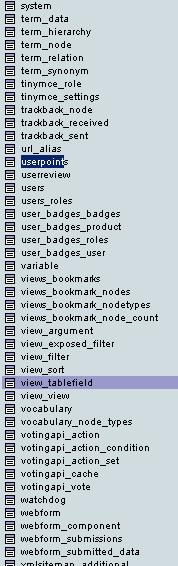
Foodster commentedyup, i am sure that i am upgraded from 2.14. i have checked that the userpoints_txn table in the database, it is not there. i have also attached a screen shot of the database tables i have.
Comment #3
jredding commentedUnfortunately you have a rather serious error. Many versions ago (<2.03), possibly 2.0, userpoints added a second table userpoints_txn which is required for version 2. I'm rather confused as to why you haven't had any errors to this point as version 2.14 is trying to write to the userpoints_txn table.
Regardless I believe that this is an isolated case and isn't necessarily a bug and thus properly classified in the support category. Sorry I'm just trying to rule out bugs/support/etc. and everyone wants this to be a stable module.
You will need to manually create the userpoints_txn table. You can find the code within the .install file but to save you the trouble it is pasted below. Run that SQL statement directly within phpmyadmin (or the DB application you use).
Don't forget to add in the database prefix if you are using one (i.e. change userpoints_txn).
Please update this thread if this fixes your problem.
Comment #4
Foodster commentedHi there,
the sql query above is not valid, as it does not have the event column. below is the create table query from the 2.14 .install, which is rather different from the one you gave. which should i use instead?
Comment #5
jredding commentedNO do NOT use the 2.14 query as it is for 2.14 and you are using 3.x. There have been major changes from 2.14 to 3 and the database tables have changed. The event column no longer exists, it has been renamed to operation. This is done in update #7
The SQL statement is ripped directly from the 3.x module thus it is the correct query to use.
Comment #6
Foodster commentedo.k, shouldn't that KEY (reference), be renamed to KEY (operation), as well? and i notice on the .install the 'pgsql' database query has less columns compared to the mysql. is that, it has not been updated to the latest one?
Comment #7
jredding commentedyes the key should also be renamed.
regarding postgres the answer is in the support/feature request queue.
Comment #8
jredding commentedThis issue is happening to those that have used userpoints since BEFORE userpoints_txn
There isn't an update which added the userpoints_txn table so it must be manually added by using the code above. We can look at fixing this in the future.
Comment #9
Foodster commentedyup, i am the one, anyway i have already manually added the table, and so far everything seem great. just only that i have to use the retroactive to recalculate the point, because after upgrade it could not display the userpoint correctly.
Comment #10
Jerimee commentedI installed userpoints 3 directly and still had this problem.
Comment #11
Jerimee commentedThank you for all your work on this module.
Can you please post the corrected SQL query below? Noobs like me find this thread confusing.
Comment #12
jredding commentedjerimee,
Did you uninstall version 2.14 first? If you only disabled it the Create table will not be ran. They are only ran when a module is installed for the very first time (no upgrades) thus you will need to use the uninstall feature of userpoints to remove version 2.14
Correct SQL is