

Closed (fixed)
Project:
Views Isotope (Deprecated)
Version:
7.x-2.x-dev
Component:
Code
Priority:
Normal
Category:
Bug report
Assigned:
Reporter:
Created:
14 Mar 2013 at 14:05 UTC
Updated:
25 Oct 2015 at 13:34 UTC
Jump to comment: Most recent, Most recent file

Comments
Comment #1
Funkwarrior commentedI've the same problem
Comment #2
zikaelismik commentedSame here
Mine is a view with term id contextual filter. But this error appears even in the example page.
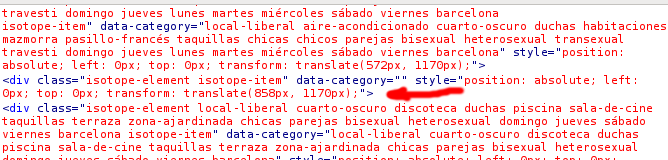
I noticed the attribute data-category is empty on every element.
Comment #3
matt.elkins commentedComment #4
matt.elkins commentedThanks for your posts! I'm struggling to reproduce this problem at the moment. From a clean install of the Isotope example feature, I had to do the following:
After completing the three steps above, the Isotope grid on the example page was populated with the articles I'd published, and I was able to filter and sort them as expected.
In order for me to investigate further, would it be possible for you all to post features containing your implementation? I'm hoping that a simple misconfiguration is causing the problem. If you do choose to post a feature, please include all relevant views, content types and taxonomy vocabularies.
In the mean time, I'll keep experimenting to try and recreate the problem for myself. Thanks!
Comment #5
Funkwarrior commentedHello,
Thanks Matt for your hard work.
On my side, I have the same error without using any filter, only with a view:
http://pastebin.com/K4FzLVx1
And there's my features file (hope I build it well): http://cl.ly/1t3e1R2Q461R
Thanks!
Comment #6
saturnine_nl commentedI have the same problem, except i know whats causing my problem.
I dont know why it occurs but it might help you in the right direction.
I created a content type with a few standard fields. I also added an images field,
with an unlimited amount as default. Each person i added with this content type has
5 pictures added. If i look with devel, on what is going on under the hood, they pop up.
field_profile_image (Array, 1 element)
und (Array, 5 elements)
0 (Array, 16 elements)
1 (Array, 16 elements)
2 (Array, 16 elements)
3 (Array, 16 elements)
4 (Array, 16 elements)
And thats where things tend to go wrong. I assume the first element stores
the number of pictures attached, wich makes sense for the error message,
its undefined. I hope this information helps you with solving this problem.
Greets Sat
Comment #7
tonygjerlufsen commentedI stumbled across this when I didn't add any filter classes on fields.
As I can see, views-isotope.tpl.php relies on filter classes being present (from lines 24-54 in views_isotope.theme.inc).
However, what if you simply would like to take advantage of the raw non-filtered Isotope functionality?
Comment #8
zakxxi commentedSame bug here… Any issue ?
Notice : Undefined offset: 0 dans include() (ligne 14 dans /var/www/drupal/sites/all/modules/views_isotope/views-isotope.tpl.php).
Comment #9
pyxio commentedi have discovered this not a bug in the module... it is just a very difficult module to configure. but when configured properly, there is no offset error. it is impossible to say where the configuration problem is in your case. Check out my post here to ensure you have properly configured the module https://drupal.org/node/1987912#comment-7442866
Comment #10
zakxxi commentedYes, I think you're right, it's not a bug but a configuration problem… The module works with the example features. I dont understand why i have the offset error, the problem comes when I use a custom content type instead of Article, I clone the view and I think the config is OK.
How can you help me ?
There is 2 sceenshots :
EXAMPLE :
https://www.dropbox.com/s/bmqor8bgm79beju/Screenshot%202013-06-09%2014.0...
CUSTOM CONTENT TYPE / VOCABULARY :
https://www.dropbox.com/s/qmwkrs4iyscn6zl/Screenshot%202013-06-09%2014.0...
Comment #11
pyxio commentedyou cloned the view. but did you change the vocabulary the field_tags is associated with? if it is still associated with tags somewhere you will have this problem. you need to check both the isotope view and the isotope filters view. somewhere, you have not specified the different vocabulary than the examples.
Comment #12
zakxxi commentedFinally I found the solution, thank you talengix for helping me, I just added a "security" on my view / filter criteria Content: Has taxonomy term (not empty)
And everything was fine.
https://www.dropbox.com/s/rcjw7uvforlruiz/1942898.png
Comment #13
pyxio commentedHi zakxxi,
thank you very much for reporting back the solution... yes, this sounds exactly right and i included it now in my instructions above. if the term value is empty an offset error will occur! Duh! ;o) Hopefully this thread will be helpful to many people as on the surface it seems like a very difficult module to configure. But it really isn't if detailed instructions are troubleshooting tips are provided. Cheers Kevin
Comment #14
royerd commentedI'm getting this kind of error, trying to use the example. I simply don't understand the fix described above. Can you help? I pretty familiar with views, content types, fields, taxonomy, etc. I just don't understand how this error was fixed when I read the posts above. Any clarification?
Comment #15
royerd commentedYes, I've been fighting with this and then saw your post #7 and added something other than the default class and the errors when away.
Comment #16
abailarri commentedHello!
I'm getting the same error, but in my case, it's very strange, because only happens with some entries. Some entries have the clases, and other some entries not have the clases, and I don't understand why. I attaching a screenshot of my code.
Thanks!
PS: I'm using multiple taxonomy filters by following these steps: https://drupal.org/node/1958022#comment-7252784
Comment #17
rajmataj commentedThis happened to me as well but the source of the problem was in the field settings for my taxonomy term. On the page view for your isotope, check: Fields > Content: [your-term], and then in the Style Settings area check the following settings:
After saving, I had all my offset errors disappear. Hope that helps out others.
Comment #18
meanderix commentedI've been trying to debug this issue and I found that the error occurs when the $isotope_filter_classes array has not been assigned proper filter classes. This can occur if the current item does not have any taxonomy terms. A workaround is to add the following line to views_isotope.theme.inc:
Comment #19
jmary commented#17 did it for me.
Comment #20
tuthanh commentedI encountered this bug when making an Isotope View without a filter.
A work around is adding a field, exclude it from display and add the "isotope-filter" class for it.
Comment #21
shankar javali commentedThis error may occurred, because of an wrong configuration, as i installed an tried to do configuration, the module works fine for me without an error, if u want u can follow the steps as in this video: "http://vimeo.com/40662343"
As i used the custom taxonomy terms instead of an tag terms.
Comment #22
N1ghteyes commentedthis issue seems to be when not using filters. you can override the tpl file with the following.
Create a new file in your theme directory. name it views-isotope.tpl.php
Inside that file put the following (without the very first < ? php and last ? >):
save, and clear your cache.
This checks that the array position exists, if it does it will work as normal. If not, it prints a 0 to the end of the class name and stops the error.
Comment #23
alexmartin commentedThe .tpl fix by N1ghteyes in #22 works for me. Thanks!
Comment #24
francoud commentedWorkaround #20 workes for me. replacing the tpl as in #22 also works. Beware the code is a little wrong, there's a "
Comment #25
adeelnawaz commentedin my site we have multiple languages i am using node--custom.tpl.php file to select different languages some page pages have 3 languages and some have 2 languages problem is that when we move on page that have two language they give error on it but in 3 language page they work perfectly here is my code to get languages
$value1_node = ($content['field_translation']['#items'][0]['value']);
$value2_node = ($content['field_translation']['#items'][1]['value']);
$value3_node = ($content['field_translation']['#items'][2]['value']);
error on this line when we move on third languages
$value3_node = ($content['field_translation']['#items'][2]['value']);
undefined offset 2
Comment #26
Chris Gillis commentedIf you have some nodes without associated terms, and error reporting on Strict, you will get notices. This patch fixes it.
Comment #27
Chris Gillis commentedFixed in 7.x-2.0-beta1.