

Closed (fixed)
Project:
Simple hierarchical select
Version:
7.x-1.x-dev
Component:
User interface
Priority:
Normal
Category:
Feature request
Assigned:
Unassigned
Reporter:
Created:
18 Mar 2013 at 16:12 UTC
Updated:
3 Jun 2013 at 17:50 UTC
Jump to comment: Most recent file



Comments
Comment #1
ditcheva commentedI just started using this module, and think this would be a useful visual feature to have too!
At first I was confused, and thought the node count was an indicator of term children, considering that this module is all about term hierarchies.
I'm including a patch that provides this feature. Please review and let me know if it works for you all. Would love to see this in the module, if possible.
Here's what the patch does:
That's it!
Comment #2
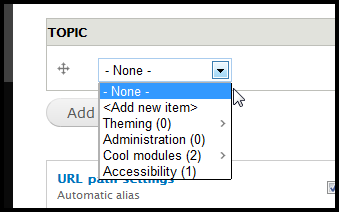
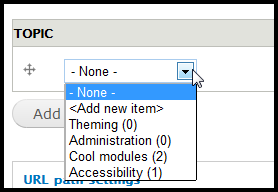
ditcheva commentedI meant to include a before and after screenshot above, but forgot, so here they are. A subtle, but important difference... Obviously, the two terms with the arrows are the ones that have child terms in my site.
Before:
After:
Comment #3
stborchertHm, I'm still unsure whether to include the image or not (though I tend to leave it as suggested by you).
On the one hand it would be good to provide some default, on the other hand I'm no fan of to much CSS provided by modules (because you have to override it in your theme).
Maybe you could add a
padding-right: 10px;here to avoid overlapping and try to give the image some margin (to the right).Additionally the selector
.shs-processed .has-childrenwould be better because it takes only a weak selector to override it in custom CSS. And I would prefer using "has-children" instead of "has_children" (as its done all across Drupal or at least should be done ;) ).Comment #4
ditcheva commentedHey @stBorchert,
Thanks for all those suggestions! I've made a new patch version with all of your suggestions.
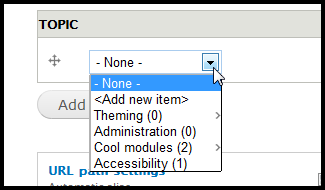
.shs-wrapper-processed .has-children-- definitely agree it ought to be more general like that ;-)margin-right: 5px;-- adding padding to the right still caused the background image to be flush right, so I'm just doing it with a margin instead. I thought 10px looked a little much on my preview, so I decided to do 5px, but if you want me to increase, I sure will. Look at the preview below to decide.has-children-- thanks for noticing!I guess the only thing I haven't responded to is about including the image and css with the module... I didn't even think of it as a negative. So many widely used modules have extensive, full /theme folders with images, css and templates. I have super-customized themes on many of my sites and am completely used to overriding via css. I sort of assumed that's everyone else too. :-)
In any case, let me know if I can adjust anything else too or if you have other thoughts! Here's the new image preview:
Comment #5
stborchertCommitted to latest HEAD. Unfortunately the styles seems to have no effect in Safari and Chrome (both on Mac). In Firefox I could see the image.
Comment #6
ditcheva commentedYou're right! Chrome does not apply the background-image on select options. There's actually a ton of info about that online, I now realize. I just installed Hierarchical select to see how they did their options, and their little arrow image doesn't display in Chrome either (or Safari I suspect, but haven't verified).
Here's my question: do you think I should modify the patch to do this via text, rather than css, to support all browsers? A css solution will not be well supported for all browsers, since it seems css styles for selection options are currently not well supported.
I could, however, include another option that adds the number of term children to the parentheses that currently displays the number of nodes. This could be a similar configurable option in the admin UI too.
If anyone would prefer that type of solution, I can update the patch (those parentheses may get a little busy though). Otherwise, we can just stick with what we have...
Thanks!
Comment #7
stborchertNo, I think we can leave it as it is for now. If someone want to display an indicator (other than the background image) that is visibile in chrome one max simply use
.shs-wrapper-processed .has-children:after { content: " >"; }or something similar (didn't check this but it could work).