Active
Project:
Zircon
Version:
7.x-1.0
Component:
Code
Priority:
Critical
Category:
Bug report
Assigned:
Reporter:
Created:
20 Mar 2013 at 22:53 UTC
Updated:
29 Oct 2013 at 12:54 UTC
Jump to comment: Most recent, Most recent file


Hello I am using drupal 7.21and Zircon theme (very nice), but I have a problem with IE9.
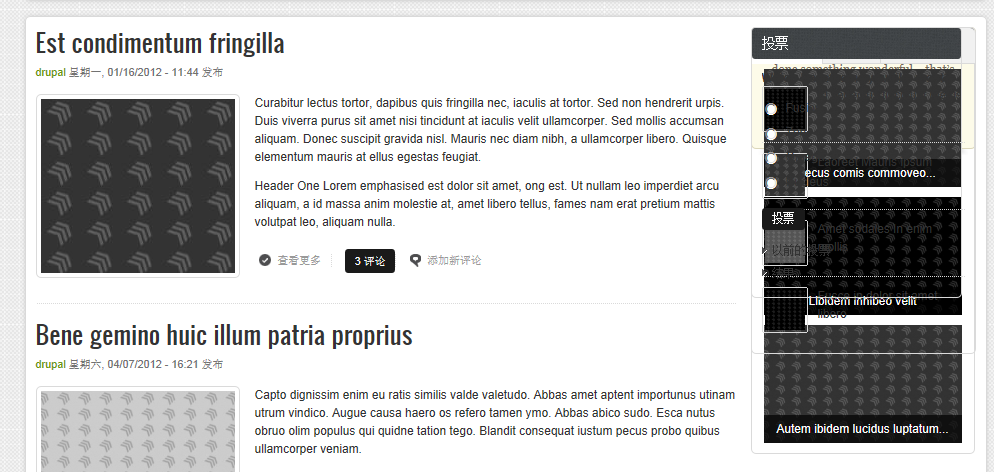
In the sidebar first: blocks overlap.
Link my website: ordineveterinaricz.it
Same problem on the website of weebpal : demo.weebpal.com/#zircon
please help me!!!
and sorry for my english
Thank you
| Comment | File | Size | Author |
|---|---|---|---|
| #11 | zircon_change.png | 44.71 KB | weebpal |
| #5 | error.png | 150.76 KB | antims |
| zircon ie9.jpg | 269.62 KB | stefanorusso |



Comments
Comment #1
christophoro commentedThe problem I found is somewhat similar. I am using Drupal 7.21 and IE8. If I remove all the blocks from Sidebar first because I only want a two column layout the blocks in Sidebar second overlap each other the same way as stefanorusso's picture shows. So Sidebar second looks all right if Sidebar first is shown but overlaps the blocks if it is hidden. This bug doesn't show on Firefox or Chromium. I know this bug is not the same as what stefanorusso posted since on his picture both sidebars are shown but it might help to track the issue down. Also I noticed that even when I use the Green style skin the Main menu colour is still red when I hover over it in IE8.
The skin is amazing btw, thank you.
Comment #2
ossan commentedI have the same problem with IE as well. No problem with chrome, firefox, and safari. I really like this theme. Anyone can help?
Comment #3
75300 commentedI have the same problem. If both sidebars are switched on, blocks in the left sidebar overlap. If the right sidebar only is on, blocks in the right sidebar overlap. The bug appeared for me in MSIE8. I had no chance to load the site in MSIE9 but I've checked it in MSIE 10, Chromium and Firefox, the theme looked great.
Comment #4
75300 commentedCommented string "console.log(container_width);" in js/responsive.js - it worked for me (no overlaps in MSIE8 as I can see).
Comment #5
antims commentedI have the same problem with IE9.
Comment #6
weebpal commentedHi, you can update the latest version of zircon. I tested in it and saw it worked good.
Thanks,
Comment #7
Terebinth commentedThanks @75300 that worked for me. @Weebpal, the latest version of Zircon still has the same issue.
Comment #8
christophoro commentedI can confirm that the latest version still have the issue and #4 worked for me too. Thanks.
Comment #9
Carlos R. commentedprocedures did not work but 4 °
I await response Thank you
Comment #10
etdouglas commentedSubscribed
Comment #11
weebpal commentedHello,
This issue came from conflict of masory js library. So you can open sites/all/modules/zircon/zircon.info and comment 2 lines
Save it, and clear all cache. Refresh your site and it will work good.
Thanks,
WeebPal Team
Comment #12
antims commentedand replace Responsive.js with:
Comment #13
lionheart8 commentedHi
I noted that the solution in #11 solves the problem for Internet explorer 10 BUT not 8, leaving the blocks overlapping.
Sure, I am not using I.E. 8 myself, but there is still a significant number of folks around the world for example using Win XP, which does not allow even I.E. 9, who cannot just buy Win 7 - yes, for many folks stuff like $$ are a no small issue at all, or for some other legitimate reasons. ;)
Anyway, would be grateful if I would be able to use this theme as many site visitors are from the poorer countries, etc or at least use Win XP/ I.E. 8.
For #12 you say:
Does it mean the whole js or just some lines?
Thank you & regards.
Comment #14
lionheart8 commentedUpdate for I.E. 8
Replacing responsive.js with that in #12 solves the issue I mentioned above for I.E. Explorer 8 /Win XP users. ;)
Thank you.
Comment #15
antims commentedWelcome.
Comment #16
dibyadel commentedI am also facing the same problem with overlapping
Comment #17
balcorn commentedcommenting out line 97 in js/responsive.js "console.log(container_width);" worked great for me.. thank you
Comment #18
Anonymous (not verified) commented#12 solves the issue for me and also solves other js error in IE8...
thank you