Closed (fixed)
Project:
Menu Views
Version:
7.x-2.1
Component:
Code
Priority:
Normal
Category:
Bug report
Assigned:
Unassigned
Reporter:
Created:
21 Mar 2013 at 03:37 UTC
Updated:
25 Jun 2013 at 20:20 UTC


If a user doesn't have the "Administer menu views" permission, when they edit a node and add a menu item the form is missing some fields so you cannot select a menu.
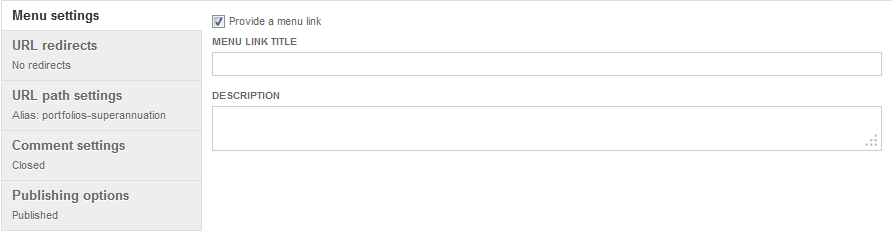
These two screenshots show the problem. Both are with the same user, who has the "Administer menus and menu items" permission.
This is what you see when the user doesn't also have the "Administer menu views" permission:
This is what you see when the user also has the "Administer menu views" permission:
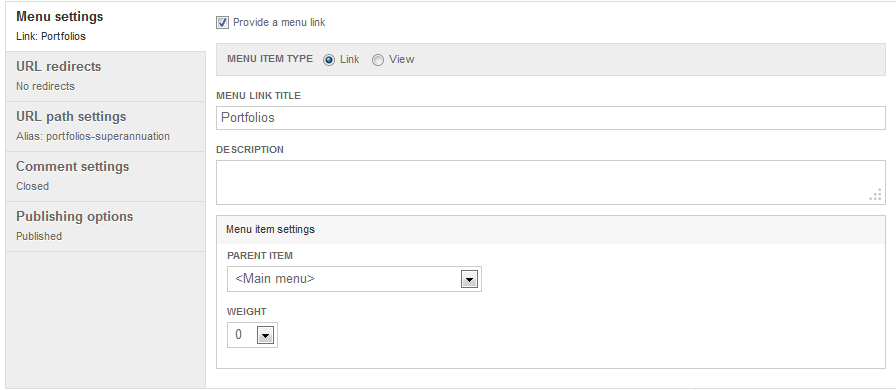
The "Menu item settings" part of the form should always be there.
| Comment | File | Size | Author |
|---|---|---|---|
| menu_views-node_edit-with_perm.png | 16.26 KB | rooby | |
| menu_views-node_edit-without_perm.png | 10.43 KB | rooby |

Comments
Comment #1
rooby commentedI guess what is probably happening is that the Menu item settings area is dependent on what you choose for the menu item type setting and because the user doesn't have access to teh menu item type settings then the rest is hidden.
The menu item settings part should default to visible.
Comment #2
markhalliwellHmm, I'll need to take a look at this. More than likely a line just needs to be moved around.
Comment #3
markhalliwellComment #4
markhalliwellFixed in commit e6c8601.