

 Come together with the global Drupal community in Rotterdam, 28 Sept – 1 Oct 2026. Sessions, contribution, connection, and Early Bird savings until 8 June.
Gallery2 API version 7.18 /1.2
Status OK (including URL rewrite and user sync)
Mod rewrite enabled
URL rewrite enabled
Gallery2 has been properly integrated into the existing database
Drupal 5.3
MySQL 5.0.27
PHP 5.2.1
Running locally
File locations:
Gallery2: sites/politico/gallery2
Gallery module: sites/politico/modules/gallery
Gallery2 passes all rewrite tests and I have created the required three .htaccess files in the Gallery2 main folder as well as in the following two folders:
/politico/gallery2/modules/rewrite/data/mod_rewrite/custom/.htaccess
/politico/gallery2/modules/rewrite/data/mod_rewrite_no options/custom/.htaccess
I had initially installed the beta5 module (which stomped all aver the original base .htaccess file); I removed the offending code from the head of the .htaccess file, reinstalled the gallery module and configured the Gallery2 embed - it passes all tests.
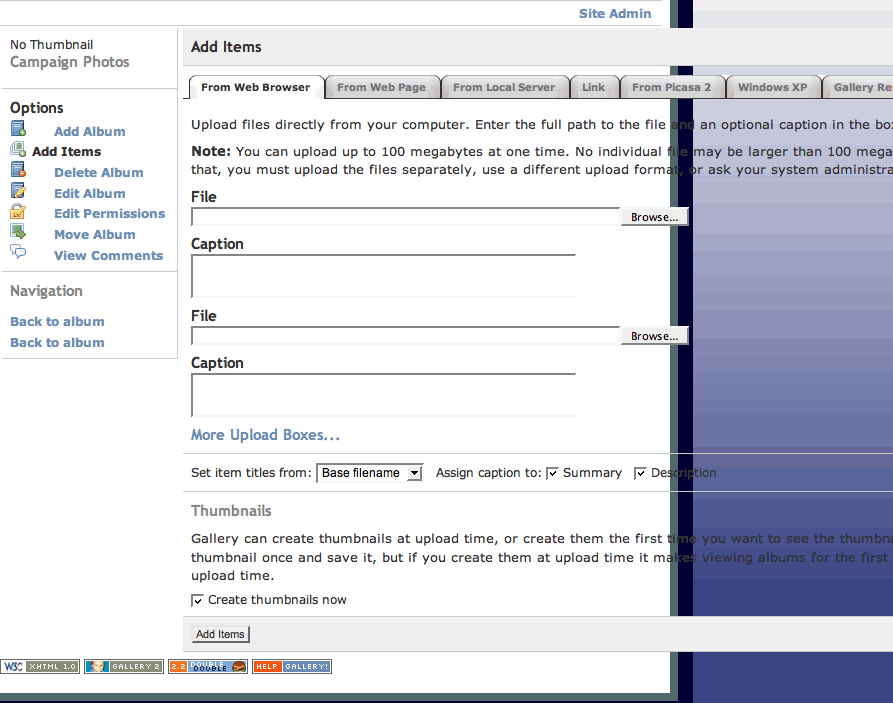
When you add a photo, the following error is thrown and the table "breaks" (see screen capture, attached.) I had this problem before in a previous (incorrect) embed of Gallery - my first attempt resulted in pointing to a G2 install on another site I'm running on the same server.
Uploading a photo works, so Gallery seems to be otherwise functioning normally. The embed is messed up. I've now been trying to fix this for a day (yes, I spent a significant part of Thanksgiving trying to get this to work - I'm on a deadline!)
See screenshot, attached.
Is it possible the beta install hosed my db? Please help - thanks!
Target: http://xx.xxx.xx.xxx/~username/politico/index.php?q=gallery&g2_view=core...
I/O Error: http://xx.xxx.xx.xxx/~username/politico/index.php?q=gallery&g2_view=core... Internal Server Error
| Comment | File | Size | Author |
|---|---|---|---|
| Gallery error.gif | 44.45 KB | bcobin |

Comments
Comment #1
bcobin commentedFollowup:
In Drupal Gallery Settings > Install, I had missed the description for the Clean URL / URL Rewrite which advises to make the appropriate changes to the .htaccess file.
(point#1: easier said than done, point#2: when one sees a green "OK," one tends to move on.)
Making changes to the .htaccess file doesn't work from within embedded Gallery2 in the Mod rewrite section (this has been documented by others); after much flailing, I opened G2 standalone; it successfully modified the .htaccess file and passed all tests. Joy!
I then reset the install settings in Drupal; now the Clean URL / URL Rewrite settings indicated "The status of all Drupal modules and Gallery2 plugins is optimal for your embedded Gallery2." Perfection! (read on...)
Trembling, I tried to upload a photo. I get the same screen error as before (see attached capture in previous post), but now the error message is different - note that the GALLERYSID does not match the login.txt in the Gallery2 folder, nor in any other Gallery2 folders I have on my system.
Target: http://xx.xxx.xx.xxx/~username/politico/index.php?q=gallery&g2_view=core...
I/O Error: http://xx.xxx.xx.xxx/~usernamen/politico/index.php?q=gallery&g2_view=cor... Internal Server Error
(The errors don't output to the screen; this is via error checking in Firefox.)
Important Note: My previous post is in error as to the release version; I am using the 5.x-2.0 official release - which is pretty frightening, actually.
This is two days now I've been trying to get this to work; IMHO, the module is definitely not ready for prime time. I don't mean to be rude and I am extremely appreciative of all the development work that has gone into the module - this is extraordinarily frustrating. I'm signing off for the evening and will dream of bugfixes... hoping to wake up to an early Christmas present...
Comment #2
profix898 commentedActually I cant see any error here. You seem to have some css issues with your theme, but otherwise it looks as it should. Does it throw any errors that are not in the screenshot?
What exactly did you try to fix this? As mentioned above this seems to be purely a css issue and I'm actually inclined to say, that this is a 'wont fix' issue. The styles in gallery.css are designed to embed Matrix (G2 default) in Garland (Drupal default). We cant provide css styles for every theme out there, what means that you have to modify the css overrides to match your custom theme(s). This is nothing gallery module will/can do for you. If you liked the old styles better, you are free to use them (simply replace gallery.css with the old drupal_g2.css).
Whats the problem here? I mean you posted two identical urls (or is
~usernameand~usernamenintended in your followup?) marking the second with 'internal server error' ...Not sure I'm missing something here, but the .htaccess file that is written by G2 in standalone mode is different from the one in embedded gallery. In the first case you are modifying /%gallerydir%/.htaccess and /%drupaldir%/.htaccess in the latter.
GALLERYSID is not meant to match the content of login.txt (which should/can be removed after G2 installation anyway). The session id is a unique id to identify you (stored in your browser) and track you while you are navigating through the site. And it is different everytime you login/visit your site.
Again, what errors? You can configure how errors are handled on the 'General' tab of 'Gallery settings' (Output to watchdog, browser, ...).
If you installed beta5 a few weeks ago, there was enough time to post a bug report! We cant read people's minds ;)
Comment #3
bcobin commentedThank you for the prompt reply! Christmas comes early... excellent!
That's just a typo (it was pretty late) - I'll post the error here again without the 'http://' prefix again so you can see the entire string -
Target: .../index.php?q=gallery&g2_view=core.ItemAdmin&g2_subView=core.ItemAdd&g2_itemId=7&g2_GALLERYSID=b500b5be81bfa839b30b5a92e773cd11
I/O Error: .../index.php?q=gallery&g2_view=core.ItemAdmin&g2_subView=core.ItemAdd&g2_itemId=7&g2_GALLERYSID=b500b5be81bfa839b30b5a92e773cd11: Internal Server Error
Although I'm new at this, the above error certainly does not look like a simple CSS error to me. I've tried testing in Garland; the theme won't "take", which could be another issue entirely. I completely understand that you can't be expected to address CSS issues outside of what you've already done; the error message seems to be indicative of a deeper problem which may or not be related to the screen output error in the screen capture I attached in my first post. I have Watchdog enabled and the text error message above is generated when I do a CSS validation on the broken page in Firefox.
It would be great to have all this documented in one place, and being able to view correctly configured .htaccess files would be most valuable here. Following are the G2 rewrite sections of my two .htaccess files:
Site base:
And now the .htaccess in sitebase/gallery2
I believe the two are identical - is this correct?
Thanks - that's a relief to know - the string seems to be identical; why would this request cause an internal server error? I would certainly want to try to figure out what's going on here before trying to "paper it over" with a CSS "fix" that wouldn't pass CSS validation anyway.
I'm not sure where I gave you that impression - I installed beta5 only a few days ago and upgraded to the 2.0 version on Wednesday latest - all of these posts relate to the 2.0 version, although I neglected to set it properly in the drop-down menu of my first post. And as far as reading peoples' minds is concerned, I'm not sure if you would want to right now...
Just kidding, of course. I am incredibly in awe of the work you are doing (both you personally and the entire Drupal community) and appreciate your quick response more than I can say. But I stand by my assessment that the module should still be in beta; just by having a big green 'OK' in the URL Rewrite section when things are clearly not ('warning' would be more like it) would disqualify it in my book.
In any event, I maintain there's a problem here, and the whole G2 embed procedure certainly needs much better documentation. If I were qualified, I would volunteer. (Perhaps if I can get it working properly...)
Thanks again for your help - I will anxiously await your reply. Keep up the good work!
Comment #4
profix898 commentedYou rewrite rules appear to be wrong. Please check the rules in Gallery2 (admin > url rewrite > rules) and make sure that the 'Show Item' rule is set to 'gallery/v/%path%'. The rules must be prefixed with 'gallery/...' to work correctly. Watch your .htaccess (in Drupal's root folder) to be updated correctly when you hit Save in G2. Also verify the paths configured in ' Embedded Setup' (admin > url rewrite > setup) to point correctly to your Drupal's .htaccess file.
The rules should look like this (more a guess, but should be much closer to the truth):
URL Rewrite configuration has always be extremely tricky. I know several people running G2/Drupal without it, because they were unable to get to work correctly on their servers. On the other hand I also know several people running a production site on 5.x-2.x since beta 4 or so. The point is that it is really difficult to get qualified feedback on beta releases. You will never have a 100% bugfree release and - of course - we will continue to fix issues. 5.x-2.0 will not be the last release in this series, for sure. Another point is that a 5.x-2.x release is almost a requirement for us to focus on Drupal 6 developement.
I know that it is really frustrating if you are experiencing (major) issues with a new module and it doesnt help at all to know that the same module is running fine for others. However the decision to tag a release was not impetuous and was based mainly on the number of critical issues and the dynamics of the queue.
Yep. Sure. We are working on documentation (and we are hoping for users to help). However missing/incomplete documentation is no reason to hold back a release IMO. There wasnt much documentation for the previous version either.
As a side note: If you are close to a deadline and you think the 5.x-1.x series was more stable and usable, why dont you use it? You can always update later if some more issues have been fixed to justify a 2.1 release ... just a thought ...
Comment #5
bcobin commentedThanks again for the prompt response... let us hope we're getting somewhere!
I was only able to do this via the G2 standalone. When I go to the embedded version, the change has indeed been saved properly as 'gallery/v/%path%'.
This does not work (as I have noted previously). G2 generates " An error occured while trying to save your settings. Cannot write to the embedded .htaccess file, please create it."
The file does, indeed, exist and is writable. (I am doing all this locally, BTW, so I can see what's going on.) On the .htaccessfile you posted, there are a bunch of commands missing from the one I was using (for example, I don't see the '/d/' variable, nor anything related to '_view'.) On your post, was that a complete listing of the rewrite commands or an excerpt? Could I use that as is? Again, a full posting of the correct format for both .htaccess files (in the main directory and in /gallery2) would be amazingly helpful. Should they be different? If so, where? I'm a designer, not a programmer (at least no more than I have to be), so what might be apparent to you in the code will most likely be Greek to me.
I have never been able to get the embed to display correctly (the functionality seems OK, in limited testing) - when I had the problem in the last beta and saw there was a official release, I installed it immediately.
The module wizard passes all tests in Drupal - certainly, this should not be the case (although it's great seeing everything come out 'OK'!)
Thank you so much for your help - I'm hoping my feedback will make things easier for others, as their (and your) work has made things easier for me.
Comment #7
profix898 commentedI tried on 4 different servers, but I was unable to reproduce. However another user had the same problem of G2 being unable to write the rules properly. Maybe this helps you as well: http://drupal.org/node/194975#comment-639214
Ideas how to improve the setup or (as Todd mentioned) the description on the page are welcome ;)
- Some 'commands' are missing, yes. G2 only writes the rules to .htaccess that are enabled in admin>url rewrite>rules. If you wish I can post a .htaccess file containing all of your rules for reference.
- You dont need the .htaccess of your G2 folder (thats only used in standalone mode). The problem here is the .htaccess file in Drupal's root folder, which apparently isnt being updated by G2 for some reason.
Comment #8
bcobin commentedI actually think I have Gallery2 working (so far - I need to test more), using a modified version of the .htaccess file you posted. Thank you! However, image attach is working strangely - but at least I got the test site up and will dig deeper into all this probably in about a week. (I have another project starting tomorrow.)
That would be really neat, actually. I now have all my pieces working (including CiviCRM, which acts as sort of a "sub site" - so the setup is fairly complex) - perhaps by the time I revisit this, you will have a better idea of what's happening. I actually noticed the same screen error on one of the menu items in an Administer page earlier today - I'm now trying to hunt that down where it was and see what's happening with the page.tpl file, so my specific screen error may only be related to Gallery2 insofar as the Gallery2 table behaves in the same way. Could be a broken
"</div>"Of course, that wouldn't throw the sort of Watchdog error I've been getting, but I'll keep you apprised.
Thanks so much for your help... stay tuned...
Comment #9
bcobin commentedRevisiting this issue now; the screen problem was (almost) solved by adding the following line to the matrix theme.css:
Now if I could figure out how to change the "60" in the following line to, say, "50," I'm in business:
<input type="file" name="g2_form[1]" size="60"/>Any ideas? Thanks!
Comment #10
profix898 commentedSorry, I was offline and disconnected from the Drupal community for about a month and completely missed your post ... Is this still an issue? The line above comes from the G2 theme template, so I guess you will need to change the G2 theme for this. (But all this is not a critical bug, is it?)
Comment #11
bcobin commentedIt actually is pretty critical, but not at this particular moment, for me. This was only a test site, so I decided to "punt" until I need to deal with this again in the real world. There's another issue I ran into with my test site as well; there should be a warning to disable User Registration before it's embedded - otherwise you get into a nasty permissions loop that I don't believe can be fixed without reinstalling Gallery2.
I hope to be diving back into this in the near future; I will certainly reach out should I run into this again on client sites. Thanks!
-b
Comment #12
alexandreracine commentedSo it's fine now? Good.
------------
Feel free to reopen but please look at the latest version first! It's probably fixed.
http://drupal.org/project/gallery
Closing (cleanup)