Problem/Motivation
When creating a variant the very first page has a "create variant" button:
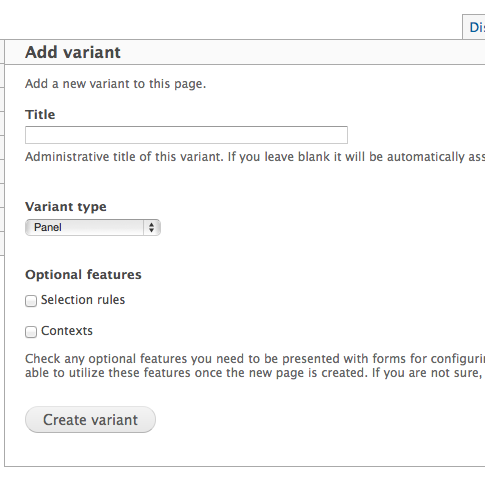
The interface then steps the user through multiple pages and on each one provides buttons at the bottom of the page:
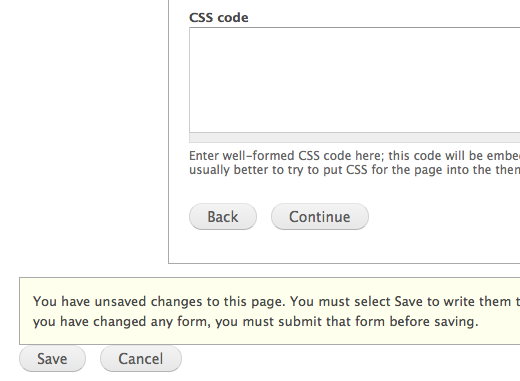
Note that there is a "Continue" button to step to the next page, a "Save" button underneath and that the user is informed that they "have unsaved changes to this page" and that they "must select Save to write [the changes] to the database."
The user is expected to click 'Continue' until they get to the last page where they are supposed to click 'Create Variant' again:
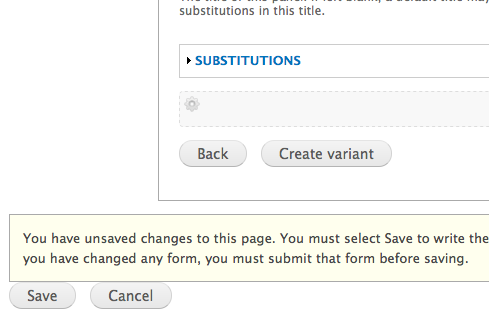
The user is then expected to click either "Update and save" in the content area or 'Save' in the outer area:
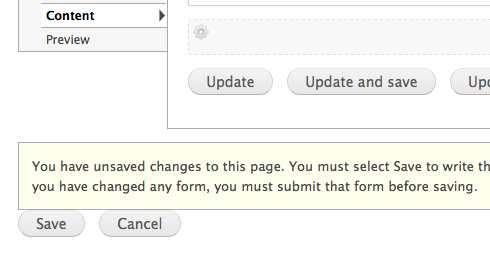
I've seen many beginners either click "Save" at a random point throughout the process or click the "Create variant" button but then forget to click "Save" again. In the first case nothing is actually saved and the variant's configuration is lost forcing the user to start over, i.e. the "Save" button doesn't actually save anything but instead cancels the in-progress variant configuration; in the second case the variant is "created" but not saved - nothing is lost but there's major confusion on behalf of the user who wonders why their new page is not displaying correctly.
Proposed resolution
Change the UX as follows:
- Replace the "Create variant" button on the first page with a "Continue" button. Alternatively, change the process so that the changes are stored (created) and updated with each step rather than only at the end.
- Clicking the "Save" button at any point creates the variant with the current definition and saves it. Alternatively, remove the 'Save' button until the end when an actual save action is possible.
- Replace the "Create variant" button on the final step with "Create and save". Alternatively add a third button that says "Create and save" and place it in a more prominent position so users will be more inclined to click it instead of just "Create".


Comments
Comment #0.0
damienmckennaClarified that the interface instructs the user to save.
Comment #1
japerryDrupal 7 is no longer supported, closing.