

 The 2026 Drupal Business Survey is open. Your response will help shape the future of the Drupal business ecosystem.
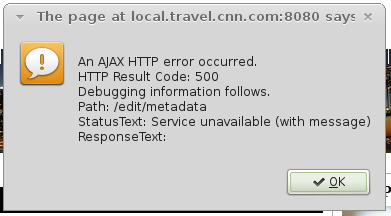
The error thrown by JS which happen while the node is loading.
An AJAX HTTP error occurred.
HTTP Result Code: 500
Debugging information follows.
Path: /edit/metadata
StatusText: Service unavailable (with message)
ResponseText: Recoverable fatal error: Argument 1 passed to edit_select_editor() must be an array, null given, called in /var/www/vhosts/myproject/modules/contribs/edit/includes/pages.inc on line 129 and defined in edit_select_editor() (line 208 of /var/www/vhosts/myproject/modules/contribs/edit/includes/pages.inc).
Looking in the console after closing the alert window, I found this error.
POST http://myproject/edit/metadata 500 (Service unavailable (with message))
Clicking the Quick Edit link also generates this error in console.
Uncaught TypeError: Cannot call method 'removeAttr' of undefined
I already applied the core patch. Enable the permission.
EDIT: I noticed that this is happening because of the image field. The reason I include the image field is because I want the image caption to be editable as well as the image.
Do you think I'm doing it wrong? Is there a way to make the image caption editable?
Any idea?
| Comment | File | Size | Author |
|---|---|---|---|
| #9 | The error when loading full node view | 17.95 KB | stoickthevast |
| #9 | Description below the main image (part of image field).png | 309.4 KB | stoickthevast |
| #9 | Node template | 9.86 KB | stoickthevast |
| #9 | Main image field settings | 40.52 KB | stoickthevast |
| #9 | Content type | 19.96 KB | stoickthevast |





Comments
Comment #0.0
stoickthevast commentedAdded more information
Comment #0.1
stoickthevast commentedAdded debug information
Comment #0.2
stoickthevast commentedAdded useful info for debugging
Comment #0.3
stoickthevast commentedAdded more info.
Comment #1
wim leersIs this happening in a View?
Comment #2
philsward commentedGetting the same thing on a UC product page which has an image field... Not that it should matter, but the product content type is overridden with a panels template. I "just" installed edit to try things out and ran into the same error when the Quick Edit block is enabled.
Checking out some pages without an image field, and they appear to work just fine. Talk about whoa cool totally mind-blown! :-D
Comment #3
philsward commentedJust checked out a view based page with images and again received the error.
Looking into it just a bit more, I "think" it can be reproduced by having an image field with the description and(or) alt text enabled.
UPDATE: Scratch the reproduction method... I just tried it on a sandbox site and wasn't able to re-produce the error... It's definitely something with images though...
Comment #4
stoickthevast commentedNo it's just a node page. I think image field is not editable? Is there any change that the image caption be able to edit?
Comment #5
philsward commented@techwarrior I threw edit down on a sandbox site and was able to use edit without a problem with image "Descriptions" and "alt Titles"... I think there's something else going on with the images (but I might be wrong)
Comment #6
wim leersAgain: is this happening in a View?
Comment #7
philsward commented@Wim I have the problem on both a node AND view. (The node images are not using a view)
Comment #8
dmsmidtEditing on node view & in a views view is no problem in my test case.
(Styling could use some love though, see screenshot)
Still.. more info needed. I guess you'll have to start trying to turn off modules (better to start clean and turn them on one by one).
Comment #9
stoickthevast commentedHi Wim Leers. Thank you for your support. See the attached screenshots.
The pop error shows when loading a single node with main image. Example "http://mydomain/this-is-a-node".
When I click the "Quick Edit" link this is the error in my console "Uncaught TypeError: Cannot call method 'removeAttr' of undefined".
Thanks
Comment #10
stoickthevast commentedThanks MrDamasajaga. In my case the site I'm working on is existing for several years (D7). I already installed Edit module and there is no problem until I enable the field_article_main_image field in the "admin/structure/types/manage/article/display". Is there any problem when adding editable fields after installing Edit module?
Comment #11
dmsmidtI'm trying to reproduce your error.
For a starters you have more fields enabled on you image field (like: title, alt, description).
I only have title and alt. Adding fields to the file entity using media 2.x doesn't give me more options. Can you tell me how to reproduce this?
Comment #12
wim leers@MrDamasajaga; Thanks for helping to resolve issues — much, much appreciated!
Comment #13
stoickthevast commented@MrDamasajaga. I believe the image description is unset in image.field.inc in image module
Line 138 in latest Drupal 7.22
I tried to investigate and I found out that the $display['type'] is hidden but the field is using image formatter type.
It's not clear to me why they unset this very useful field. Commenting that line will make the description field available.
Thanks
Comment #14
stoickthevast commentedFinally! I got it working.
After some debugging in the page.inc I found out that its a conflict in $view_mode. In my content type Custom display setting I'm using Default and Teaser display mode. Using this code $display = $instance_info['display'][$view_mode]; it only returns default and full keys. So I went into my content type Custom display setting and checked the Full content and bang.
Thanks guys.
Comment #15
philsward commentedI wish I were as lucky as you @techwarrior :-/
Unfortunately, I don't have the luxury of setting the display settings since my nodes are overridden with a panel template.
I also have views with images on the same page and unless I shut both the image field AND the views with the images, I get the error... So yes Wim, it's definitely happening on views with images.
Disabling the panel template override for the node and just using the core drupal display, I have no problem with edit. So it looks like it's more of a problem with how images are being called in panels and views?
Comment #16
philsward commentedWhoa! When I re-enabled the panel override, the image field started working! Re-enabling the views panes... and they work too!! Woohoo!
Is it an issue with caching?? All I did was disable the panel override, save and re-enable it...??
BTW: I checked the actual views pages that were also having the problem (separate pages from the views on the node, but utilizing the same images from that content type) and those view pages are now working as well.
Comment #17
stoickthevast commented@philsward...yeah sometimes you need to resave it in order to capture the new configurations. Its happening to me most of the time.
Comment #18
philsward commentedAlright, scratch everything I said before... *whoops!*
@techwarrior was on the right path. After moving from my sandbox over to my production site to get edit going, I still had problems, even after disabling the panel template and re-enabling... That wasn't the fix like I thought.
What fixed it was basically doing what techwarrior suggested.
1) Enable "Full Content" for the content type
2) Make sure the Image field is set to "Visible". It seems to have issues if it's set to "Hidden" which mine was for some reason.
Hope this helps get to the core of the problem so it can be taken care of a bit better :-)
Comment #19
dmsmidtJay! Finally I'm able to reproduce an error haha!
Good find techwarrior. I've elaborated a bit on it.
On a clean install there is no issue.
To reproduce:
1. Enable "Full content" for a content type in "manage display -> default -> custom display settings".
2. Go to "Full content" tab and set the format for ANY field to "hidden".
3. Go back to the "Default" tab and disable "Full content". -> Bam AJAX error on full node view of the chosen content type.
4. Enable "Full content" again. -> Error is gone.
Note:
- The problem isn't field specific. Following these steps for any field, results in the error.
- The problem isn't display specific. Following these steps for teaser, results in the same error.
- The problem only occurs if you have enabled a "custom display" and "hidden" a field for that display AND afterwards disabled that display AND have the default display set to display the field. Hiding the field on the default display wil also get rid of the error.
- Clearing all caches doesn't help.
I guess edit needs to check if a display is still activated, otherwise asume default settings.
@philsward: good to hear your issue is resolved as well. I didn't try panels.
Comment #20
stoickthevast commentedThanks MrDamasajaga for expounding the problem.
Any idea why the image description was unset?
Comment #21
dmsmidtNo problem.
I have no idea why they got rid of the description field. I guess because it's not really necessary for SEO and basic functionality.
With file entity module you can create as many extra field as you wish.
It's a bit off topic, but you seem to have even more fields (attribution, display main image online).
How did you get those to show up on the config screen for the image field?
Comment #22
wim leersReproduced. Thanks a lot, MrDamasajaga! Currently working on a solution.
Comment #23
wim leersThis is a D7-only problem; it works differently in D8.
The problem was that I was using custom code that was too dumb; I should have used the utility function that Field API provides.
Thanks again for going through so much trouble to help get this solved, you're both really making a difference here! :) Fixed: http://drupalcode.org/project/edit.git/commit/f322d34 I attributed this commit to you, @MrDamasajaga, because you helped so much :) Thanks!
Comment #24.0
(not verified) commentedUpdate the question.