

 The 2026 Drupal Business Survey is open. Your response will help shape the future of the Drupal business ecosystem.
I'm trying to position 3 elements in a container. Here's the HTML and relevant Zen Grids SASS.
HTML
<div id="main">
  <div id="preface">...</div>
  <div id="preface">...</div>
  <aside class="sidebars">
      <section class="region-sidebar-first">...</div>
  </aside>
</div>
SASS
#preface,
#content,
.region-sidebar-first {
  @include zen-grid-item-base();
}

#main {
  @include zen-grid-container();
}

#preface {
  @include zen-grid-item(9, 1);
}

#content {
  @include zen-clear(left);
  @include zen-grid-item(9, 1);
}

.region-sidebar-first {
  @include zen-grid-item(3, 1, right);
}
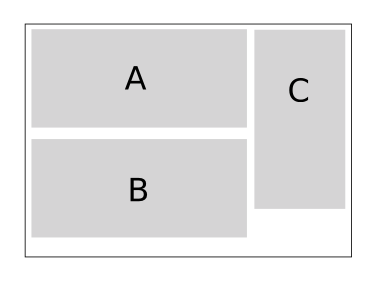
Expected result
- A being #preface
- B being #content
- C being .region-sidebar-first
Actual result
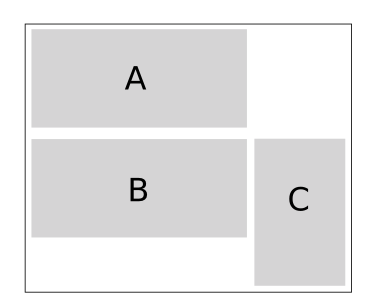
I thought this was going to be a simple layout to achieve with Zen Grids... am I doing it wrong?
| Comment | File | Size | Author |
|---|


Comments
Comment #1
watergate commentedI think you need to wrap A and B, and position the wrapping element to C. Within the wrapper you can position A and B relative to each other.
Comment #2
cossovich commentedI kind of wanted to avoid wrapping elements in markup just to achieve the layout but perhaps I'm asking too much of my lovely Zen Grids.
@MrWatergate, Thanks for the tip.
Comment #3
greg.b commentedYou cant have 2 divs with the same id's, maybe that is causing confusion?
Comment #4
watergate commentedI think it's just a small copy/paste flaw and as far as I know doesn't change the question. However, the HTML most probably should be:
Comment #5
johnalbinzen-clear() starts a new row. which means adjacent siblings of that item will also be on that same row.