
Add picture groups to views
After setting up the Breakpoints and Picture modules (see http://drupal.org/node/1902264) you will have some picture groups to apply in views.
First open a view or create one with an image field.
In the settings for the image field you will see the picture settings:

The first setting is the formatter. Choose "Picture".

Next is the picture group. Each group is a set of image styles, which together allow responsive behavior by letting the correct image size be chosen depending on the current window size.

The last setting is the fallback image style. Most of the time the "Automatic" option is fine, but it is possible to choose a specific size for Picture group. The list of options will change in each site.
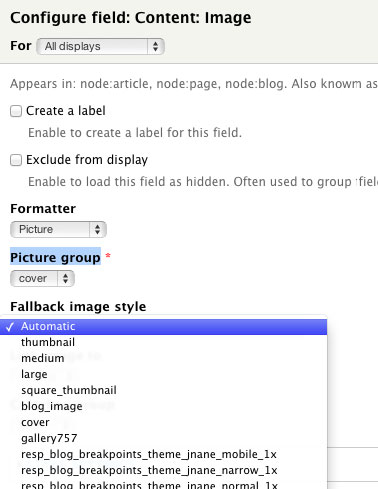
Apply these settings for the image field and save the view.
Help improve this page
You can:
- Log in, click Edit, and edit this page
- Log in, click Discuss, update the Page status value, and suggest an improvement
- Log in and create a Documentation issue with your suggestion
