Closed (duplicate)
Project:
Panels
Version:
7.x-3.x-dev
Component:
Panel pages
Priority:
Normal
Category:
Bug report
Assigned:
Unassigned
Reporter:
Created:
5 Apr 2013 at 08:34 UTC
Updated:
6 Apr 2013 at 16:43 UTC


If you are adding a visibility rule to, for instance, prevent a pane to display if the value of a field is empty, and if that field is not a textarea / textfield, when the panel page is going to be rendered Panels is going to throw an exception.
Here is how to reproduce the issue:
* Add a field on the article content type (type of the field: link, product reference (the only one i tested but the list could be longer))
* Create a new panel page with that path: test/%node, assign the argument of the node nid from the url, keep the default settings for the rest of the configuration of the panel
* For the content of the panel, add a rendered entity of the node being viewed
* Add a visibility rule on the field you added (link or product)
* Create a new node
* Go to your test/ page
* You should see the exception thrown about EntityMalformedException: ---typeMissing bundle property on entity of type node.
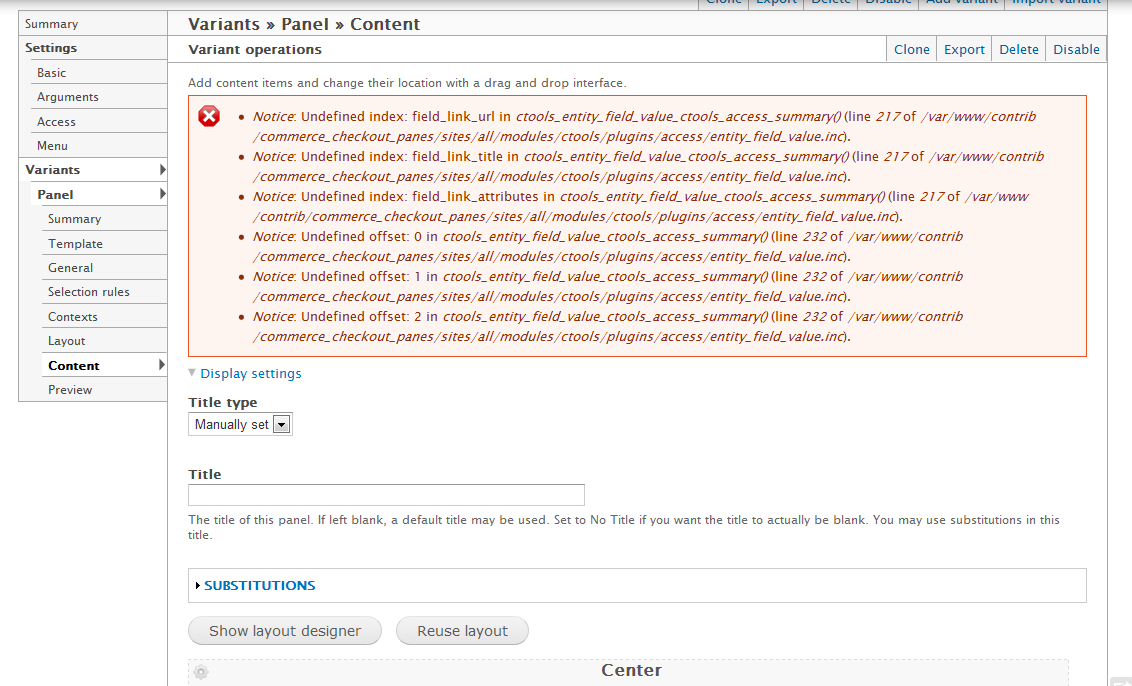
Additional input, when you save the visibility rule the following warnings are displayed and if you try to set a value in the visibility rule configuration it's not saved. See below:
I noticed that when the page is rendered and the pane loaded in ctools_access() when you iterate on the $settings['plugins'] for the access plugin the settings are empty (and should have instead the values of the columns of the field saved in the visibility rule settings.) See the code portion and the value of $settings in the inspected variable.

Hope it helps.
| Comment | File | Size | Author |
|---|---|---|---|
| panels_visibility2.png | 106.42 KB | artusamak | |
| panels_visibility.png | 87.89 KB | artusamak |


Comments
Comment #1
merlinofchaos commentedThis would be fixed by #1955954: entity_field_value.inc is mostly useless