Description:
There are many jQuery tab and accordion libraries out these days! How do you choose which one to implement? Many site builders don't have a programing background and can get lost when trying to add such libraries to their theme. Never the less, embedding these libraries into a custom theme will prevent anyone from easily reusing or customizing the library configurations.
So why another tab or accordion module?
New jQuery libraries are releasing rapidly. Instead of developing a new module for every tab or accordion library, I created tabilicious! Tabilicious was designed to be flexible, so developers can easily implement the new libraries without having to reinvent the wheel.
What libraries does tabilicious support?
At the moment tabilicious works with both jQuery UI Tabs and Accordion.
I plan on releasing a new tabilicious style called "SlideTabs" in the near
future (unfortunately is a paid jQuery plugin).
How do I display my tabilicious profile?
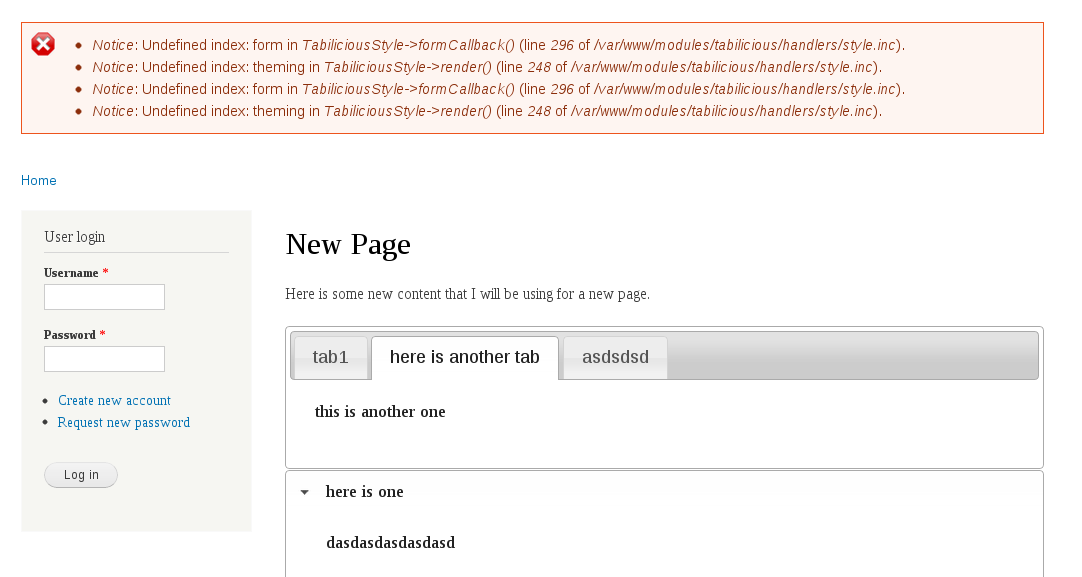
Currently you can render a tabilicious profile by creating a field for any entity type (node, user, bean, etc). Then configure the field formatter to render as a "Tabilicious Profile".
I have plans on releasing more options in the future, so you can render tabilicious profiles using: field group, views, or panels.
Features:
- Display content in a tab or accordion for any entity type.
- Export and import tabilicious profile configurations.
- Manage and customize tab and accordion configurations from a UI.
- Support other jQuery libraries (not just jQuery UI Tabs and Accordion).
Future Plans:
- Render tabilicious profile using the panels module.
- Render tabilicious profile using the views module.
- Render tabilicious profile using the field group module.
- Develop a tabilicious style using the jQuery SlideTabs plugin.
Drupal Version:
- Drupal 7
Sandbox Project:
https://drupal.org/sandbox/droath/1915288
Git Repository:
git clone --branch 7.x-1.x droath@git.drupal.org:sandbox/droath/1915288.git tabilicious


Comments
Comment #1
PA robot commentedThere are some errors reported by automated review tools, did you already check them? See http://ventral.org/pareview/httpgitdrupalorgsandboxdroath1915288git
We are currently quite busy with all the project applications and we prefer projects with a review bonus. Please help reviewing and we will take a look at your project right away :-)
Also, you should get your friends, colleagues or other community members involved to review this application. Let them go through the review checklist and post a comment that sets this issue to "needs work" (they found some problems with the project) or "reviewed & tested by the community" (they found no major flaws).
I'm a robot and this is an automated message from Project Applications Scraper.
Comment #2
droath commentedThe errors that were reported by the automated review tool have been fixed. These changes are now reflected in the 7.x-1.x branch.
Comment #3
jongagne commentedCode sniffer still managed to find a couple issues:
Comment #4
klausiMinor coding standard issues are not application blockers, please provide a manul review.
Comment #5
arnoldbird commentedThe git command in the original project application is wrong. It should be...
git clone http://git.drupal.org/sandbox/droath/1915288.git tabiliciousComment #6
arnoldbird commented@droath,
Thanks for your submission. It appears to be a duplicate of http://drupal.org/project/field_jquery_tabs -- Your module also provides an accordion in addition to the tabs field, but it might make more sense to either focus on the accordion field or contribute your accordion-related code to the aforementioned module.
When I create a profile with the type set to tabs, I see...
In the project page, it was not initially clear to me what you mean by this:
At first I wondered... why would someone want to display tabs or accordions? For what purpose? Please provide a sentence or two of context, or describe a use case, so it's easier to get started testing this module. I found myself doing web searches to find if tabalicious might be a 3rd-party service of some sort. Eventually I did reach a point where I could see the output of the field and then I understood the intent of the module, but this must be made clearer in the README and project page.
Grammar issue: In your README there are a number of instances of "your" that should be "you are" or "you're".
When saving a profile, I get...
When I save the display settings for a field, I get...
Once I get to step #2 in your README, I no longer am sure what you are referring to. I don't know what the "style" is that you are referring to. It may be that I pulled your code at a time when it is in flux. In any case, please fix the errors and check to make sure the instructions in your README are still consistent with your latest code. And consider whether this module may be a duplicate.
Thanks again.
Comment #7
arnoldbird commented@droath,
Your module should be free of statements like "TODO: please describe this table!" in your install file. You should go ahead and supply the description.
Comment #8
jongagne commentedManual Review
Issues:
Suggested Future Improvements:
I found it difficult grasping the concept of the module until I took a look at the jQuery Tabs Field module. Perhaps provide visual support in order to better describe the functionality of your module. Consider updating the README.txt file as well, relate it to the jQuery Tabs Field module in order to better describe what yours does.
Comment #9
droath commentedThanks @jongagne and @arnoldbird for your review!
I have implemented your suggestions, as well as updated my module description. Hopefully this will give you a better idea on what I'm trying to accomplish.
Here is a list of things that have been fixed.
Comment #10
k3vin_nl commentedHi! I tested / reviewed your module on a clean Drupal7.22 installation with only tabilicious and it's required modules.
As stated earlier it was a bit difficult to actually understand what this module has to offer and how it differs from other tab solutions like Field Group.
If I had to describe it: It basicly allows you to create a single field that consists of several tabs or accordion items, while most other module allow you to put existing fields into tabs or accordions.
After I saw how it works, I think this could be a usefull module.
( Not really part of the review, but maybe it would nice to make use of the Field Collection module? Your module could provide a field collection, that renders as either tabs, accordions, etc... I think this would make the configuration easier, and provide more flexility. )
Issues I found
But all in all it is a nice module, that a lot of people could benefit from!
Comment #11
PA robot commentedClosing due to lack of activity. Feel free to reopen if you are still working on this application.
I'm a robot and this is an automated message from Project Applications Scraper.
Comment #11.0
PA robot commentedUpdate description