Active
Project:
Agreservations
Version:
6.x-4.0-beta3
Component:
Documentation
Priority:
Major
Category:
Bug report
Assigned:
Reporter:
Created:
8 Apr 2013 at 14:42 UTC
Updated:
9 May 2013 at 16:56 UTC


Hello,
web browser Google Chrome Version 26.0.1410.43 m (actual version)
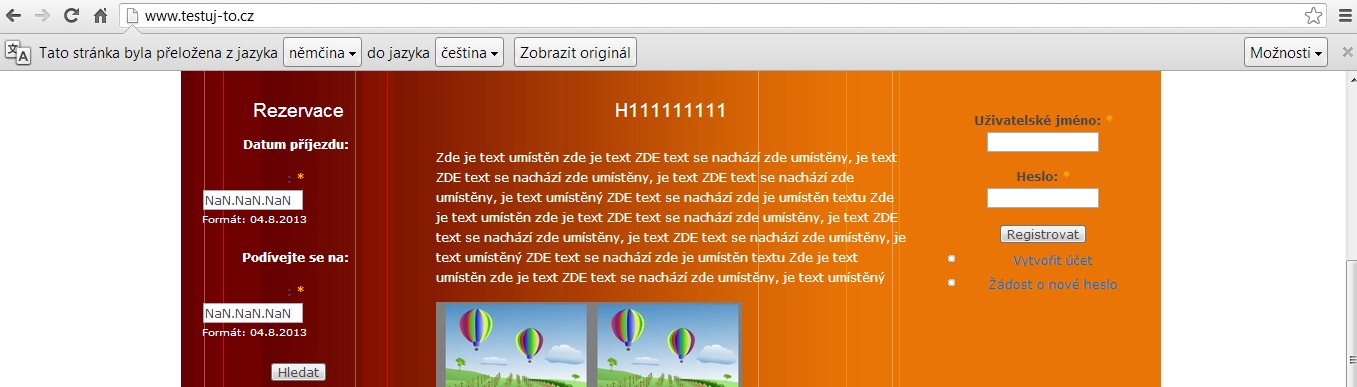
is showing automatically the "translate" function for english a german version
of my web site: homepage (german language version) (as homepage is set up german version).
After the user click on translate and right date-terms of reservation
is : "NaN.NaN.NaN" coming to display.

and than shows this error message:

Field
Check in:
is invalid.
Field
Check out:
is invalid.
Date 1 has to be within service hours.
If I choose right date and without translator is everything working right.


I know is not obligate to use the Google Chrome translator but how to correct this bug?
Many thanks in forward.


Comments
Comment #1
PN1 commentedI just forbided-banned the Google Chrome translator this way:
I inserted this tag:
<meta name="google" content="notranslate"/>into the "page.tpl.php"
URL: root/sites/all/themes/garland/page.tpl.php
It is not the best way how to solve the problem, but I haven´t found any better and cleaner solution.