I am attaching the htaccess code generated by Boost. The issue I am having is that the Boost pages are shown once the user logs in, so use still sees the login block and other pages saved by Boost and Boost is displayed in page header. I was assuming that this issue had been resolved for 7.x based on #1616356: Boost Module problem in logged in user
Anyone facing this issue?
    ### BOOST START ###

  # Allow for alt paths to be set via htaccess rules; allows for cached variants (future mobile support)
  RewriteRule .* - [E=boostpath:normal]

  # Caching for anonymous users
  # Skip boost IF not get request OR uri has wrong dir OR cookie is set OR request came from this server OR https request
  RewriteCond %{REQUEST_METHOD} !^(GET|HEAD)$ [OR]
  RewriteCond %{REQUEST_URI} (^/(admin|cache|misc|modules|sites|system|openid|themes|node/add|comment/reply))|(/(edit|user|user/(login|password|register))$) [OR]
  RewriteCond %{HTTPS} on [OR]
  RewriteCond %{HTTP_COOKIE} DRUPAL_UID [OR]
  RewriteCond %{ENV:REDIRECT_STATUS} 200
  RewriteRule .* - [S=3]

  # GZIP
  RewriteCond %{HTTP:Accept-encoding} !gzip
  RewriteRule .* - [S=1]
  RewriteCond C:/wamp/www/cache/%{ENV:boostpath}/%{HTTP_HOST}%{REQUEST_URI}_%{QUERY_STRING}\.html -s
  RewriteRule .* cache/%{ENV:boostpath}/%{HTTP_HOST}%{REQUEST_URI}_%{QUERY_STRING}\.html [L,T=text/html,E=no-gzip:1]

  # NORMAL
  RewriteCond C:/wamp/www/cache/%{ENV:boostpath}/%{HTTP_HOST}%{REQUEST_URI}_%{QUERY_STRING}\.html -s
  RewriteRule .* cache/%{ENV:boostpath}/%{HTTP_HOST}%{REQUEST_URI}_%{QUERY_STRING}\.html [L,T=text/html]

  ### BOOST END ###





Comments
Comment #1
Anonymous (not verified) commentedWhat exactly do you mean that boost is displayed in the page header ?
The rules look correct unless something is not triggering the DRUPAL_UID cookie which you should be able to check in firebug, when triggered 3 rules should be skipped and it counts up correctly. The other possibility is that it is not installed correctly in the .htaccess file in the root folder (it could be in a virtual host).
Comment #2
Anonymous (not verified) commentedBTW. Boost does not work with non-ajaxed log in blocks, you have to use one as mentioned in your previous thread. The basic reason is that each form contains a unique identifier so, like here on these forums, you have to go to a page to log in (which is never cached) otherwise the login fails.
Comment #3
acidpotato commentedHmm by header I mean the boost signature, which is basically
<!-- Page cached by Boost @ 2013-04-09 21:51:35, expires @ 2013-04-16 21:51:35, lifetime 1 week -->I am using a link which takes the user to /user link to log in. I am using login destination module as well, which I disabled and enabled to check if that could've had an effect, but it seemed like it doesn't.
The htaccess file is saved in the root folder.
One interesting thing I notice now is that the pages on Firefox 19 don't have an issue, I can login to my site and don't get Boost Pages.I checked on IE8 and the issue exists there. So probably this is a browser specific problem and not a Boost issue, per se? If indeed IE handles the DRUPAL_UID differently, how can it be managed since obviously I won't have control over what browser is used to view the site?Checked all the browsers again, seems like FF is back to having issues again..
Comment #4
acidpotato commentedI am seeing this problem on Safari as well.
Comment #5
Anonymous (not verified) commentedUsing firebug in firefox can you see the DRUPAL_UID cookie set as soon as you log in ?
If firebug is turned on does the site mysteriously work ?
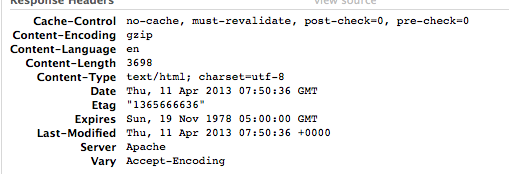
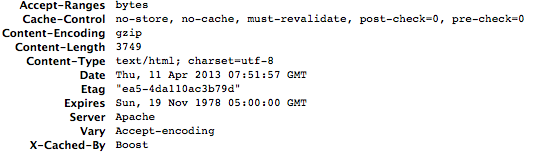
Are your cache headers being sent correctly e.g. no-cache for PHP pages,
I should have read the subject more closely, sounds like a cached content issue to me, firebug disables the browser cache. This is not the same issue as the previously mentioned issue. What does
do ? you may need to alter the line
RewriteCond %{REQUEST_URI} (^/(admin|cache|misc|modules|sites|system|openid|themes|node/add|comment/reply))|(/(edit|user|user/(login|password|register))$) [OR]for your set up.
Comment #6
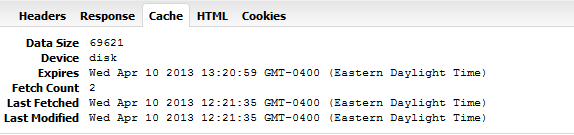
acidpotato commentedYes, it seems like the DRUPAL_UID cookie is being set. See attached screenshots. I cleared all cookies, reopened browser, clicked on a couple of links on the site and then logged in.
What login destination module does is for example, if you are currently on page node/7 and you click on the /user link from the page, you will be taken to the login page /user, but the module appends the originating path to the url. So once you are logged in, you will be taken back to node/7. The url on the login page for this example is then user?current=node/7
I tried to update apache condition but doesn't seem to resolve the issue.. (note user?current=* towards the end)
RewriteCond %{REQUEST_URI} (^/(admin|cache|misc|modules|sites|system|openid|themes|node/add|comment/reply))|(/(edit|user|user/(login|password|register)|user?current=*)$) [OR]Would there be any other settings that may impact this? I also use SSL and secure pages module on login pages. Secure Pages allows the site to have encryption only on specific pages of the site.
Comment #7
Anonymous (not verified) commentedBoost should disable for HTTPS too, but there's a possible contradiction in this. If one imagines that the cookie is set for the HTTPS domain only then it would be ignored for the non-HTTPS as not being valid (the browser not wanting to send a secure cookie through to a HTTP site), but that's guesswork and doesn't explain the hard refresh needed to disable boost for logged in users.
Can you note the headers as you log in get to a boosted page and see how the module redirects, I'm looking for something that says "Cache me" to the browser as that appears to happen. Also once you have the cookie set and have logged in but been redirected to this boosted page, does going to any other page result in boosted pages or is boost disabled ?
Comment #8
acidpotato commentedOk so let me describe the steps I took maybe that will provide some insight into interaction between http and https
1. Cleared all cookies and temp files, closed and then reopened the browser.
2. Went to the homepage of my site which is https://www.mysite.com
3. Clicked on login link which brings me to https://www.mysite.com/user?current=home
4. After being redirected to home, clicked on Link1, Link2, Link3 which are links that have been boosted and are http, not https.
5. All of them give me boosted pages. Even if I refresh or hard refresh (CTRL+SHFT+R in FireFox).
6. Then I either click on Home, which is https, or a http page which is not currently boosted, for example Link4. In both these instances I am shown "logged in" page correctly.
7. Once I goto either of the pages (home or Link4) and go back to Link 1-2-3 and click refresh I am shown to be logged in (non-boosted).
So to answer your question about the cache me setting, not sure to look for, attaching annonymized source file of the boosted page when I first log in (Link1) -
After your comments I checked secure pages issue queue and indeed there is discussion about boost + secure pages not working BUT the issues remain unresolved and inconclusive #443896: Secure pages not being redirected back to http if pages are cached by boost and #1070048: New folder structure
The issue "New Folder Structure" could be the answer? I should've mentioned this earlier..
Also #587000: Cached pages are not being redirected comment 12, 28 is relevant? There is no conclusion in this one as well for my issue and one of the later comments refers to the issue above as a potential solution..
Comment #9
Anonymous (not verified) commentedTo check the cache settings, firebug will give you the headers of each page is you click on "network" then the page, where there will be request and response headers, this should let you see as you progress through the site, whether a cookie is being sent by your browser, as well as what the server is sending you for the cached information.
It reads very much like this module you have to redirect does not set you as logged in, possibly changing the boost's detection of a drupal cookie, since hard refreshing has no effect. (ironically 90% of queries are along the lines of boost not sending out cached pages ;)
Comment #10
acidpotato commentedAlthough sort of a duplicate, I would like to leave this one open till its resolved or reached a logical conclusion, if possible, since this thread clearly describes a problem and tries to identify a solution to seemingly common but critical component of a somewhat widely used drupal configuration.
Comment #11
acidpotato commentedYes the boost seems to be doing the job extremely well! Need to ask for love from other modules and core as well :)
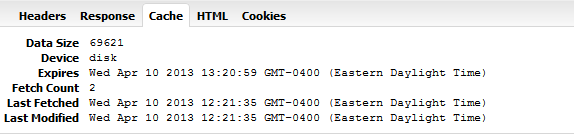
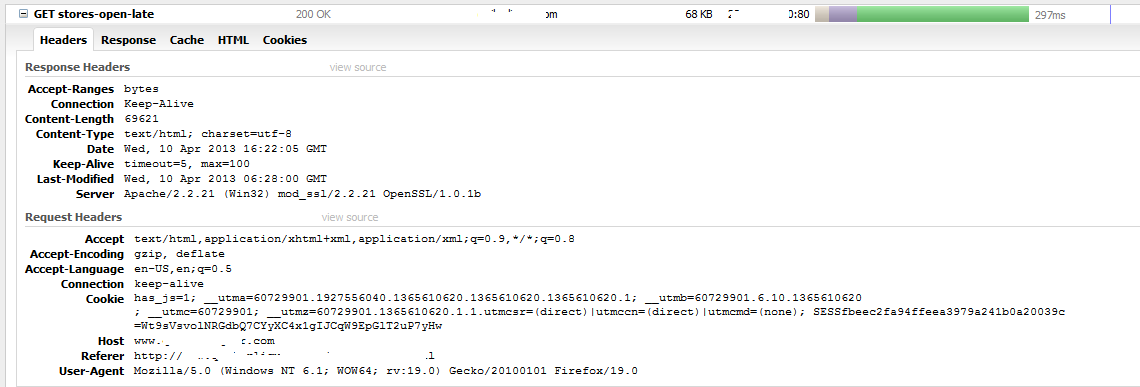
So attached are the screenshots of cache, cookies and headers info once I log into a boosted page.
Through discussion in #1070048: New folder structure it seems like there might be multiple solutions based on Apache version..
Comment #12
acidpotato commentedOops adding the cookies screenshot..
Comment #13
Anonymous (not verified) commentedWhere are the cache headers ? I refer primarily to the drupal set headers that should be set with the block below and your site could also use mod_headers to add them
I attach a first and second visit to a page after the cache has been cleared, I'm not very surprised that the browser is caching when it receives no requests to the contrary.
Comment #14
acidpotato commentedAhh I had disabled cache headers in httpd by doing Header unset X-Drupal-Cache in mod_headers.c
See attached screenshots. I am guessing DRUPAL_UID is being set on the secure login, but it is not being set for the non secure pages? Once the id is set by visting non boosted pages, THEN the expected behavior occurs on boosted http pages? My site has https only on login, register and home pages if that helps..
Comment #15
Anonymous (not verified) commentedThat would be expected browser behaviour, it is a specification the HTTPS set cookie not be transferred across domains even to the HTTP version, so the workarounds would be
not a boost issue as far as I can see, more attributable to browser behaviour and the redirect module (possibly even drupal core).
Comment #16
acidpotato commentedGreat thanks for the help and conclusion.