

Closed (fixed)
Project:
Drupal core
Version:
7.x-dev
Component:
base system
Priority:
Normal
Category:
Task
Assigned:
Unassigned
Issue tags:
Reporter:
Created:
3 Dec 2007 at 02:00 UTC
Updated:
23 Mar 2010 at 22:27 UTC
Jump to comment: Most recent, Most recent file


Comments
Comment #1
webchickClaimed by munit5000.
Comment #2
webchickComment #4
munit5000 commentedHi,
I have a few questions concerning the my Clean Green theme (working title).
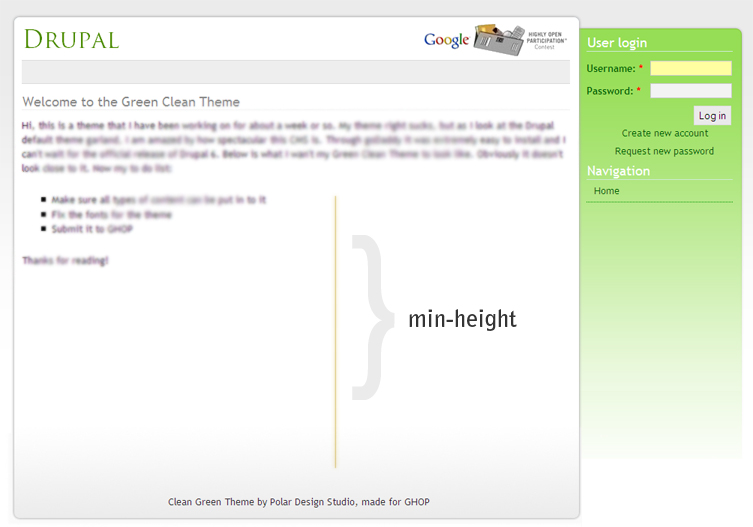
What are the HTML tags that a user can use when creating content? Also, what accessibility will this layout need to comply with (font-size increase/decrease, window size 640*800)? Next, will this have to be compatible in non-standards compliant browsers such as IE5.5, 6 (and can how can i hack it with drupal so IE supports .png transparency)? Also, does someone know a workaround/hack for mozilla's min-height in IE?
Thanks for reading,
munit5000
Comment #5
elv commentedYes. In IE 6 and below height acts just like min-height in other browsers. The element will expand if the content becomes too long.
So you can just set the height for IE <=6 only with a "star html" hack and set the min-height using the standard syntax:
Comment #6
elv commentedA variant:
!important is ignored by IE<=6, so height: auto is replaced when the property is set again.
In standards compliant browsers the !important rule keeps a higher specificity, so the height: 300px declaration is ignored.
Use the one you prefer. The first one is handy if you want to put all IE fixes in a separate stylesheet.
Comment #7
munit5000 commentedFrom past experience I have tried putting the height: 300px; in an ie only style sheet. But the problem there is that if the content is larger than 300px it doesnt expand downwards. So the footer would become 'fixed' at 300px below the beginning of the content and would not move downwards as more content was added. Can you confirm it will not do this?
Comment #8
webchickmunit5000, it might help if you post the code that you have so far, so people could tinker with it on their local sites to try and reproduce your problems and come up with a fix.
Comment #9
munit5000 commentedOk. Here is the url for my theme in action: http://www.polardesignstudio.com/drupal
Next, if you want to look at the style sheet look at the source and you'll find the url of the css. Otherwise if your too lazy here is a direct link: Clean Green style sheet
If you are looking at the style sheet sorry for the unorganized-ness of it all, ask me to clarify anything for you.
Thanks for all the help!
Comment #10
webchickmunit, could you clarify? Is this task complete? If so, could you attach your theme (.info file + css) to this issue?
Comment #11
munit5000 commentedSorry about that, it isn't done yet. I still have to work on compatibility issues with Internet Explorer, style the menu completely and also some of the inner administration pages.
Comment #12
munit5000 commentedTheme files.
Comment #13
adrian commentedThings I noticed after installing theme.
A lot of these items are nitpicky, but over all i really like this theme. I especially like what you've done with the menus.
Comment #14
adrian commentedOh. and looking at the requirements, you need to support at least 3 columns, but only 2 seem to be available at this time.
Comment #15
munit5000 commentedThanks for the feedback.
Does not provide navigation regions
I need to fix that, do you mean that I left out the right sidebar? I only coded the left sidebar into the theme, and thats actually on the right.
Style isssues with sidebar headers, Not sure red is the best colour for already visited links, Text sizes on account just created front page
I should be able to fix this easily. Do you know how to reset drupal so I can see the welcome page?
Couldn't click on save buttons button in admin/build/blocks in Safari
Don't have Safari so I don't know why this is happening. The only things I changed in the css are the
#edit-submit, #edit-resetfor form buttons. I don't know how to fix this!No screenshot provided
I am pretty sure I included a small screenshot for the theme selection page. I'll double check.
Node form has issues even at 1024x768, Comment form has same issue as node form (too wide)
Ok, I will need to fix this too.
About the requirements, I have made the provisions for 3 columns, but I don't have an idea what I should put in the 1st and 2nd columns. The 3rd column is for the left sidebar, the white part of the page is for the content. Also, I have to fix this theme in IE.
Comment #16
meba commentedDoesn't have screenshot also...
Comment #17
keith.smith commented@munit5000: I should be able to fix this easily. Do you know how to reset drupal so I can see the welcome page?
The welcome page appears if no posts are promoted to the front page (i.e.: edit any sample content you may have created and on each, under Publishing Options, uncheck "Promoted to front page")
Comment #18
webchickOk. This task has been going on for about 2 weeks now, so it's time to wrap it up.
munit, if you could please fix the problems mentioned in #15 and #16, we can mark this task closed. I've extended the deadline in the Google tracker to Tuesday, Dec. 18, but that's as far as we can reasonably push it.
Please ask for help if you get stuck and we'll do our best to help you.
Comment #19
munit5000 commentedHelp please:
Does not provide navigation regions
I don't know what you mean by navigation regions? Am I missing any statements in my page.tpl.php file or should I change my theme's info file?
Style isssues with sidebar headers
I don't know how to reproduce the settings in the image (sidebar-title-differences.png), I haven't seen any wierd title fonts or sizes in the sidebar.
Couldn't click on save buttons button in admin/build/blocks in Safari
Don't know how to fix this, could I get an idea where to start, or what I did wrong?
Node form has issues even at 1024x768, comment form has same issue as node form (too wide).
The form input's look fine to me in Firefox, should I specify their width as a precaution in the theme's css?
Comment #20
eclipsegc commentedMunit5000
Does not provide navigation regions
he means block regions. You've defined your blocks in the .info file as regions[left] = Left sidebar. In older drupal versions $sidebar_left was just "left" in the template.php theme_regions function, but it's been redefined by the .info file here, and so you need to name things consistently. Since you named it regions[left], you can refer to that variable as just $left... not $sidebar_left. I hope that made sense.
Style issues with sidebar headers
This is an issue with your css, specifically line 351 of your style.css in which you specific that H3 tags should be "font-family: Georgia,"Times New Roman",Times,serif" but this particular line conflicts with all the other styling you've done on the site.
I'm looking into the other issues, but they aren't as easy to track, I'll post as soon as I have anything.
Comment #21
eclipsegc commentedOK, your other issues are as follows:
Node form has issues even at 1024x768, comment form has same issue as node form (too wide).
OK, so if you'll look at the pngs I've uploaded here, you'll notice that in firefox you don't see the titles for certain fields. This is because of some rather annoying different issues, however, suffice it to say if you'll add this to your style.css it should fix all your problems concerning this (at least all the examples of it I could find... this bug was through out the entire theme in many places including admin pages and the like) Also fixes safari.
html.js .resizable-textarea textarea, .node-form .form-text {
display:inline;
}
Couldn't click on save buttons button in admin/build/blocks in Safari
Your #bottom id has a -80px margin-top on it, and safari is covering the button with it. This is why it is unclickable. If you remove the -80px, it is suddenly happy.
Find another way to do what you want. If you're on a PC running XP you should be able to get access to safari via the new Safari 3 beta, however it's rendering engine is better, so it may not display all the errors that regular Safari is running into right now. I hope I've helped you out.
Eclipse
Comment #22
eclipsegc commentedPS: You should really get the regions displaying in the right areas. Putting something in the left sidebar so it'll show up in the right is totally not kosher.
Comment #23
eclipsegc commentedAlso, you might note that $language is an object NOT a variable. So you'll need $language->language if you want what you need to show up there (line 2 page.tpl.php)
Comment #24
munit5000 commentedI can't thank you enough for your help eclipse. I'll post the updated theme by the end of today.
Comment #25
eclipsegc commentedGlad it helped you. Drop into IRC and ping me if you need any extra help.
Comment #26
munit5000 commentedTheme files attached. Sorry for posting them so late, goDaddy suspended my hosting for the last few days so I couldn't test any changes for a while.
munit5000
Comment #27
add1sun commentedchanging status for review. Let's get some eyes on this so all this hard work can be closed out. :-)
Comment #28
eclipsegc commentedDanW
Ok, first off the whole thing crashes right off the bat. You're missing a ";" in line 29 of your page.tpl.php. go fix :-)
second, your help text is only taking up half the area it could. WHY? Visually quite unappealing. This is PAINFULLY obvious on the primary admin page. Also, the primary admin page almost always requires some extra loving in all browsers (especially ie6) so go look at that and take care of it.
Finally your left sidebar is still on the right side, and you have no real left sidebar functionality that I could determine. My understanding is that this is to be a 3 column layout/implementation (which is what it says on the top of this page, I just checked :-D ). So you need to square that away before this is done. You're so close man, just take care of these things and I think you'll have it.
Also, as I mentioned in another post $language is NOT a string; it is an object. Thus, you have a chunk of code that looks like so:
And that will throw an error every time. Your code should look like so:
if you'd like to see all the stuff inside the $language object just print_r($language) and you'll see everything in it. I'd suggest looking at it in "view source".
EclipseGc
Comment #29
eclipsegc commentedAlso,
Your info file could sure use a version in it. How will people know if it ever gets updated?
Comment #30
Anonymous (not verified) commentedComment #31
aspilicious commentedWTF is this doing in D7?