

Needs work
Project:
Printer, email and PDF versions
Version:
7.x-2.x-dev
Component:
Code
Priority:
Normal
Category:
Feature request
Assigned:
Unassigned
Reporter:
Created:
17 Apr 2013 at 17:41 UTC
Updated:
10 Jul 2013 at 15:44 UTC
Jump to comment: Most recent file


Comments
Comment #1
nancydruAnd here's the patch.
Comment #2
jcnventuraAnd another for PDF? And another one for EPUB?
I'd be willing to do this, if only there would be a way to define these as 'chilren' view modes of the print view mode. Otherwise, configuring the module would be a nightmare..
Comment #3
nancydruWithout it, managing the displayed fields is a nightmare.
Comment #4
jcnventuraI think a suitable compromise would be to have those view modes be enabled via configuration. That way, the current 'simple' view modes work as they are, but in case someone needs the 'email', 'pdf' or 'epub' view modes they can simply enable them and configure them as they see fit.
Comment #5
nancydruHere's how the Node-to-Word modules does it: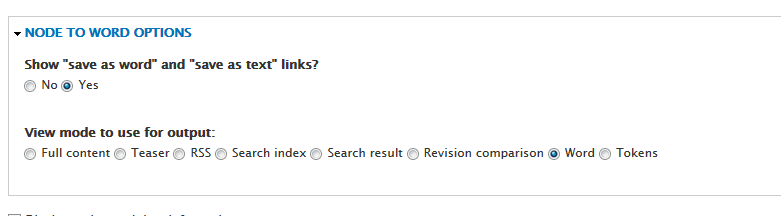
This is added to the "Display" tab in the content type.
Comment #6
jcnventuraI didn't know about the 'Node-to-word' module. That's clearly not the same 'Node-to-word' as in http://drupalcode.org/project/node_to_word.git . I find it funny that they actually don't export to Word, and not even RTF.. It's just HTML served as application/vnd.ms-word, which the browser will open in Word, and Word will convert HTML to Word. I was looking at http://htmltodocx.codeplex.com for doing that for real.
But yes, this would be the type of pick-your-view-mode that I had in mind.
Comment #7
nancydruYes, it's the same module. There is an issue that has a 7.x port.
I had never heard of HTMLDocx. I''m not sure I could figure out how to use it.