Many folk seem to find adding the images via code a bit of a drawback - and it is a missing link.
This patch will allow you to enable the taxonomy images to display where and when you want them in which nodes, via the settings.
It does so by appending the images to the node content, via nodeapi(view)
I did also try to integrate it with the CCK-style of node field management, but found I'd have to cheat the system too much, so the configs are on their own page. This, plus the views integration, will make things much more user-friendly.
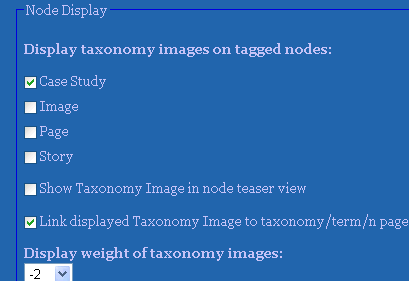
Attached is a screenshot of the new options in the UI, a picture of the result, and a patch (which includes the filesystem problem patch also)
(PS, the module throws some warnings from code style review, but I avoided patching them in this patch)




Comments
Comment #1
dman commentedUI additions
You can also add the links to the images
Node view
The 3 icons shown are from my taxonomy_images:
Comment #2
ThePickwickProject commentedThis sounds very user friendly indeed! I know this sounds very newbie, but I do not know how I can apply this patch, could you please point me in the right direction? Thanks!
Comment #3
dman commentedThe normal approach would be searching drupal.org handbooks a little and finding
http://drupal.org/patch/apply
Sometimes I'd upload the full version just for convenience, but this approach is still in the early stages, looking for a bit of feedback, rather than saying this is an optimal solution...
Hot-patching is for folk that know how to fix thing up when they break ;-)
The best newbie action is to nudge the maintainers to say this is a good feature, then get it committed properly, and use that
Comment #4
ThePickwickProject commentedThanks, I already read the http://drupal.org/patch/apply page before posting and was kind of scared away by the warning at the beginning, that's why I asked. Well, this is a brilliant feature and I do hope it gets committed soon!
Comment #5
dman commentedDue to popular demand, here's the patched file.
I'm still not totally happy with the UI - I think the settings should be on the content-type page, not on the admin/settings/taxonomy_image page, but whatever.
It will work on default node.tpl.php - themed nodes. If you have custom content types, (you've already hard-coded your node page display) you'll have to revisit the available $node->content fields.
For most new users however, you should just start seeing results as soon as you've checked the boxes in the admin page.
This ONLY adds the images to the NODE pages. Not the term overview pages, although it MAY add it to the node teasers listed there.
Comment #6
ThePickwickProject commentedThanks Dman, this is ab-so-lu-te-ly brilliant!
Comment #7
Christefano-oldaccount commentedsubscribing
Comment #8
drew reece commentedsubscribing
Comment #9
nancydruAfter I get through the bugs and support issues I will come back to the features.
Dan (dman) is there any way I could get you to recreate this patch on the latest code version, please?
Comment #10
dman commentedThis weekend I'm revisiting this task - I'm upgrading the site I did it for originally to the latest image modules, so this will be part of it :0)
Comment #11
nancydruThanks. That would be great. I'm running out of issues to fix. ;-)
Comment #12
nancydru@dman: I have this all done and it works for 5.x, but it's not working under 6.x. Do you have any ideas before I go digging deeply into node.module?
Comment #13
nancydruWell, duh! The "html" attribute of the new "l" function options has to be lower-case...
Look for this soon.
Comment #14
nancydruCommitted on both branches.
This is now an add-on feature. It is in the "contributed" folder that is distributed with the module.
Comment #15
dman commentedSorry for not getting back on this. Real life (TM) and real work intervened.
I found my requirements were more than could be achieved in this generic way anyway so had to hard-code some template theme stuff :)
My nodes now
- show an image-attach image
OR a taxonomy-image icon
OR a default icon
as available, for consistancy :-}
So it was a custom-theme job.
Cheers for getting it in ....
Comment #16
nancydruHmm. Sounds like a possible feature request in there somewhere.
Comment #17
Anonymous (not verified) commentedAutomatically closed -- issue fixed for two weeks with no activity.