I use the domain access module to control context on my pages.
I set up one main domain and 2 subdomains.
- mydomain.com (default = 0)
- sub1.mydomain.com (domain_id = 1)
- sub1.mydomain.com (domain_id = 2)
I use views to display my individual nodes. Each individual node can be published on one or more subdomains.
- A blockview to display one random headerimage node published in the context of the active subdomain
- A blockview to display one random backgroundinfo node...
- A blockview to display one random advertisement node...
- A pageview 'regions' to display all regiolal nodes assigned to the corresponding subdomain
All views only exist once. So the same view selects the nodes on all my diferent subdomain.
- mydomain.com/regions (shows all regional nodes assigned to default PLUS all the context like headerimage, backgroundinfo,...)
- sub1.mydomain.com/regions (same)
- sub1.mydomain.com/regions (same)
|-----headerimage-----|
#######################
|---------------------|
|-regional-|---Ads----|
|--nodes---|----------|
|----------|--BgInfo--|
|---------------------|
I'm just pointing it all out, because i dont know if it has something to do with the problem.
Everything worked absolutely perfect. Very intuitive. But all of a sudden all my views on sub1 (domain_id = 1) show all nodes (so: sub1.mydomain.com/regions). No matter if they are published on one, more or no domain.
Of course im not logged in as the admin. I tried this with different browsers even on a seperate computer. I emptied the cache, views cache (any further caching is disabled, no css compression). I didnt change anything expet for adding nodes. I tried disableing and deinstalling all modules that come with doman access, except for domain access (no change).
I checked the domain table:
domain_id  subdomain           sitename        scheme     valid
1          sub1.mydomain.com   sub1.mydomain.  http       1
2          sub2.mydomain.com   sub2.mydomain.  http       1
example node published on sub1 (nid occurs only once in the node_access table):
nid   gid   realm       grant_view    grant_update    grant_delete
9     1     domain_id   1             0               0
example node published on sub2 (nid occurs only once in the node_access table):
nid   gid   realm       grant_view    grant_update    grant_delete
52    2     domain_id   1             0               0
Sorry for the endlessly long post, i have no idea what information could be useful. I dont use any modules using node access, not even the forum module at this point.
Thanks a lot for all the work.


Comments
Comment #1
agentrickardYou are running beta7 or HEAD?
Is the following row in your {node_access} table:
Comment #2
derjochenmeyer commentedthat was fast :)
The mentioned row is NOT in node_access. Im running beta7 with small bug (http://drupal.org/node/195256) fixed manually.
this is there, but thats ok, right?:
i tried some naive things:
Created a new domain record in domain access settings (domain_id = 4) and then ran the following sql in phpmyadmin (i only have about 40 testnodes so its still easy to get an overview of affected nodes on one page)
UPDATE domain_access SET gid = 4 WHERE gid = 1 AND realm = domain_id-> no change (sub1 is broken while sub2 keeps working as expected)
Comment #3
agentrickardCan you dump the output of the {node_access} table into a text file and attach it. I think you should be ok, but would like to look.
Two other questions:
-- Did you ever delete sub1.mydomain and reenter it? -- This may, in fact, be a bug, as we likely have to wipe all {node_access} records for a domain when that domain is deleted.
-- Is the function domain_grant_all() returning TRUE on this view for any reasons? That would invoke the domain_all grant and explain the current behavior.
You might also try doing a variable dump on the $grants array set by domain_node_grants() -- that would give us a clue.
Comment #4
derjochenmeyer commentedI tried a lot in the meanwhile, but before i made a db backup. Attached the is the original MySQL dump of {node_access}. That produces all the errors:
The NODES IN QUESTION are: 53, 49, 33, 52, 51, 9 (9,33,49 should appear in my view on sub1 = domain_id = 1 but all do)
see: http://arco.tazmaz.com/gebiete
I never deleted the subdomain sub1. I guess its about matching IDs in {domain} and {node_access}, right?
I did a CVS checkout and tried HEAD of the domain.module.
BTW: I think i found a bug in domain_configure_form(). Lines 213 and 223 make the search options required, which produces errors because the the radios are also hidden. I just commented them and tried with HEAD
-> no change
// Edit: I just read that domain_configure_form() is fixed.
Went back to beta7 now.
I checked domain_grant_all() wth the following code in the header section of the view (PHP Filter), returning FALSE on all subdomains:
I dont mind installing everything new, but i would like to know what caused the error. If its my fault or a module i use.
I use (output via module_list() function): block, comment, filter, help, locale, menu, node, path, profile, system, taxonomy, user, watchdog, admin_menu, backup_migrate, content, number, optionwidgets, text, cck_teaser_field, custom_breadcrumbs, devel_node_access, domain, fivestar, gmap, gmap_location, gmap_macro_builder, gmap_views, googleanalytics, imagecache, imagefield, jquery_update, location_views, location, panels_page, relativity, textfield_autocomplete, thickbox, update_status, viewfield, views_rss, views_theme_wizard, views_ui, views_bonus_grid, votingapi, pathauto, suggestedterms, fieldgroup, panels, token, views, devel
Comment #5
agentrickardFor some reason, the following record is in your {node_access} table:
This might make all nodes viewable on domain 1.
Try deleting that row.
Comment #6
derjochenmeyer commentedTHANKS... it works... (i slowly start to understand node_access i guess) but the question is, how did that record get there...
if it happens again i hope i will have a clue what i did...
Comment #7
agentrickardI would very much like to know how that record got there. Pretty sure I didn't do it.
I'm going to close this, let me know if it comes back.
Comment #8
agentrickardI should say that the key to understanding node_access is:
-- Read the API on Node Access, especially hook_node_access_records() and hook_node_grants().
-- Turn on the Devel module's query tracker. Look for the queries in functions: node_view_all_nodes(), node_access(), and _node_access_where_sql().
Comment #9
derjochenmeyer commentedThanks again... ill try to find out what caused it but hope it wont happen again ;)
Comment #10
mrichar1 commentedThis bug bit us as well. In our case it was domain_id = 5, but I should also not that domain_id 5 is in fact the first subdomain after the master domain (I had created deleted some other subdomains previously). As soon as I deleted the row in question everything wen back to normal. This is what it looked like
I was originally using Beta 6 and am currently using Beta 7. I had used the batch node access editing options a couple times, but nothing turned up while attempting to reproduce the bug using this feature. I'll be sure to post here if the bug comes up again.
By the way, by default the batch node access editing form allows you to submit with no subdomains selected (this seems to be the default state) which makes it very difficult to get your nodes back into the right subdomain (you have to edit them individually). Has an issue been opened for that bug?
Comment #11
agentrickardI wonder if batch node editing is inserting an nid of 0 for some reason.
Comment #12
agentrickardThere was an issue but I can't find it.
I assume you mean on the Drupal default "Content management" screen. This has been fixed. The edit domain access rules option is now only available on the page provided by Domain Content.
This is by design and has been fixed in HEAD.
Comment #13
mrichar1 commentedI assume you mean on the Drupal default "Content management" screen.
No. Though I did notice that. Glad it is fixed.
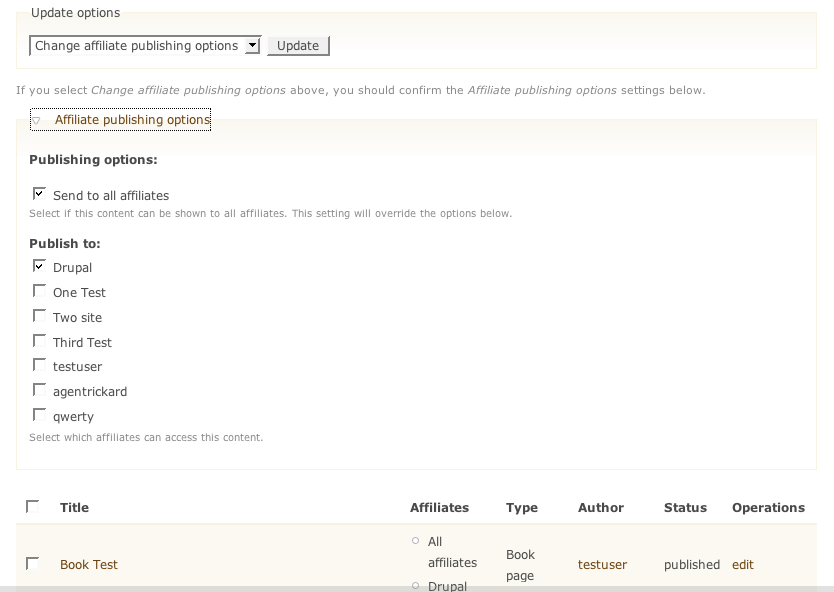
What I mean is that on the "affiliated content" pages, the domain access options form that shows up at the bottom of the page doesn't require any subdomains to be selected.
By default If you select a few nodes and then choose "Change Domain Access Rules" (without selecting a domain on the form below) those nodes will have all domain assignments removed...I am assuming that is not intentional since "Publish to" is a required field when editting nodes individually.
I would expect that choosing "Change Domain Access Rules" would give you an error if no domains are selected. I got bitten by this because I didn't notice the form at the bottom of the page. Is there any way to have the form show up above the node listing, with the fieldset closed by default?
Comment #14
agentrickardI see your point. The form should, however, only act on the selected nodes. The default empty selection is a design choice -- there are times when you want to remove all. But we could default to the current domain.
Perhaps we should move the form element to the top.
Attached are screenshots of the UI fix.
Comment #15
agentrickardAs to the main issue, I suspect this is a testing bug that I let slip into beta7.
Lines 78-79 in domain_admin.inc should be removed.
These lines may force the {node_access} table to be rebuilt, causing errors.
Comment #16
agentrickardI'm going to close this, in light of rc1.
If something similar comes back, let's open a new issue.
Comment #17
agentrickardSee http://drupal.org/node/202714#comment-665983 for the fix.