

Closed (duplicate)
Project:
FileField Sources
Version:
6.x-1.8
Component:
Source: Remote URL
Priority:
Normal
Category:
Support request
Assigned:
Unassigned
Reporter:
Created:
26 Apr 2013 at 07:33 UTC
Updated:
29 Nov 2013 at 16:26 UTC
Jump to comment: Most recent, Most recent file


Comments
Comment #1
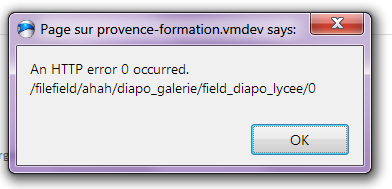
quicksketchThis means that the server encountered an unrecoverable error when saving the image. Since the server can't return anything, Drupal's AJAX system returns that rather unhelpful error. Does this problem occur with all images? Or just one (or some) in particular? The most common problem is the server running out of memory when dealing with large files (especially if this is an Image field). Checking your server logs would be the surest way of determining this problem, since that's the only place these errors are recorded.
Comment #2
aiphesapache or php logs ? where are they on ubuntu server ?
Comment #3
quicksketchOften times the PHP logs are stored in the the Apache logs if you have PHP running as an Apache extension. You can easily Google your question.
Comment #4
aiphesfound it :
[Mon Apr 29 12:00:15 2013] [error] [client 192.168.xxx.xxx] PHP Fatal error: Call to undefined function curl_init() in /var/www/drupal6/sites/all/modules/filefield_sources/sources/remote.inc on line 130, refere$Comment #5
quicksketchAh, well that's simple enough. Your PHP installation is missing the cURL library: http://php.net/manual/en/book.curl.php.
Comment #6
aiphesok, i go to install it and retry..
do phpinfo could get me information about installed php libraries ?
Comment #7
quicksketchYes, php_info() will tell you if cURL is enabled or not.
Comment #8
aiphesit doesn't work...
i have install like this :
sudo apt-get install curl libcurl3 libcurl3-dev php5-curlthen edit php.ini to add the extension curl.so
sudo nano /etc/php5/apache2/php.inithen restart apache
sudo /etc/init.d/apache2 restartno change
Comment #9
quicksketchFor help installing PHP extensions, please use other resources. If you can get cURL to show up in php_info(), but it's not being used by FileField Sources, then I can help you further. But it sounds to me like you just need help getting cURL working on PHP. There should be plenty of references on the internet for such a task.
Comment #10
aiphesit seem to be not related to curl.i just try on another server and i get the same result : WSOD on creation or edition node...
on both servers curl is enabled.
Comment #11
dallasw1983 commentedI'm having the same/similar problem. I'm getting filefield/ahah/article/field_main_image/0
I noticed when I click the "Transfer" it throws the error and the dialog comes up, but when I just paste the url for the image file and hit return to submit the form, the page loads, Drupal says I forgot the title, but the image loads when I scroll down and see the preview. Also on the page load, I get this text at the top of the page.
If I type
filefield/ahah/article/field_main_image/0into my URL ashttp://www.whatsmadeinamerica.us/filefield/ahah/article/field_main_image/0I get
{ "data": "\x3cdiv class=\"messages error\"\x3e\nAn unrecoverable error occurred. The uploaded file likely exceeded the maximum file size (30 MB) that this server supports.\x3c/div\x3e\n" }The file I'm using is my website logo.
To view this, you can visit my devel site at http://dev.whatsmadeinamerica.us/node/add/usa-made-product and use the main image field.
I'm not sure what is causing it, but I'm going to be checking modules and server logs over the next few days as my time permits.
Comment #12
dallasw1983 commentedFound out that its the 1.8 module causing the problem.
On my live site, I have 1.8 installed and on my dev, I have 1.7. Everything else is the same.
Next I'm going to dig into the code and commits to see whats different.
Comment #13
dallasw1983 commentedFrom my digging, I found out this was an issue in 1.5 version, and a patch was already made.
http://drupal.org/node/1795160#comment-6664786
I applied the patch to 1.8, no fails and the remote transfer works.
So along the lines, it was removed?
Comment #14
dallasw1983 commentedI'm not sure how to attach a patch and test it.... but here's the patch from #13
Comment #15
aiphesthank you dallas, will test later
Comment #16
mrP commentedduplicate of #1795160: An HTTP error 0 occurred when transferring remote files