Closed (fixed)
Project:
GMap Module
Version:
5.x-1.x-dev
Component:
Code
Priority:
Critical
Category:
Support request
Assigned:
Unassigned
Reporter:
Created:
6 Dec 2007 at 15:47 UTC
Updated:
30 Sep 2008 at 16:25 UTC


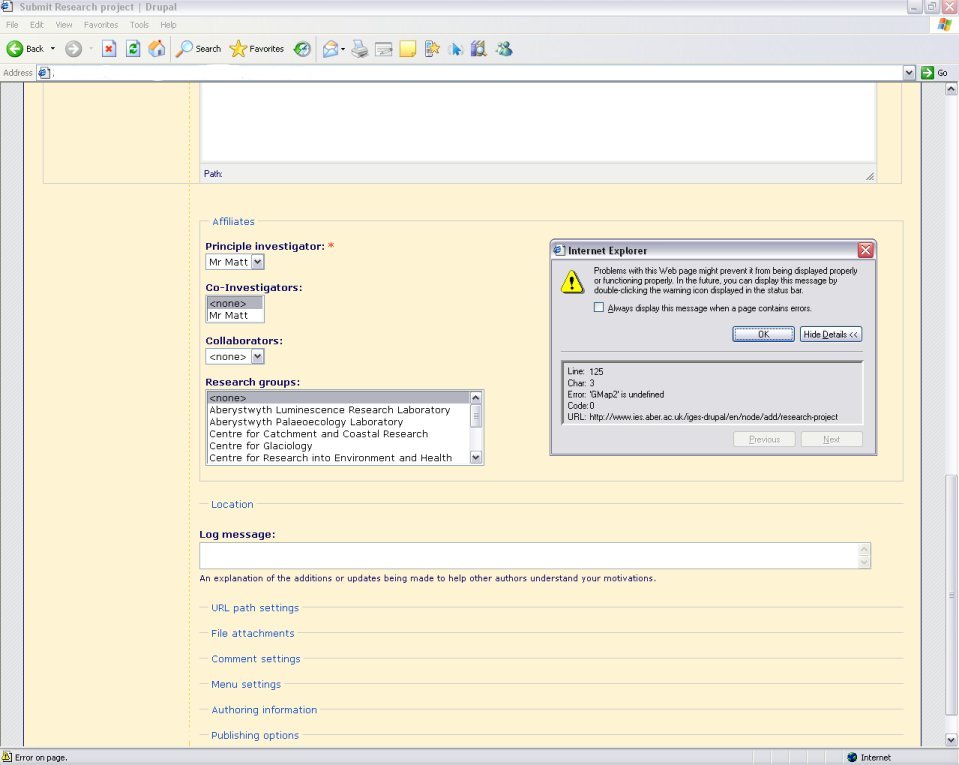
I have installed the latest dev version of GMap and it's all configured and works great under IE7 and Firefox. However when it comes to IE6 two JavaScript errors are given:
On the Macro Builder page:
Line: 131 Char: 1 Error: 'GMarker' is undefined
Line: 125 Char: 3 Error: 'GMap2' is undefined
On a Content type data entry form that is using GMap's location stuff:
Line: 125 Char: 3 Error: 'GMap2' is undefined
It looks like some JS is not being included, but everything is being linked in via the html and I am using all of the appropriate doctypes etc. as expalined in the README.txt
The main symptoms are that the maps are not displayed at all (but the div still takes up the space where the map should be) and all of the Drupal drop down fieldsets in forms are completely broken, making the site unuseable in IE6. There are a couple of unrelated GMap JS errors reported in Firefox but nothing that is a blocker on map functionality, or all of the built in Drupal features. At first I thought it might be JSTools as reported by other people but I have that removed and the problem persists.
Any help you can give me on this would be much appreciated, I can't give external access to the website I'm working on but here is a copy of the HTML header as seen by IE6 and I've attached some screenshots:
<!DOCTYPE html PUBLIC "-//W3C//DTD XHTML 1.0 Strict//EN" "http://www.w3.org/TR/xhtml1/DTD/xhtml1-strict.dtd">
<html xmlns="http://www.w3.org/1999/xhtml" xmlns:v="urn:schemas-microsoft-com:vml" lang="en" xml:lang="en">
<head>
*Other modules stuff*
<script src="http://maps.google.com/maps?file=api&v=2&key=ABQIAAAA99s3K6rpLleTmtB1MZy6fRSAw9A4GhaGDDUS8tDhckMyAqw2lhQlSQhi6eyJr2JjUewfH63l8dhy5A" type="text/javascript"></script>
<style type="text/css" media="all">@import "/iges-drupal/sites/all/modules/gmap/gmap.css";</style>
<script type="text/javascript" src="/iges-drupal/sites/all/modules/gmap/js/gmap.js"></script>
<script type="text/javascript" src="/iges-drupal/sites/all/modules/gmap/js/marker.js"></script>
<script type="text/javascript" src="/iges-drupal/sites/all/modules/gmap/js/gmap_marker.js"></script>
<script type="text/javascript" src="/iges-drupal/sites/all/modules/gmap/js/poly.js"></script>
<script type="text/javascript" src="/iges-drupal/sites/all/modules/gmap/js/locpick.js"></script>
*Other modules stuff*
</head>
Other modules that are installed:
biblio
calendar
cck
cck_blocks
cck_fieldgroup_tabs
contemplate
custom_pagers
date
email
filefield
gmap
gmap_addons
i18n
imagecache
imagefield
imce
jstools *not enabled*
link
location
oai2
pathauto
phone *has some of my own edits but no JS*
thickbox
tinymce
token
views
views_bonus
views_slideshow
zipcode
| Comment | File | Size | Author |
|---|---|---|---|
| macro_builder_broken.jpg | 90.54 KB | meo | |
| fieldsets_working_ff.jpg | 102.31 KB | meo | |
| fieldsets_broken.jpg | 82.67 KB | meo |


Comments
Comment #1
meo commentedComment #2
bdragon commentedDoes a more recent snapshot or the beta1 work better?
Comment #3
marcoBauli commentedsimilar problem here on latest beta1 release in IE6 on every page containing a Gmap:
--
Line: 81
Character: 1
Code: 0
Error Message: 'GIcon is undefined'
--
Line: 191
Character: 7
Code: 0
Error Message: 'G_NORMAL_MAP' is undefined'
Maps does not show at all.
------
UPDATE: enabling the 'collapsehack' checkbox in the Gmap settings removed the first error (Line: 81). The other error is still there though and no map.
No Clusterer, all other Map behaviours turned off.
Comment #4
bdragon commentedHmm, "'G_NORMAL_MAP' is undefined" makes it sound like a timing issue...
Do you have a particularly fast internet connection?
Comment #5
marcoBauli commentedwell, not "that" fast, is a 4MB ADSL..
Comment #6
bdragon commentedMy connection is satellite internet, with around 1.7 second RTT, so that's why I was asking. ;)
Comment #7
marcoBauli commentedoh my..the errors have gone now. Probably the old gmap.module's javascripts where still cached in IE (i updated to beta1) ?
well, now works without no errors, very slow but hey, it's IE ;)
Comment #8
meo commentedThe map comes up with beta1. However I have issues with the map not jumping to where markers have been placed, instead the default map location is used (Only in IE). I imagine this issue will sort itself out once I update to Location3 when it's ready. There is a werid bug with tiles not being loaded for the centre of the map (only in IE), instead the tiles around the centre are loaded, but I can't see how this would be anything to do with your code bdragon. This is all with IE7 as I don't have access to anything else. I'll wait until I have updated to Location3 to report any real issues I'm having.
Thanks for the great work on this module!
Comment #9
bdragon commentedAssuming everything was fixed sometime around the beta4 era. Reopen if there are any remaining problems.