

Closed (fixed)
Project:
Twitter
Version:
7.x-5.8
Component:
Code
Priority:
Major
Category:
Support request
Assigned:
Unassigned
Reporter:
Created:
5 May 2013 at 17:21 UTC
Updated:
15 Dec 2014 at 09:19 UTC
Jump to comment: Most recent, Most recent file


Comments
Comment #1
Tyler the Creator commentedI've also run into this problem. I installed the module and it imported all the recent tweets from my client's Twitter, but it has not updated once since then. Cron is set up, and I have also tried manually running cron. No luck. Any insight would be extremely helpful.
Comment #2
dddave commentedI've have the module working on various installs without any issues. Changing to support request until it is shown that this is indeed a bug. The fact that the view page results in a page not found (in the OP) suggests that this is an individual set-up issue and not a module problem.
Things to look after: Is views up-to-date and has no issues with CTools (which also should be up-to-date). Have you modified the included view? If not have you made sure it was initialized correctly? Compare it to a working install.
Comment #3
amybrate commentedI don't know if OP's problem is the same as mine, but I have stopped receiving tweets. The exception is that, for those accounts that checked "mentions," mentions get imported.
Just discovered it was happening this evening.
In my case, it is definitely NOT a Views problem. Looking in the twitter table in the DB, the tweets are not getting imported at all. I have checked account feeds on Twitter.com and verified that there has been activity.
Timestamps indicate most accounts stopped importing in the last week to week and a half; some further out.
Also of note is that the last_refresh values in twitter_accounts *is* updating when cron runs, so Drupal thinks it's getting new tweets.
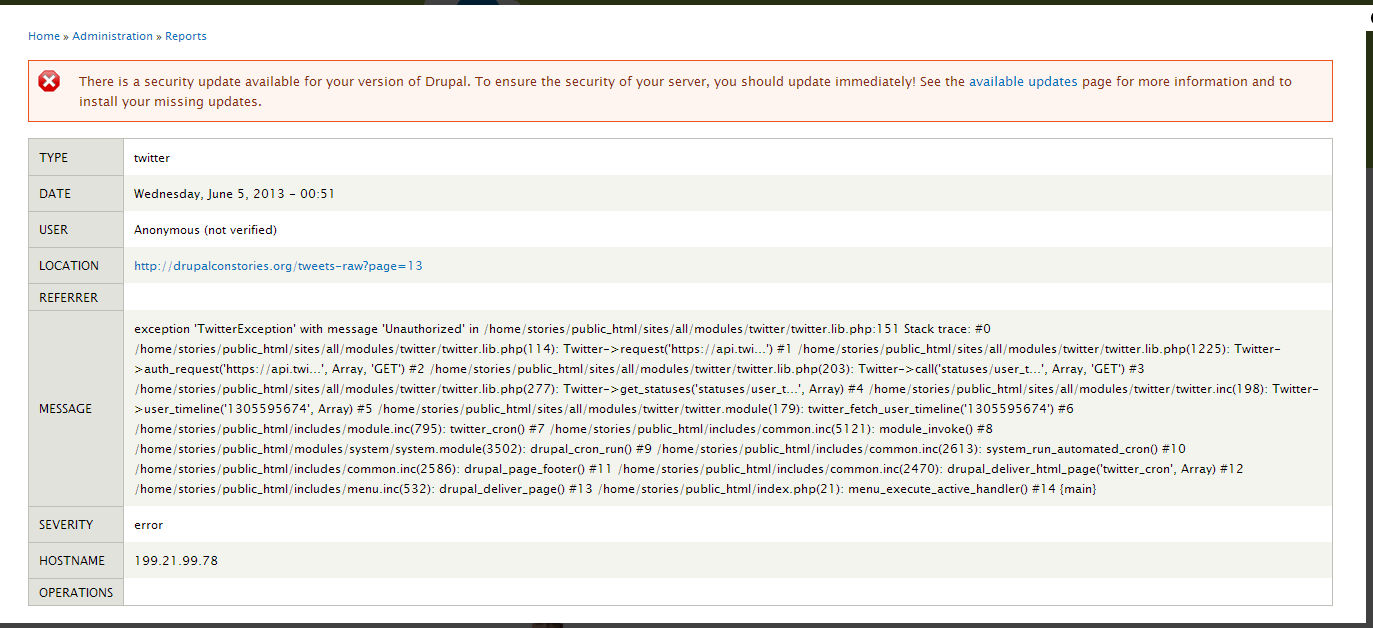
In the logs, however, I am getting an Exception when cron runs. Screenshots attached.
FWIW, my accounts are a mix of authenticated and non-authenticated; this status does not seem to impact this issue. Most were added to my site a few days before DrupalCon Portland.
If I can provide any other details, just let me know. Reverting Category to bug report.
Edited: another note...there are 16 Twitter accounts that should be importing, and 16 exceptions thrown with each cron.
Comment #4
steph33560 commentedSOLVED FOR ME ! :)
1/ Check if application is in read ** AND ** write mode
2/ Reset the keys
The articles/pages are published ! :))
Comment #5
tuckera commentedTweets have stopped displaying in the Twitter Profile Widget block.
Any help is appreciated.
Comment #6
kbrinnerChanging the application to both Read and Write solved the problem for me as well. I didn't need to reset the keys.
Comment #7
llillf commentedHi all,
do your tweets update automatically? Why I have to run cron and clear cache to upload all the updated tweets?
Thanks!
Comment #8
Roar-1 commentedSame problem here. Tweets View comes up blank, no Tweets seem to be downloaded when all Twitter/OAuth settings entered correctly. Tried deleting module settings, disabling/re-enabling, resetting keys and making sure Tweets are set to 'Read and Write' but no luck.
Update: fixed - after playing with it for an hour+ finally must have got my settings correct ;)
Comment #9
techman-1 commentedI have the same issue. Twitter feeds stopped updating 3 months ago.
Just logged into my twitter account to verify application settings
Indeed my application is set to read and write mode.
So I tried reseting the keys and updating the new keys into the drupal module.
and then ran cron. No fix.
If anyone can suggest some other things I can try, I would greatly appreciate it
Comment #10
HairMachine commentedWe are also seeing this issue, will report back if we find any thing.
Comment #11
daveX99 commentedI'm also experiencing this on a number of sites. Focusing on one site for now, I have updated to the latest version (7.x-5.8), ran database updates, ran cron, flushed caches and still do not see latest tweets.
ETA: I have also set the application to be 'read and write' on the Twitter app page.
Subscribing.
Comment #12
xurizaemonLots of similar situations here but all of them will require more info for us to assist meaningfully. For now, I can give you tips on how to debug your site better.
The symptoms described might be caused by any of the following -
* Cron failure in another module
* Cron failure in Twitter module
* DUPLICATE KEY errors due to MySQL cast to decimal - #2055951: Interesting MySQL issue appears to cause randomish "twitter_views_handler_field_formatted_tweet->render()" errors
* Unicode characters causing cron failure - #1910376: SQL error when importing tweet with emoji
* Misconfigured / de-authenticated Twitter app
* Something else ...
Happy debugging!
#3 @amycham - https://drupal.org/files/2013-04-06-twitter-error-sample.png indicates your site oauth creds are not being accepted by Twitter - delete your site Twitter account and re-add it?
Comment #13
HairMachine commentedFor us we're getting an error in the watchdog tables thrown by the twitter module:
exception 'TwitterException' with message 'Unauthorized' in /mnt/www/html/developdev/docroot/sites/all/modules/twitter/twitter.lib.php:151 Stack trace: #0 /mnt/www/html/developdev/docroot/sites/all/modules/twitter/twitter.lib.php(114): Twitter->request('https://api.twi...') #1 /mnt/www/html/developdev/docroot/sites/all/modules/twitter/twitter.lib.php(1225): Twitter->auth_request('https://api.twi...', Array, 'GET') #2 /mnt/www/html/developdev/docroot/sites/all/modules/twitter/twitter.lib.php(203): Twitter->call('statuses/user_t...', Array, 'GET') #3 /mnt/www/html/developdev/docroot/sites/all/modules/twitter/twitter.lib.php(277): Twitter->get_statuses('statuses/user_t...', Array) #4 /mnt/www/html/developdev/docroot/sites/all/modules/twitter/twitter.inc(198): Twitter->user_timeline('889538461', Array) #5 /mnt/www/html/developdev/docroot/sites/all/modules/twitter/twitter.module(179): twitter_fetch_user_timeline('889538461') #6 [internal function]: twitter_cron() #7 /mnt/www/html/developdev/docroot/includes/module.inc(833): call_user_func_array('twitter_cron', Array) #8 /mnt/www/html/developdev/docroot/includes/common.inc(5253): module_invoke('twitter', 'cron') #9 /mnt/www/html/developdev/docroot/modules/system/system.admin.inc(2341): drupal_cron_run() #10 [internal function]: system_run_cron() #11 /mnt/www/html/developdev/docroot/includes/menu.inc(517): call_user_func_array('system_run_cron', Array) #12 /mnt/www/html/developdev/docroot/index.php(25): menu_execute_active_handler() #13 {main}
Twitter app all looks good, is set to read and write permissions, the callback specified works correctly. I haven't tried resetting the keys yet, will do that now.
EDIT:
Just realised this is the same as #3. For us there are multiple authenticated twitter accounts, but none of them have pulled anything in for the last 2 months and 2 weeks. Could it really be that they are all broken somehow? I also just deleted and re-added one to make sure, but that had no effect at all.
Resetting the keys was ineffective as well.
Comment #14
HairMachine commentedTried digging a bit further, but not getting very far.
The actual error that seems to occur from the twitter API side is {"errors":[{"message":"Could not authenticate you","code":32}]}, which is returned when accessing https://api.twitter.com/1.1/statuses/user_timeline.json.
There is this thread on the twitter API developers forum but... I understood pretty much none of it. :*( What people seemed to keep talking about was permissions and the formatting of the OAuth tokens, but I've already checked the permissions and regenerated the keys so have become entirely stumped.
https://dev.twitter.com/discussions/11494
Comment #15
daveX99 commentedPer grobot's post (#12), I checked watchdog & the server error log for twitter events - nothing. I ran cron via drush and no errors were displayed. I then checked watchdog and the server error log again - no sign of twitter errors. Flushed cache just to make sure, still no new tweets.
I'd be happy to try something else. Thanks for whatever help you can offer.
-dave.
Comment #16
daveX99 commentedThis may finally (?) be solved for me (& my clients)... I think it may be an error in the way these were set up on our end.
I was having trouble with both the D6 and D7 versions of this module, but the problem may have been on our end. I re-authorized the apps in both cases and then ran cron and saw the latest tweets.
I still have to go look at some other of our sites to verify, but that seemed to take care of it.
In the case of the D6 site that I was able to fix, I found that the OAuth variables stored in the 'twitter_account' table did not match what was displayed at dev.twitter.com for that client's application. Reauthorizing caused those fields to update, and they now match.
What's odd is that for the D7 site, the oauth variables (oauth_token & oauth_token_secret) are still listed as NULL in the twitter_account table. Is it possible that the D7 version of the twitter module handles these differently?
-dave.
Comment #17
afeijoHey guys, my site wasn't getting the twittes for many months
I fixed it by deleting all accounts (I had only one) under admin/config/services/twitter, and adding it again
I noticed something interesting, before I did that, the Tweets and Mentions columns had nothing, no checkbox. After I added my acct, it now has checkboxes and I enabled only for the Tweets column. I dont want mentions.
And I didn't had this option there before I re-authenticated my twitter acct:
HTH
Comment #18
gmontanez commentedI had experienced the same problem and the fix was enabling the "Import and display Twitter statuses..." option in the twitter module settings... as suggested by https://drupal.org/node/1965112#comment-7687485 in 7.x-6.0-alpha2
Comment #19
xurizaemonLooks like this was permissions / auth issues for various users. Fixed.