

Closed (won't fix)
Project:
Image
Version:
4.6.x-1.x-dev
Component:
image.module
Priority:
Normal
Category:
Bug report
Assigned:
Unassigned
Reporter:
Created:
3 Apr 2005 at 13:44 UTC
Updated:
25 May 2009 at 23:23 UTC
Jump to comment: Most recent file

Comments
Comment #1
nurlan.bayaman@bayaman.com commentedgreat patch. Strange, that the module didn't have such an ability.
Is it possible instead of title of the image have thumbnails of the prev and next picture?
Comment #2
lewiz commentedI couldn't get that patch to apply but it was a simple job of hand-applying it. To save anybody else the bother I've attached a new patch (made against the 4.6.0 release).
Comment #3
lewiz commentedHmm, I don't know if this is due to the way I've imported my images but... somehow it seems to work out a lot better for me when I swap $next and $prev around ;)
Comment #4
walkah commentedi like this a lot ... lewiz - i'll await your updated version that adds thumbs (optionally?) to the next/previous links...
keep up the great work!
Comment #5
ezheidtmann commentedThis looks nice, but I have a question (I haven't tried the patch). What happens if I put an image in a book? Will I get two sets of next and prev links, one for the book and one for the gallery? Thanks.
Comment #6
lewiz commentedclydefrog,
I don't know how you include an image, but, the navigation stuff only works when you visit the actual page. I use inline.module and this just sources the image itself. I think everything will work as normal for you with this patch.
Comment #7
lewiz commentedOkay, here is a patch that includes thumbnails in the navigation list. The navigation stuff can be turned on/off and thumbnails can be enabled/disabled in the image settings page.
I've introduced a "minithumb" which is used for the navigation thumbnails (in case, like me, you use larger than normal thumbnails). The regular thumbnail will be used for pre-existing images without minithumbs.
Please let me know if you have any problems with this and I'll do my best to sort them out.
Comment #8
battochir commentedHey Lewiz,
Nice work. I've been pounding on the galleries with your patch installed and came across something. The navigation path that 'previous' and 'next' use INCLUDE non images. For example, say I have 5 images in my gallery...images 2,3,4 will all have pretty minithumbs at the bottom of the page, as expected. However, image 1 will have 'previous' and 'next' links but only the 'next' link will have an image if the node before image 1 in the navigation path is a non image node, i.e page or story. The 'previous' link will have no image and link to a non image node/page. The same goes for image 5 except 'previous' will have the image and 'next' will not if the node type after it is not an image node. I guess if you only have image nodes it's ok, but I have many different node types churning out content and being published all at the same time. When I use these nav. links, I think I will be navigating the appropriate image gallery, which is not the case...I think, unless I'm missing something. I bring this up only because it's a let down to be cruising those beautiful minithumbs and then have it all interrupted by a node type, within the navigation path, that does not have/support 'previous' and 'next' links to continue navigation with, ie story or page nodes. Thanks again...it's a cool patch.
Wim
Comment #9
lewiz commentedHmm, the actual next/previous SQL was based on the original patch which in turn was based on the book navigation code ;)
I still don't quite get the terminology with Drupal but does your taxonomy category used for images also include other types, e.g. blog entry? If so, I think that can be sorted easily enough. If it is something else I'm not so sure about the immediate solution (but I'm sure it won't be too hard).
What is your URL? Unfortunately I pretty much hosed my galleries last night after removing them all and expecting to re-import with image_module (which was a disaster)!
Comment #10
battochir commentedLewiz,
Actually, I think you solved it, although I must try it out first. Yes, I do have multiple node types sharing taxonomy terms...including image node. If this is the case, do you know of a quick work a round without changing your navigation schema. I like the book like navigation. I was so used to the old image module...it ignored non image node types and you could share taxonomy terms among multiple node types. I'll see if this works. Thanks for the suggestion. Oh..and,uh...sorry about the hosed image galleries. Doh! I feel your pain, believe me, I feel your pain.
thanks again,
Wim
Comment #11
lewiz commentedHmm. I just added three test images to a taxonomy category comprising of image, image_import and blog types. It seems the image module doesn't consider these proper galleries (or something else is hosed as a result of my gallery meddling). Right... after considerable faffing I've managed to re-create what you've got. It seems the most bizarre thing to do but I also know that half of the stuff I do is probably bizarre to other people so there must be something behind it!
Anyway, this (incremental) patch only looks for next/previous nodes that are of type "image". I don't quite know how this will work with the "image_import" module... I'll revisit this patch when I get it working!
Good luck!
Comment #12
battochir commentedLewiz,
Your addition of "image" type-node to the database query worked for me. The new image.module handles galleries much easier than the last one ever did, but it is strange that it treats gallery terms as non-taxonomy terms as far as navigation is concerned. Your gallery hosing did not make that happen as I have the same situation without the gallery hosing! In any case, your patches create very nice navigation for images. Thanks again and good luck with the import_module.
Wim
Comment #13
Bèr Kessels commentedpeople: do **not** change the title of a tread please!
Comment #14
lewiz commentedbattochir,
Sorry, I don't really understand what you are saying about taxonomy terms and such. In all honesty taxonomy still confuses me quite a bit (although I think I'm slowly getting the hang of it). Is there something else that I can patch to get the navigation stuff working?
I'm just trying to revise for a crappy OS exam I have tomorrow and I have a couple more after that. At some point I will expand this to provide a "warp bar" (ala http://www.ericscouten.com/gallery/humor/056806-you-are-here). I spotted how I could do it when patching the non-"image" node problem. The real issue is doing the CSS, I'm afraid I'm not very good at that so it might end up working okay but looking a little crap. Hopefully somebody else can sort that :)
Comment #15
crac commentedI would like to vote for that feature to be included in cvs HEAD.
Comment #16
zach harkey commentedI agree that this "functionality" should be added but I am not sure about the code primarily because it is so difficult to interpret and apply all of these incremental patches. Is there any way we can get a consolidated patch that will apply to the default 4.6 image.module?
Comment #17
sami_k commentedA fixed version of this module may be found at: http://drupal.etopian.net/image_module with the above patches applied plus some.
Comment #18
kiev1.org commentedI cannot understand - how to add the image - gallery was created but at addition there is no choice name gallery where is added
Comment #19
thechraveler commentedI installed and it works, but now whenever I submit a change to anything, this error appears (but the change is still implemented)
warning: Cannot modify header information - headers already sent by (output started at /home/chravele/public_html/tsg/modules/image/image.module:785) in /home/chravele/public_html/tsg/includes/common.inc on line 192.
Comment #20
sethcohn commentedregarding the headers already sent error:
this is a common error, so check your new module(s) or other code for a trailing space at the end of the module, after the php close.
Can someone post a complete patch please? Not a whole module, but a patch to the current 4.6.0 version?
Comment #21
thechraveler commentedI installed and it works, but now whenever I submit a change to anything, this error appears (but the change is still implemented)
warning: Cannot modify header information - headers already sent by (output started at /home/chravele/public_html/tsg/modules/image/image.module:785) in /home/chravele/public_html/tsg/includes/common.inc on line 192.
Comment #22
lakyljuk commentedImage gallery navigation patch is great, but I realised, that minithumbs for navigation are created even if I set up I don't want to see minithumbs. I only want to see prev/next links below picture. Can this be corrected?
lakyljuk
Comment #23
zach harkey commentedI really want to see previous/next navigation make it into HEAD, and this particular patch may be the ticket, but first it needs to be reworked to integrate with the new theme_image_body() function, then we need to get on the ball and start pushing the +1.
Comment #24
zach harkey commentedI'm thinking theme_image_view() should be called theme_image_navigation() (just like theme_book_navigation()). I also think it should concentrate on only assembling the image_navigation and not worry about $image_html, $description, $links, etc.
Then the image_navigation should be pulled into the node with the new theme_image_body() function. And I think all of that would kick ass!
Comment #25
nethome commentedWould have been a great module if not for the ERROR. Does anyone know how to fix this?
Comment #26
sami_k commentederase the blank space at the end.
Comment #27
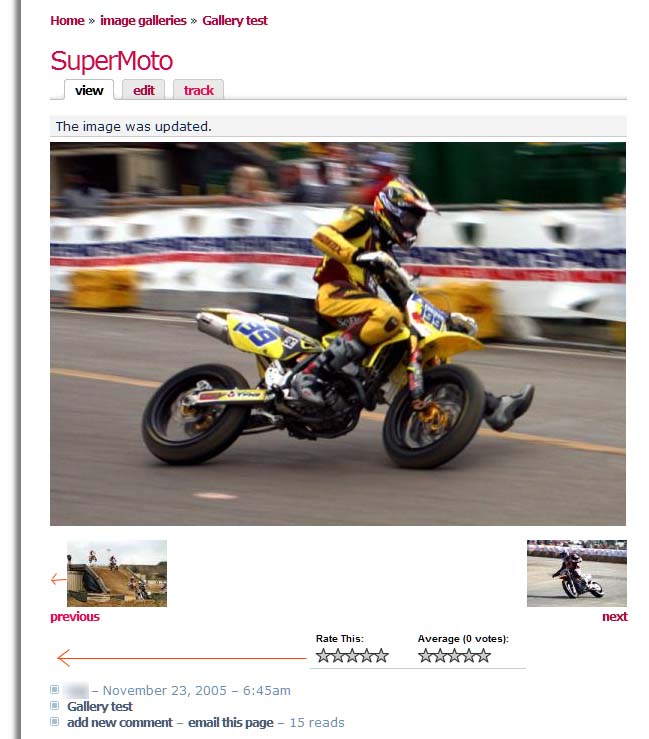
timeToy commentedI use Sami Khan's Image module patch for Navigation, I like the idea and the look, but I found some alignments issue. In France they said a little drawing is better than a long speech so I attach a jpg file with some red arrow where I think alignment should occur.
Idealistically I’d like to have the Rate button in between the previous and next button :-)
Also I’m consistently hit by this warning:
warning: Cannot modify header information - headers already sent by (output started at /home/myweb/public_html/Drupal/modules/image/image.module:785) in /home/myweb/public_html/Drupal/includes/common.inc on line 192.I read about the blank space at the end, but I the end of what ?
Comment #28
bwynants commentedVery good patch. one problem i have is that it does not follow the correct path if an image has multiple terms attached.
But thats minor. Thanks for this cool addition!
Why isn't it in head yet?
Comment #29
Bèr Kessels commented* Image module is clean, basic and feature-poor.
* image module will probably be split into a gallery and an image node part
* there are multiple gallery modules around that use image module but extend the gallery features.
So I think we can mark this wontfix.
Comment #30
bwynants commentedtimeToy: the allignment issue is there because inside the div nav he uses a div links and that's a class some themes handle special.
Change the links into linkimg and also the css and the spacing is correct.
[code]
if (variable_get('image_nav_show', 1)) {
$content .= '
$content .= '
';
$content .= '
';
$content .= '
';
}
[/code]
and
[code]
.image_view .nav .linkimgs {
  clear: both;
}
[/code]
I guess for the rating something similar is happening
Bèr Kessels: agreed if it's split off. but this is a basic need. It can be disabled! AFAIK there is no good alternative today if I don't want to install gallery2 or folksonomy....
so +1
Comment #31
bwynants commentedtimeToy: the allignment issue is there because inside the div nav he uses a div links and that's a class some themes handle special.
Change the links into linkimg and also the css and the spacing is correct.
and
I guess for the rating something similar is happening
Bèr Kessels: agreed if it's split off. but this is a basic need. It can be disabled! AFAIK there is no good alternative today if I don't want to install gallery2 or folksonomy....
so +1
Comment #32
Bèr Kessels commentedThere is one alternative: shazamgallery. It does not have prev/next, but it could have that, I built all the stuff in to allow this prev and next stuff, yet did not need it myself, and therefore did not make it yet.
I will welcome a patch that allows this. Please patch against HEAD though. 4.6 is unstable yet, I am working on getting that fixed.
Comment #33
walkah commentedyeah, I agree with Ber - this should be handled by gallery modules , not image itself... marking wontfix.
Comment #34
ronandownes commentedTrue Novice here. How do I apply a patch?
Ronan