

 Come together with the global Drupal community in Rotterdam, 28 Sept – 1 Oct 2026. Sessions, contribution, connection, and Early Bird savings until 8 June.
Hi,
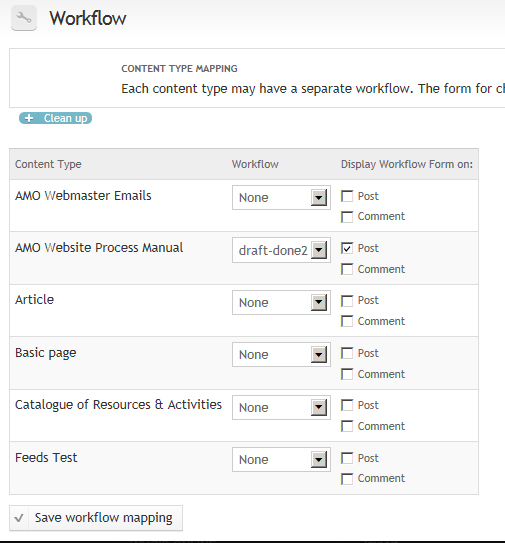
I've been trying out the Workflow module for the past 2 days and ran into an issue that I can't seem to fix. After installing and activating the Workflow module, I started playing around with it and added a new workflow. I then created another role and went into Permissions to enable the "participate in workflow" permission. After that, I went back into Configuration > Workflow, but the "Add workflow" button was removed (please see attached screenshot) and all I could access was content type mapping. Do you know if this is supposed to happen? I would like to be able to add another workflow but haven't been able to figure out how since the "Add workflow" button is unavailable.
Thank you for your help!
| Comment | File | Size | Author |
|---|---|---|---|
| #4 | workflow_admin_afterpatch.jpg | 108.63 KB | Drupal7N00bie |
| #1 | temp.patch | 703 bytes | nancydru |
| workflow_ui_question.jpg | 161.46 KB | Drupal7N00bie |

Comments
Comment #1
nancydruI wonder if it is just hidden? The attached patch should move the form back to where it should be.
Comment #2
Drupal7N00bie commentedHi NancyDru,
Thank you for the patch! I am getting a hunk fail when I tried it just now, but I've actually never applied a patch before, so I'm going to read more documentation on how to do it and try again. I just wanted to thank you in the meantime. :)
lamp:/var/www/drupal$ patch -p1 < /var/www/drupal/temp.patch
can't find file to patch at input line 5
Perhaps you used the wrong -p or --strip option?
The text leading up to this was:
--------------------------
|diff --git a/workflow_admin_ui/workflow_admin_ui.module b/workflow_admin_ui/workflow_admin_ui.module
|index 5a8a3b6..8dfd405 100644
|--- a/workflow_admin_ui/workflow_admin_ui.module
|+++ b/workflow_admin_ui/workflow_admin_ui.module
--------------------------
File to patch: /var/www/drupal/sites/all/modules/workflow/workflow.module
patching file /var/www/drupal/sites/all/modules/workflow/workflow.module
Hunk #1 FAILED at 1199.
1 out of 1 hunk FAILED -- saving rejects to file /var/www/drupal/sites/all/modules/workflow/workflow.module.rej
Comment #3
nancydruIt's simple enough that you can do it manually. And note that I am working from the latest dev code.
The patch has already been committed because we ran into the issue at work. It will be in the dev release that is rolling out as I type.
Comment #4
Drupal7N00bie commentedHi NancyDru,
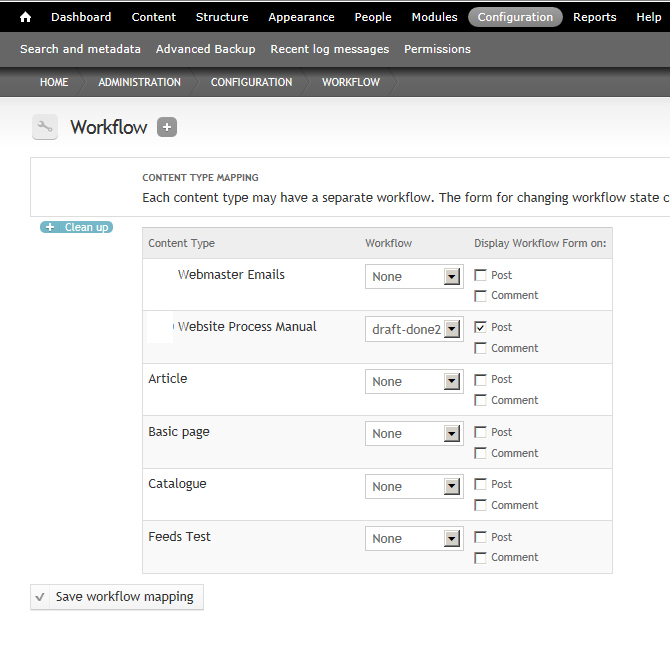
Thanks, I implemented it manually and it moved the Content Type Mapping table down -- unfortunately, the "Add Workflow" button doesn't seem hidden (screenshot attached). I'm going to try uninstalling the workflow module and installing it again and see if that helps.
Thanks for your help,
Winnie
Comment #5
nancydruVery strange. The "Clean up" button is produced in exactly the same way. Are there any errors in the log?
Comment #6
Drupal7N00bie commentedHi NancyDru,
It is strange! No errors in the log either -- but after uninstalling and reinstalling, the "Add Workflow" button is back, so we'll see if I run into this again (hopefully not).
Thanks for being so responsive!
Comment #7
Drupal7N00bie commentedHi NancyDru,
I went through the same steps and the same thing happened where the "Add Workflow" button disappeared. I then decided to change the Administration Theme because all of the documentation and webcasts I've seen, the authors used the Default theme (I was using the Rubik Theme). As soon as I changed the theme, the button was back!! So, the theme was the troublemaker :(.
Thanks again and have a great weekend.
Comment #8
Drupal7N00bie commentedthanks!