

 The 2026 Drupal Business Survey is open. Your response will help shape the future of the Drupal business ecosystem.
Hope that someone can help?
The logo & icon will not appear after uploading jpg image files from local computer into Danland setting, when saved successful only Drupal logo disappear and in it place 'Home' link showing. What I am doing that both logo & icon not showing?
Not: Using Drupal 7.22 and Danland 7.1
| Comment | File | Size | Author |
|---|---|---|---|
| #8 | 1995096-8.patch | 953 bytes | bhumikavarshney |
| #7 | patch_error.png | 17.88 KB | vikashsoni |
| #6 | error.png | 18.5 KB | bhumikavarshney |
| #4 | logo.4.patch | 240 bytes | hitvika_verma |
| #4 | logo.png | 56.75 KB | hitvika_verma |



Comments
Comment #1
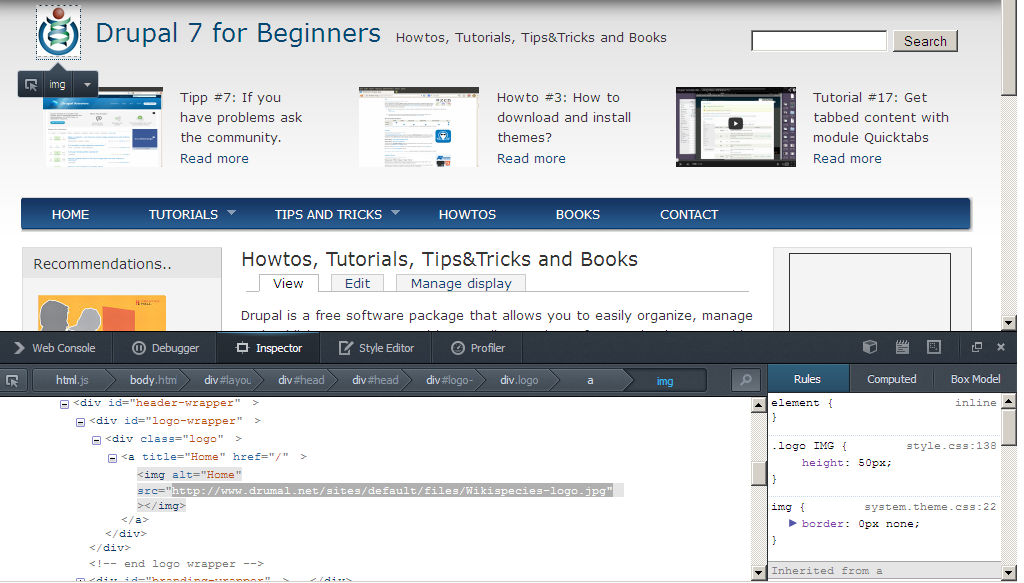
drupal4u.org commentedThe logo image is configured that it links to the home page of your site (Link URL) and "Home" is displayed when you move over with the mouse (Link Text). Thus it seems that the your changes were applied, but that the image can't be displayed. Thats why Link URL and Link text are there, but the image isn't.
I suggest that you check, whether the file has been really stored in sites/default/files/ and whether the logo can be loaded manually
http://www.yoursite.xxx/sites/default/files/logoname.jpg.If yes, try to verify the css settings applied using the "Inspect Element" function of your browser (see attachment). If you are not familiar with "Inspect Element": http://www.drumal.net/tips-and-tricks/use-inspect-element-troubleshoot-p...
Comment #2
kribjo commentedHi,
I had the same issue as Ashvatha. Luckily I found the solution in a Norwegian forum at drupalnorge.no. It's only in Norwegian so I'll share the solution that worked for me here. Hopefully it will work for other users too. :-)
My webhotel have some restrictions (one.com) when it comes to the .htaccess file. I guess other web hotels have too, but I'm not a web-techie so I would not know for sure. After I commented out each line beginning with Options in sites/default/files/.htaccess the custom logo I uploaded finally showed.
Regards,
Bjørn
Comment #3
b5moody commentedI had the same issue and fixed it by editing sites/default/files/.htaccess as follows:
1. Comment out: Options +FollowSymLinks (i.e. add "#" in front)
2. Add: Options +SymLinksIfOwnerMatch
If I remember correctly, it was a Drupal 7 issue.
Comment #4
hitvika_verma commentedits showing but because of slider z-index it is going behind the slider increase the margin of icon or of the slider
Comment #5
hitvika_verma commentedComment #6
bhumikavarshney commentedHi @hitvika_verma,
Patch is not working for me.
Please check.
Comment #7
vikashsoni commented@hitvika_verma patch not working giving error would u suggest how i can check it for reference sharing screeshot ....
Comment #8
bhumikavarshney commentedUploaded updated patch.