

Closed (fixed)
Project:
Facet API
Version:
7.x-1.3
Component:
Code
Priority:
Normal
Category:
Bug report
Assigned:
Unassigned
Reporter:
Created:
15 May 2013 at 09:24 UTC
Updated:
27 Oct 2016 at 09:44 UTC
Jump to comment: Most recent, Most recent file


Comments
Comment #1
cpliakas commentedHi @Deadmoon13,
This is likely to be a Javascript issue somewhere, as I cannot replicate on a clean install od Drupal. If you are comfortable with javascript debugging tools I would see if there are any errors preventing script execution. I would also turn off aggregation if it is enabled to see if that does anything. If you are not comfortable debugging Javascript, then try disabling modules on a development environment to narrow down where the issue is coming from.
Thanks,
Chris
Comment #2
Naomi79 commentedHi! I think I'm having the same issue. Checkboxes are not showing up when facets blocks are added via Views module. The file facetapi.js is not loaded. Here is what I've done:
1) create a search index
2) create a new view based on this index
a) create page with filter criteria:
- Search: Fulltext search (exposed)
- Indexed Content: Item language (= Current user's language)
and contextual filters:
- Search: Fulltext search
-Indexed Content: Item language
b) add a facet block with these settings:
- Block name:None
- Search page path:Use current path
- Facet field:Poll category
- Hide block:No
3) Use context module to display the facet block and the result is:
Please note that checkboxes show up when I use the context module to display facet api blocks directly, without using views (step 2b below). Unfortunately I don't know enough about Drupal to understand what's happening exactly. Any help is welcome.
Enabled module:
Search API 7.x-1.13
Facet API 7.x-1.5
Search facets 7.x-1.13
Search views 7.x-1.13
Thanks for sharing this amazing module.
Comment #3
edop commentedI had the same problem. The answer can be found here: https://www.drupal.org/node/1679974
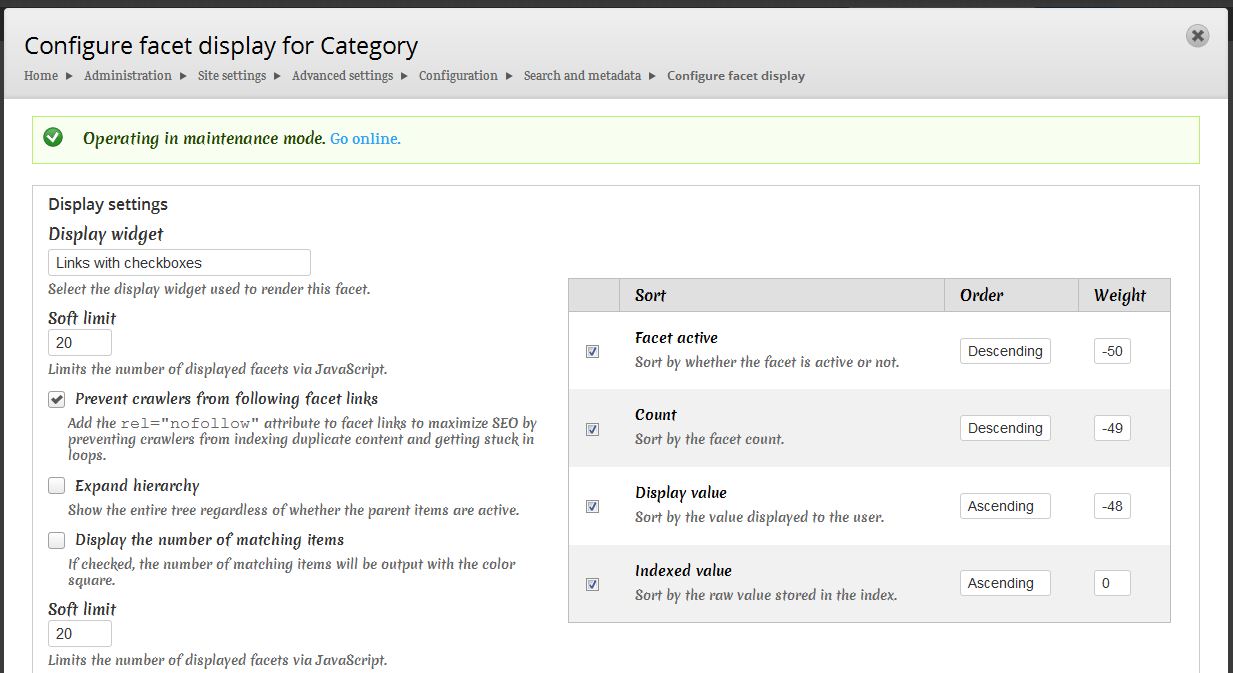
In short: in the same screen where you set the widget, you also need to adjust the GLOBAL SETTINGS / Operator to "OR"
("AND filters are exclusive and narrow the result set. OR filters are inclusive and widen the result set.")
Comment #4
msjothiraj commentedI'm also facing the same issue. Check box is not shown, even the setting are correct(Display Widge t-> Links with checkboxes).
Comment #5
Anonymous (not verified) commentedDo you have apachesolr_autocomplete enabled as well? Seems to be a conflict with jquery.autocomplete.js when the checkbox option is enabled.
Comment #6
ahmad abbad commentedMake sure to select AND Operator from Global settings
Comment #7
aaronsssp commented#5 WORKS FINE !! Thanks
Just disable Apache Solr autocomplete module (apachesolr_autocomplete)
GLOBAL SETTINGS "AND" / "OR" doesn't effect checkboxes
Comment #8
msjothiraj commentedHi,
I have a Quiz which has 'Categorized random questions' option enabled where I have added two custom fields('Section' and 'Difficulty level') in 'Multiple choice Question' content type as field type 'term reference' which has 'hierarchical select' as a widget type for both of the fields...
My vocabulary is
Quantitative Ability(QA)
-Numbers
-Calculation
Vocabulary 2 : 'Difficulty Level'
-Very Easy
-Easy
-Average
-DIfficult
-Very Difficult
Now i wants fetch only 10 questions from numbers category easy level..
Thank you for advance..
Comment #9
Anonymous (not verified) commented@msjothiraj Think you have the wrong module. Try Quiz module?
Comment #10
Anonymous (not verified) commented