Hi,
I saw this sentence in panels:
Go to advanced settings; add the argument 'taxonomy term id'; set it to just one vocabulary. Set the title to %term
This triggered a question and usage of panels for me.
I was wondering what will be the wanted behaviour of "%term" when you set a available term in the title of a pane?
So for example my term-name is "nepal"
And I have a view with argument handling code which uses the arg(1).
www.example.com/view_url/foo
and does show stuf related to the foo argument. If this is a available term show the nodes with this term.
Could I set the term nepal then in the title of a pane, and because of the panel argument setting %term the pane shows the view with this specific set term-name.
If this is so I could build a page with a panel with a couple of panes.
And the content of the panes is filled by the same view.
The title of the pane shows then content related to the title (= the term).
This way the panel-concept is as flexible as possible for me:
I only need one view with argument handling code
I only need one basic panel with a couple of panes, to export-import to have term user-selected content showing.
I only need to change the title of a pane to show different content in every pane.
Is this a correct assumption for functionality panels 2?
If not is it possible to use the title of the pane as argument handling to send to the view?
If not is it otherwise possible to have the pane-menu be responsable to set the argument-name to be used in the view?
I do not want the url to be responsible for the arguments, because I need to have the url as clean as possible. Say www.example.com/trekking (url panel).
Argument for pane (and for view in pane) = Nepal
Thanks for your reply in advance!
Greetings,
Martijn




Comments
Comment #1
summit commentedHi,
Thinking about this a little further it maybe the textfield for Arguments in which you can set %1/%2/%3 or @1/@2/@3 arguments to be used to place a fixed argument like nepal so it is used as %1 argument in the underneath view?
With this functionality every panel-pane filled with a view can show content related to
1) or the url-argument
2) or the fixed argument set in the panel-pane popup.
Is this possible?
Greetings,
Martijn
Comment #2
summit commentedVersion and status where set wrong, sorry
greetings,
Martjin
Comment #3
merlinofchaos commentedCaution: I'm not 100% sure I understand you, but I think I've got a pretty good idea what you mean.
This is 98% possible. There is one piece that limits this that still isn't implemented. But let's take an example that I'm very familiar with: The front page of a news site.
Let's say I have 3 categories: Sports, Entertainment, World news. I want the front page to have panes filled with node titles related to each of these 3 categories.
I believe what you're asking is, whether or not you can have these three contexts in the panel page without getting them from arguments. The answer is both yes and no; it's only temporarily no, however, and the reason it's temporarily no is that I haven't written the UI to allow you to choose a taxonomy term. But on the 'Contexts' tab, on the right there is a list of contexts you can add. Right now, you can use the Node context to add a specific node to a panel.
The mechanism for adding a specific taxonomy term to a panel will appear. It's just a little complicated because it needs a select box to pick a vocabulary, and then probably an autocomplete that is smart enough to restrict the choices to that vocabulary.
Once you have the context in there -- either from an argument or hardcoded -- when you edit a view pane, you'll notice that there is a 'context' selector at the top. You can turn any context into an argument for the view, and it will obligingly pass along the correct data.
Now, as you suggest, you can set fixed arguments *right now* in the panel pane popup, which is pretty much the same thing but it's not quite as user-friendly, in my opinion.
Did I answer this sufficiently?
Comment #4
summit commentedHi Earl,
Thanks for your quick response!
And great to see that you have thought about this on pane-level.
So if I need terms from 2 vocabularies will this be possible to set as arg(1) say nepal
and arg(2) trekking [from a different vocabulary]?
I love to test this if you get to it. Thanks already in advance!
Greetings,
Martijn
Comment #5
merlinofchaos commentedYou can do what you say, but note that using the word 'nepal' isn't as good as using the TID (taxonomy term ID) because you'll create a slower query. You can, however; if you use the taxonomy term name argument, it ought to still work.
Note that due to a Views limitation, using nepal/kathmandu doesn't work, and you HAVE to use tids: You can then use 234+478 (assuming 234 is the TID to nepal and 478 is the TID to kathmandu).
Comment #6
summit commentedHi Earl,
That's ok by me, using term-id's while this is not user related.
But I have been able to overcome the view limitation of 1 term-name by using view argument handling code as described here: http://drupal.org/node/161795#comment-639442
I am looking forward to testing this functionality of taxonomy term context!
greetings,
Martijn
Comment #7
summit commentedHi Earl,
Now, as you suggest, you can set fixed arguments *right now* in the panel pane popup, which is pretty much the same thing but it's not quite as user-friendly, in my opinion.
It seems this is not working, or may be I do something wrong. I have the view argument handling like above set (http://drupal.org/node/161795#comment-639442). This works in my panel if I type nepal/kathmandu as arguments in my url www.example.com/panel_url/nepal/kathmandu.
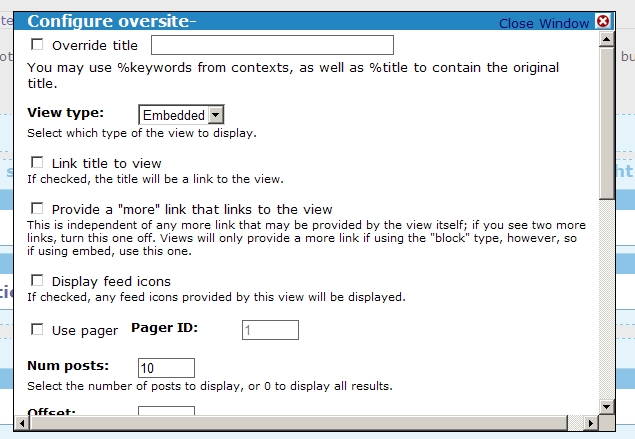
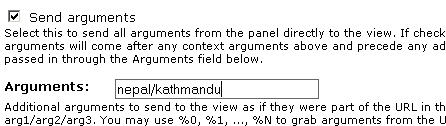
But it doesn't work when I type it in my panel-pane popup. See attached picture of where I type in hardcoded the arguments.
Off course I presume I am doing something wrong, and if I have to wait on the more gentle approach of the taxonomy term context it is fine by me also. You have a volunteer of testing!
greetings,
Martijn
Comment #8
merlinofchaos commentedI'll have to check; I received one other report about views arguments not working quite right, I believe, so I may have messed something up when I integrated the contexts. I will dig into this and see.
Comment #9
summit commentedHi Earl,
Thanks a lot for looking into this!
Greetings,
Martijn
Comment #10
summit commentedHi Earl,
Is this hardcoded usage of arguments for views in a panel-pane again supported? Or am I to fast with this reply?
I tried it in the new .dev version. (20 dec 0.08), but I couldn't get it to work.
As explained earlier I am not able to use the arguments from the url, because I want the panel to fill content which is not in the url.
My view is named oversite- (arg(0))
My arguments are
nepal/katmandu is not working (attached picture)
oversite-/nepal/kathmandu is not working also.
But my view www.example.com/oversite-/nepal/kathmandu works. I got two termnames working with argument handling code settings. But the hardcoded setting in panels-pane-popup doesn't give me the view-content
As described in the help text underneath the panel-pane arguments field (in the popup) I set arg1 and arg2 hardcoded in the popup.
But it doesn't work. See attached picture for the hardcoded placement of the arguments.
Do I do something wrong?
Greetings,
Martijn
Comment #11
summit commentedForgot to set the version to .dev. Now changed. Greetings, Martijn
Comment #12
summit commentedHi Earl,
The hardcoded argument-setting in panels pane is also not yet supported, right?
See attached picture for what I would like to do. Be able to set the arguments for a view hardcoded. To be able to only need to add a panel-pane with the same view, but with different hardcoded arguments so the panel shows easily different views in panes but the url of the panel stays clean (no arguments).
Thanks in advance for your reply!
greetings,
Martijn
Comment #13
merlinofchaos commentedHardcoding the arguments for a view pane should be supported. I haven't actually run into problems with this in my testing.
Keep in mind that if you have 'Send arguments' checked, those arguments will come *before* your hardcoded arguments. From your description, I don't think you want that.
Example: Let's say the URL for your panel page is 'foo/bar' and the actual URL visited is 'foo/bar/baz'. This means 'baz' is an argument to the panel (regardless of whether or not you have any arguments defined). If you then have 'send arguments' checked and you have hardcoded the arguments to 'nepal/katmandu' then the actual arguments sent will be array('baz', 'nepal', 'katmandu').
Moral of the story: "Send arguments" should rarely be checked. =)
Comment #14
summit commentedHi Earl,
I now tested with send arguments not checked (attached picture).
I have a view called oversite- which has 2 arguments set and working when I type the arguments in the url: ../oversite/kathmandu/nepal.
I made a panel-page with url ../over. The panel-pane is shown correctly when I just type ../over/kathmandu/nepal.
Then I set the panel-pane to this view with the 2 argument set hardcoded kathmandu/nepal.
When I then like to show the panel with just the url ../over the panel-pane with the view with arguments is not shown?
Do I still do something wrong?
Thanks for your reply!
greetings,
Martijn
Comment #15
merlinofchaos commentedIs there a select box at the top for selecting context? Make sure that is set to 'None' (or maybe it's 'No context'.
Comment #16
summit commentedHi Earl,
No I don't see the select box. See attached pictures for what I see.
Greetings,
Martijn
Comment #17
merlinofchaos commentedOk, I think I know what the problem is.
Comment #18
merlinofchaos commentedNope, I'm wrong.
Can you, in your views PHP argument code, do a dsm($args) (or drupal_set_message(var_export($args, 1)) to get what the actual args it's getting are? My testing is showing this working right, so there is something confusing going on here.
Comment #19
summit commentedHi Earl,
You brought me AGAIN on the right path.. I had this code in my view_arguments:
After your remark I tried to get the arguments from $args, because they were the same in the view and the panel after inserting your suggested code: drupal_set_message(var_export($args, 1))
The new argument handling code is:
And I was correct, the arg(1), and arg(2) didn't work, but the $args[0]. amd $args[1] did work!
I will alter my argument handling code from arg(x) to $args[x-1]
Are there other things to take care of using $args[x-1] instead of arg(x)? If not I think this issue is solved by using $args instead of arg()?
Greetings and happy new year!,
Martijn
Comment #20
summit commentedThere is by the way no select box at the top for selecting context.
Greetings,
Martijn
Comment #21
merlinofchaos commentedI suspect there is no select box because you're not using a real argument, at this point. And I don't think there should be a problem looking at $args vs looking at arg() -- in fact, looking at $args is better because it's more likely to consistently have the data you want. arg() specifically looks at the URL.
The select box I was asking about is specifically provided if you have a views Argument (such as Node: nid) involved; and I suspect what you're doing is modifying the filter in the PHP argument code. I'm going to have to come up with a solution for that, but that is a totally other issue.
Comment #22
summit commentedHi Earl.
Yes I am modifying the filter with the PHP argument code. That is working fine now with $args
Thanks for your reply!
Greetings,
Martijn
Comment #23
(not verified) commentedAutomatically closed -- issue fixed for two weeks with no activity.