

 Come together with the global Drupal community in Rotterdam, 28 Sept – 1 Oct 2026. Sessions, contribution, connection, and Early Bird savings until 8 June.
Hello,
I'm using commerce_kickstart-7.x-2.7-core with no changes and no modules installed; is a clean install.
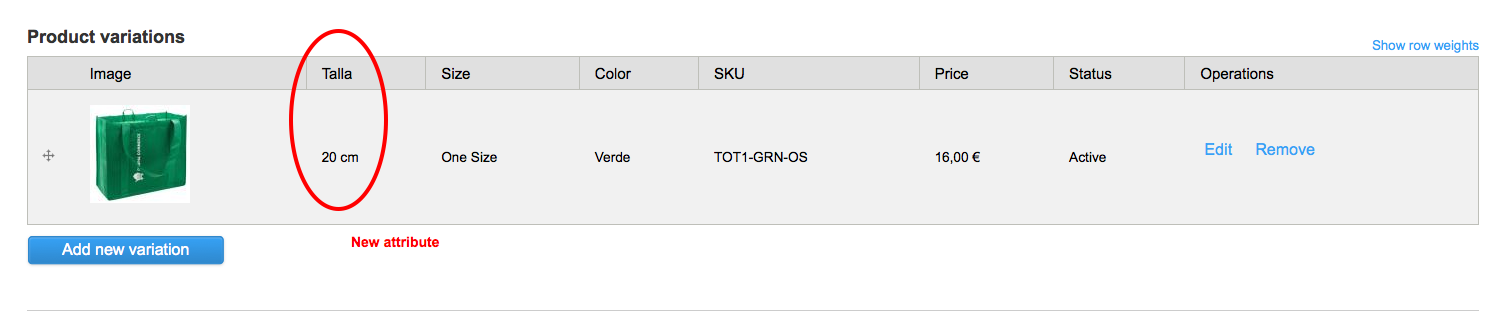
I'd edited an example product given an extra attribute called "Talla" (see screenshot 1).
In the "shopping cart" and "Add to cart confirmation" views, the attributes are not aligned "Inline" and do no shows them in "Bold" letters (see screenshots 2,3).
All these attributes have same settings.
How can i solve this? let me know if need more information.
Thanks for help
| Comment | File | Size | Author |
|---|---|---|---|
| Shopping cart view.png | 81.71 KB | makokis | |
| Product in cart view.png | 96.2 KB | makokis | |
| New attribute.png | 54.18 KB | makokis |


Comments
Comment #1
jsacksick commentedIt's a fences bug, it doesn't allow you to use the standard drupal markup.
See #1857230: Add option to use the "normal" Drupal field output, I'm going to add that patch to Kickstart. The only thing you'll have to do is :
1) Either apply the patch yourself (Or wait for the next Kickstart release).
2) Edit your field, and update the instance settings to tell fences to use the drupal standard markup.
Here's the kickstart commit : https://code.drupalcommerce.org/#/c/693/
Comment #2
makokis commentedthanks, I'll wait next release