Closed (fixed)
Project:
Views Bulk Operations (VBO)
Version:
5.x-1.0-beta1
Component:
User interface
Priority:
Normal
Category:
Bug report
Assigned:
Reporter:
Created:
12 Dec 2007 at 16:16 UTC
Updated:
27 Dec 2007 at 12:41 UTC


I just installed the VBO 1.0-beta1 release on a clean install based on the Drupal.org testing profile. I also have installed Views 1.6 and Actions 5.x-1.x-dev.
Here's how I reproduced the bug:
1. I enabled the default 'tracker' view and set the View Type for page to Bulk Operations View.
2. I then enabled the action_node_unpromote and node_operations_unpublish operations for this view.
3. I viewed the tracker view.
4. I selected the "select all rows" checkbox.
5. I then hit the Execute button *without selecting an operation*.
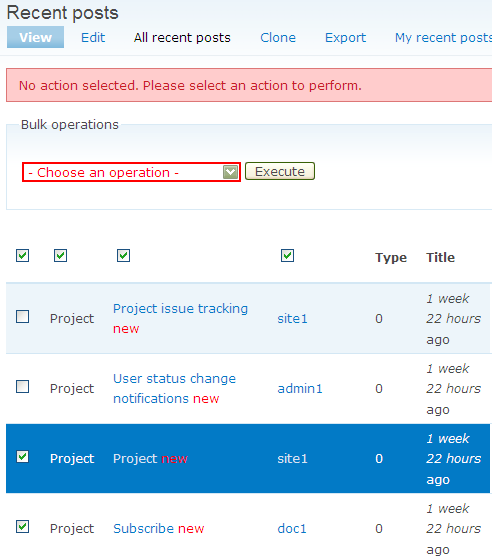
6. The page returned gave me a warning: "No action selected. Please select an action to perform." This error is expected, however I also notice that I now have two "select all row" checkboxes, and the second has replaced the header text that previously said "Type".
7. If I again click Execute without choosing an operation, the Title header text field is now also replaced by a checkbox. This happens to each successive header field as I click Execute again and again. The attached screenshot shows how the page looked after hitting execute 4 times without selecting an operation.
On an additional note, after this happens once or more, none of the checkboxes in the header row appear to function as "select/deselect all rows" checkboxes. Checking/unchecking them seems to have no effect.
Clearly I'm doing something I am not supposed to be doing (that is, clicking Execute without having an operation selected), but I suspect that the addition of checkboxes is not intentional.
| Comment | File | Size | Author |
|---|---|---|---|
| vbobug.png | 14.57 KB | aclight |

Comments
Comment #1
infojunkieGreat bug. Thanks! The latest dev version should fix it.
Comment #2
(not verified) commentedAutomatically closed -- issue fixed for two weeks with no activity.