

Closed (duplicate)
Project:
D7 Media
Version:
7.x-2.x-dev
Component:
Code
Priority:
Normal
Category:
Bug report
Assigned:
Unassigned
Issue tags:
Reporter:
Created:
24 May 2013 at 23:23 UTC
Updated:
7 Dec 2013 at 14:54 UTC
Jump to comment: Most recent, Most recent file


Comments
Comment #1
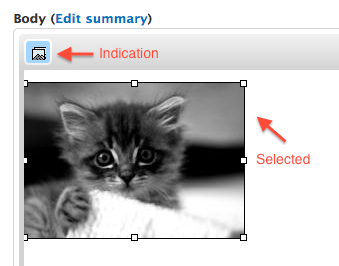
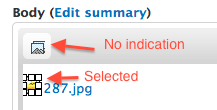
aaron commentedI confirm this behavior. I am surprised that I hadn't caught that before. it does this when the display formatter is set to "generic file" or to nothing. It works if the default formatter is changed to an image.
Comment #2
aaron commentedThe issue seems a bit complex. First, it is looking for an image of media-element, but is receiving the default of file-icon. If I change it to look as well for file-icon, then the icon for the media browser does show that it is selected, but the button stops working entirely.
This is what I tried in wysiwyg-media.js:
Comment #3
aaron commentedAdding tags.
Comment #4
ParisLiakos commentedi dont think this is an alpha blocker.
A stable/beta blocker? could be..but UI polish should not be a priority for now imo
Comment #5
aaron commentedAgreed.
Comment #6
ParisLiakos commentedThats the best we can do now..using the path and selecting the span element it works
Comment #7
alexkb commentedWe have a situation where the media button will only show depressed when the image is inserted as the default mode. Any other display mode, causes the media button not to be depressed on selection.
@Parisliakos I've tried your patch on the latest dev, and adjusted to suit the new module, but it didn't seem to make much difference.
Comment #8
alexkb commentedOk, skip that, all fixed with patch from #19 here: https://drupal.org/comment/8211971#comment-8211971
Comment #9
bneil commentedDuplicating this issue in favor of #2126755: Improve Media's WYSIWYG Macro handling based on comment 8.