

 Come together with the global Drupal community in Rotterdam, 28 Sept – 1 Oct 2026. Sessions, contribution, connection, and Early Bird savings until 8 June.
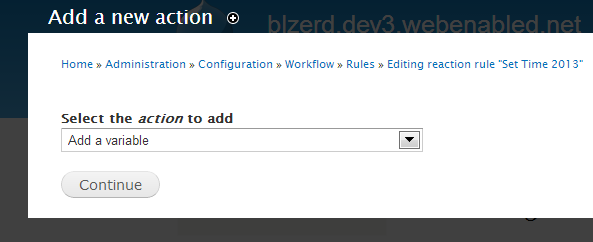
When I choose any Action then click continue it does not go to the next configuration form?
| Comment | File | Size | Author |
|---|---|---|---|
| No Load.PNG | 14.37 KB | otcassetmgmt |

Comments
Comment #1
ptmkenny commentedTry clearing your cache: http://drupal.org/node/42055
Comment #2
otcassetmgmt commentedI tried that also I removed Rules 7.x-2.3 and installed Rules 7.x-2.x-dev this did not work
Comment #3
ptmkenny commentedOk, are you able to reproduce this on a clean install of Drupal 7 with Rules? If so, please describe the steps in detail. Since Rules works for most users, there is probably some other setting in your environment that is interfering with Rules...
Comment #4
otcassetmgmt commentedFirst of all thank you for your help...
I have been using the features module and often I download a feature called blz (module) along with many other modules. I was having this very same problem yesterday so today I created a fresh site. First I installed my feature then all the required modules (which are many). Next I imported all my csv files which is a lot of data then I was able to configure some rules that I was not able to do yesterday so I thought I had the problem solved. Then the same problem started happening again?
Comment #5
ptmkenny commentedWell, the problem is probably caused by one of the (non-rules) modules you have enabled. Unfortunately, what you will have to do now is start disabling modules one by one, clear the cache, and then see if Rules is working. Do this until you find the module that is causing the problem. This is a real pain but it's the only one way to confidently find the cause.
The first module to check is JQuery Update-- right now, it appears that the Rules and JQuery Update modules are incompatible.
Comment #6
otcassetmgmt commentedCool thank you I did not have the JQuery Update installed I did that cleared the cache and it seems to work
Comment #7
otcassetmgmt commented