

 The 2026 Drupal Business Survey is open. Your response will help shape the future of the Drupal business ecosystem.
I've asked several of my users what my site needs most, and they all told me that it needs more icons. I couldn't agree more, the only icon's i have are the table sort ones and the bullet points.
User Points can really easily integrate these icons into the core for ease of use for the users, since I think everyone would like to have a better user interface. The guidelines say that the icons should be from Tango, so i did some looking.
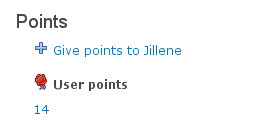
The "list-add", which is a "+" sign and is found in "actions", could work well like "+ give points to user".
The "application-certificate" looks like an award and could work where the user's points are shown.
There are probably a few others, but those are the ones that seem to lack it the most
| Comment | File | Size | Author |
|---|---|---|---|
| #18 | silk.tar_.gz | 1.66 KB | neomenlo |
| #9 | userpoints_icons_2.patch | 13.29 KB | neomenlo |
| #9 | userpoints_icons_2.tar_.gz | 1.36 KB | neomenlo |
| #7 | userpoints_icons.patch | 1.42 KB | neomenlo |
| #7 | userpoints_icons.tar_.gz | 1.32 KB | neomenlo |

Comments
Comment #1
jredding commentedMoving the task over to userpoints_basic as I think this is where this belongs.
Moreover userpoints doesn't really have a user interface except for the...
administrative settings
User's point report page
Patches are always welcome. You should consider taking the time to write a tiny bit of code to add this functionality in. You'd not only help your site but you would also help the community as a whole.
Comment #2
neomenlo commentedI have successfully added two icons to the user profile page (the two i described earlier).
I did it by adding a userpoints.css, changing the .module to call the .css, and adding a non repeating background image to the fields. The icons are from Tango, as drupal guidelines dictate, and are in an "icons' folder.
I have NEVER done anything with adding patches. So could someone walk me through it?
Comment #3
neomenlo commentedAside from a walkthrough on how to add it, I would also like to know if there are any instances of "give points" in the .links (footer) of comments/nodes. I can't find any, so i cannot add an icon to it if i don't know where or what it is, but that seems like the logical placement, so it must exist.
Comment #4
neomenlo commentedI have made the changes described above (in #2).
added a userpoints.css
added 1 line in the .module to call the userpoints.css
added a folder called icons
added two icons, icons which are from Tango, as Drupal guidelines dictate
added a non repeating background image to the fields in the userpoints.css.
I think that there is quite a few more places that userpoints could use icons, so i'm open to suggestions.
Comment #5
jredding commentedI reviewed your patch and its not done in a standard way thus I can not apply your patch. Please review the documentation on patches
http://drupal.org/patch
Additionally could you provide some screenshots demonstrating what this looks like? I'm still confused as to where you are adding icons.
Comment #6
jredding commentedThanks for your continued work!
Comment #7
neomenlo commentedI'm really sorry if this one doesn't fit the standards either, i think i've figured out what i did wrong with the last one.
I've been struggling with this. It's my first open source contribution and my first time using diff/patch.
I've followed the instructions closely and made sure that no extra modifications made their way into the patch, but no matter what i do, i can't seem to get the icons to go into the patchfile. I hope a .tar will be ok for those.
The guidelines for icons is kind of vague. I did use Tango icons, so they fit their requirements and are GPL. They also say that module's icons should be within the module's folder, but it doesn't say where. The way I have it set up, there needs to be an "icons" folder under the main "userpoints" folder.
I have also attached the screenshot that you reasonably requested.
Comment #8
kbahey commentedIcons is a good idea, but we need to make them pluggable. This means that they reside in a directory and have several subdirectories to chose from from the User Interface. This way, they are not overwritten on upgrades, and people can contribute their icons if they wish.
See the fivestar module for how that is done.
Comment #9
neomenlo commentedthe pluggable is a really good point. I did not add any php to allow the user to choose the theme through a gui, but the main tango theme is in its own folder now, so users can add their own theme. It is important to note that I decided to put the icon's .css file in the same folder as the icons, so the user can change which themes have what icons, how big they are, and the names of the icons independently.
Comment #10
jredding commentedoh now I understand where these icons would work, thank you for the screenshot and the patch file. I haven't tried the patch file but this one is much, much cleaner and I *think* it'll work just fine.
I have just a few comments though.
I like the + next to "give x,y,z" points as it definitely looks much cleaner. The flower, on the other hand, isn't something I'm too fond of and I think its really up to personal taste and it wouldn't work all that well if people called their points something like "brownies" or "gold stars" or "mileage points". Its just not generic enough.
I really, really, really like this idea though. My question is: Do you think it might be better to write up in a handbook page how to theme this instead of directly patching userpoints?
When I look at the patch file you could really just add the icons and about 5 lines to your theme's style.css file to give this functionality. Then users could choose icons that better match their site.
What do you think?
btw: again, excellent work design is a very much needed part of every website so I appreciate your time/effort into this.
Comment #11
jredding commentedI just saw kbahey's reply I second it. If you look at the fivestar module icon "Sets" are provided as dropdowns in the administrative page thus an administrator can simply choose between several different set for the one that best matches their site.
I understand this can be done via the CSS and its quite easy (my above comment about a handbook page) but if its meant to be "super, super" easy a dropdown listing of various "sets" of icon is a really good method that is heavily used around the web.
I'm almost a bit tempted to say that a good handbook page would work wonders for now and then we can build in the sets of icons over a period of time as well as the UI for it.
Comment #12
neomenlo commentedI don't like the one in front of the "userpoints" either, but it's pretty funny that you would say that it's a flower. It does look like it, but it's supposed to be one of those ribbons people get awarded. The icon itself is titled application-certificate.
I completely agree though. It could be a lot better, but that's the best that I could find out of the tango icon set. The real issue is the licensing of the icons. Many "free" icons aren't released under a GPL compatible license, or do not say.
I set up a sub-folder for the the default icons so it has the right architecture. The user would have to change the .module to be directed to the right .css file in the right folder, but that could be changed with a little coding.
However, the ui for changing the icons should probably be drupal core, shouldn't it? If not, it should at least be its own module, so this feature does not have to be recoded for each module.
Comment #13
kbahey commentedMy vision is this:
We have a directory structure is like this:
icons
\_______set1
\_______set2
\_______set3
Each of the sets has the exact same names for the icons: icon1.png, icon2.png, icon3.png, plus a css file if needed.
A user can add a set called "mysitename" for example, in addition to the ones already bundled in the package tar.gz.
Then, in the administration interface, a list is display of all the available sets, and the admin gets to chose which one to use.
This way, it does not matter if set1 is ugly, because people can select set2, ...etc.
Also, when there is an upgrade, only set1, set2, set3 are overwritten, but "mysitename" is not, and upgrades are less of a pain.
Comment #14
jredding commentedThe UI for changing icons would not have to be Drupal core it can be a contributed module to userpoints.
The basic steps would be
1) create a new module
--Which is simply a .info file and a .module file with a <? on the first line
2) fill out the .info file with the very basic info it needs (check out modules for examples) make it depend on userpoints
3) in the .module file do two hooks
1st hook) hook_userpoints($op, $points, $uid, $event)
documentation here: http://drupal.org/node/206558
In this hook if the $op == 'setting' then create/return a FAPI form to provide a dropdown form to select the various sets of icons available. Check other UP contributed modules including the userpoints_basic module for examples.
2nd hook) hook_user($op, &$edit, &$account, $category = NULL)
http://api.drupal.org/api/function/hook_user/5
Watch for $op == 'view' If so simply add the CSS file that user selected in the administrative settings.
This would only add the CSS file on the user's profile and only when viewed so icons would only be accessible there. If icons are placed in other places then you'd have to find those various places and make them accessible. The other way to do it is to make the CSS file always load as you've done in your patch.
Making the CSS file always load would definitely work and if CSS aggregation is turned on it doesn't really hurt at all BUT for those sites that don't have aggregation turned on this forces the client into another browser request for icons that they may not lose. Its a slight performance hit, tiny since its a small file but its the HTTP request I worry about and not the file size.
I still the docs are a good way to go too as it'll help others understand what's going on and submit icon sets for inclusion!
Comment #15
neomenlo commentedHere's something else to consider.
If this icon module was not userpoints exclusive, the module could aggregate only the icons.css in each module every time the icon set is changed on the ui. This way, it will limit the number of requests if icons features catch on to Drupal modules. I think that this would be important because I am currently planning on adding icons features like this to other modules.
Comment #16
jredding commentedwell that certainly is a good idea but I'm not 100% sure its super practical. In order for the module to be decently useful it would need to have several sets of icons for many of the contrib modules. Its like going after a moving target as your icons CSS might work well with v2 of a module but not with v3 but since your module encompasses a lot modules you're stuck with constantly updating.
I agree its a great idea and I'm not trying to discourage you but i might suggest just starting with a smaller goal (i.e. just finishing this particular one up) and then building up from there. Put the icons into UP, put the icons onto a few other modules then create an overall project that bunches them all together.
Its your time though and I'll encourage you either way, I'm just throwing my opinion out that smaller projects are easier to tackle. My suggestion would only be like 20-30 lines of code yours might be a few hundred and don't forget that the point of CSS aggregation is to take these multitudes of css files and pull them into one. So if people really want icons they have a built in performance enhancing feature.
Comment #17
neomenlo commentedI was thinking that each module would include its own css and its own icons, so that theres not alot of icons in the icons module that none of the user's modules use. Although, it would be very nice to have a centralized way to manage it.
Comment #18
neomenlo commentedI found some other icons. They are not tango icons, like suggested in the icons handbook page. They are silk icons from this website: "http://www.famfamfam.com/lab/icons/silk/". They use the same license as the tango icons, so I don't think that that will be an issue. The only problem is that it may not fit their icon theming specifications. Still, they fit so much better, it's probably worth it.
this icon set goes in the icons folder. If you want to use it, you'll have to change the css reference in userpoints.module
Comment #19
berdirSorry for spamming the participants in this issue. Due to the release of Drupal 7 and the lack of time from the maintainers, I'm closing all remaining 5.x issues for Userpoints.
Feel free to re-open this issue or create a new one for 6.x or even better 7.x if this bug is still open or feature is missing for these versions.