Closed (fixed)
Project:
Documentation
Component:
New documentation
Priority:
Normal
Category:
Task
Assigned:
Reporter:
Created:
23 Dec 2007 at 15:22 UTC
Updated:
16 Jan 2009 at 18:50 UTC
Jump to comment: Most recent file


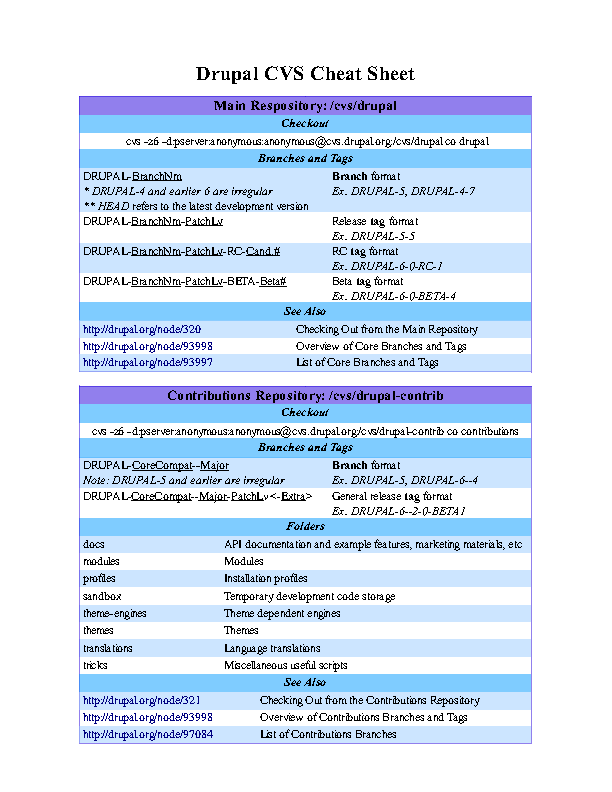
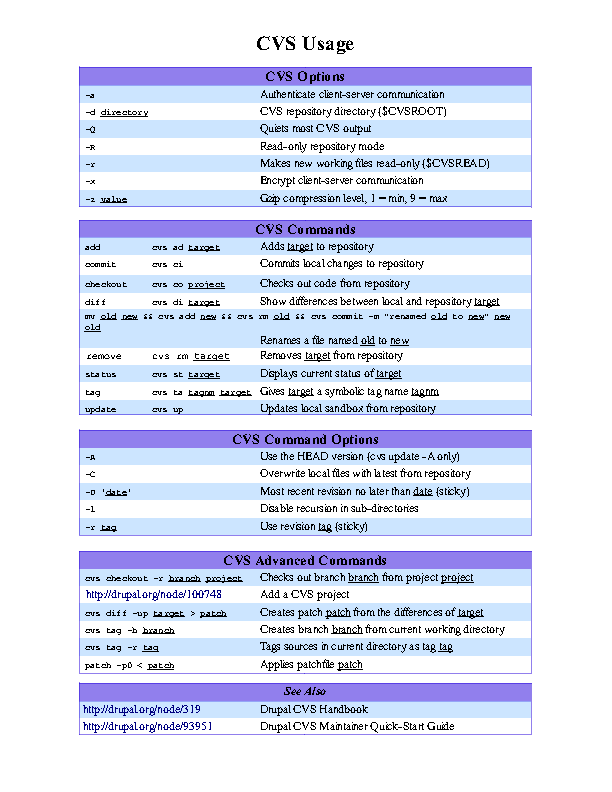
Description: Cheat sheets are a compressed list of useful commands, functions, overall helping tips in order to help accomplishing a certain task. This GHOP task would be to create such a cheat sheet on using/maintaining/developing Drupal, and contributed modules via CVS. Using this cheat sheet these basic tasks should be able to be done without the need to lookup the handbook.
An initial suggestion on what should be included on this sheet:
Basic CVS tasks should include the following tasks:
- Checking out different versions of core
- Checking out modules to directories, with respect to branches, tags
- Overview of naming conventions for tags, branches
Advanced CVS tasks should cover:
- create a project
- branching a project
- tagging a project
- checking out a given branch
- creating a patch
- merging a patch
- upgrading a module, what happens if we modified a file (M tag druing cvs up, how to circumvent it)
- moving directories/files (often a nasty thing because of lack of CVS analogue to "svn mv"
The task is complete when a sheet (with at most two sides, so it can be printed on one piece of paper) is assembled in US letter size, and a downloadable pdf and png is presented and accepted.
Use a design that can display much information, for example similar to those below on ilovejackdaniels.com, but feel free to come up with your own approach as long you provide the required information.
Resources:
* Useful examples on cheat sheets: http://www.ilovejackdaniels.com/cheat-sheets/
Primary contact:
* snufkin
Tracker on google code: http://code.google.com/p/google-highly-open-participation-drupal/issues/...
| Comment | File | Size | Author |
|---|---|---|---|
| #34 | cheatsheet.pdf | 135.85 KB | ddcc |
| #34 | cheatsheet.odt | 24.66 KB | ddcc |
| #34 | cheatsheet-0.png | 26.62 KB | ddcc |
| #34 | cheatsheet-1.png | 26.28 KB | ddcc |
| #28 | cheatsheet.pdf | 137.19 KB | ddcc |

Comments
Comment #1
snufkin commentedClaimed by d.c.ddcc
Comment #2
ddcc commentedHere's the draft, in ODT form.
Comment #3
ddcc commentedComment #4
snufkin commentedAs a draft looks cool, ODT is a great format besides png and pdf. Later on you could reduce the margin and aim for a compact layout.
Content: As a general remark, most of the sections could use some examples, not just the descriptions. Like include how the actual full CVS command looks like, so one can see in a blink of an eye how it works. Same for the tags and branches, include an example there too.
The next step would be also to include the full CVS command for checkout, which includes the CVS root and add the abbreviations for CVS commands.
Comment #5
webchickMoving to Documentation queue to get a few more eyes on it.
Comment #6
ddcc commentedI still need to remain within 2 pages, right?
Also, could you double check the folder descriptions to make sure that they're all right?
Comment #7
ddcc commentedI've modified the appearance to make it more aesthetically pleasing, but I'm holding off from the content until I can get more input and your reply. Opinions on the new color scheme?
Edit: The first part of the cheatsheet has odd coloring issues, I've fixed that, but I can't seem to delete the old revision and upload a new one, so just keep in mind it's been fixed.
Comment #8
webchickMarking for review, since there's work here that needs some eyes on it.
If you could keep it to 2 pages, that'd be nice. Remember that you can play with columns and font sizes, etc. Another option is two cheat-sheets; one that's a two-pager about CVS checkout, Drupal versions, etc. and another that's a one-pager about describing over-arching Drupal features, for example.
As for the folder descriptions:
- database: No longer a directory in Drupal 5 and up. Don't need to mention it.
- fiiles: misspelled; should be "files" (minor)
- includes: Not just installation includes, but think of this as like where general libraries called from many places in the code are held.
- modules/themes: maybe specify that this is for Drupal core modules and themes; user modules and themes go in the sites/all/modules and sites/all/themes directories, normally. Maybe mention that as well.
- profiles: We call them "installation" profiles (minor)
- sites: this directory could use a bit more explanation. It should at least mention the multisite capabilities of things like sites/example.com vs. sites/default.
- scripts: maybe mention that these are shell/perl scripts, to eliminate confusion with JS and that kind of thing.
- updates: I don't think this is any longer a Drupal directory since ... a long time. :) Don't need to mention it.
However, since these directories are all included in the Drupal core download, I think they're out of scope for what you need to cover here. Mostly what we're concerned about are the top-level folders in the contributions repository, imo. So there you go, there's half a page. :)
In the contrib section:
- docs: Should also mention that this is where API docs are held (this is the most often used stuff in the docs folder).
- for_review: We haven't used this directory since I don't know when, and it's empty in any case. Don't bother mentioning it.
- sandbox: This is more like a dumping area of devs to put any kind of "in progress" code that's not quite 'there' enough for the masses to use.
Comment #9
ddcc commentedHow's this?
Comment #10
aclight commentedThis is looking good. Some comments:
A.) In the branches and tags section under Main Repository, the first stripe (blue) shows up fine. But below that, some of the text, and probably the stripes, are missing/covered up, so it is mostly blank space. I only have OO 2.0.2 installed, so it could be due to that.
B.) For the purposes of review, could you please post .pdf files instead or in addition to .odt files. It's much easier for a vast majority of potential reviewers to view a .pdf file than it is to view a .odt file.
C.) I'd like more padding between the left and right borders of the colored areas and where the text begins. Especially in the Folders section, the folders on the left are very difficult to read because the vertical stroke of the letters almost perfectly overlaps the green border line.
D.) If I'm not mistaken, the
DRUPAL-5branch is a special case, because it lacks a major version number but is valid. Given that this branch will be used for quite some time from now, I think it would be good to include that in the sheet (instead ofDRUPAL-4-7, if necessary. It's possible you've done this already but it's in the section that is missing when I view the document, so if that's the case you can ignore this comment.Comment #11
ddcc commentedBetter?
Comment #12
aclight commentedFor the most part, yes. I still would add a little more padding on the left side. If you need to shrink the margins a bit to accommodate all text that would be fine, since the margins are pretty large.
With regards to branches and tags, if you haven't already I would recommend that you take a look at the following two handbook pages:
http://drupal.org/node/93998
http://drupal.org/handbook/cvs/branches-and-tags/contributions
I think my earlier comment was a bit misleading--for core, DRUPAL-5 and DRUPAL-6 are both valid branches. However, for contrib, only DRUPAL-5 is valid. Contrib modules would use DRUPAL-6--1 (see the Stable branches section of the second link above).
So, on the cheat sheet, I would recommend that for core, you give the following two examples for branches:
DRUPAL-5, DRUPAL-6
For contrib, you should give at least one example for D5 and for D6.
Also, the terminology you use for placeholders to build branches and tags (eg. branch, Rev#, branch name and patch level, etc.) do not correspond with what is used in the handbook pages.
For core, the handbook pages use BranchName and PatchLevel
For contrib, the handbook pages use CoreCompatibility, Major, PatchLevel, and Extra
It's probably best to stay consistent unless you have a different reason to use the terminology you used that I'm not thinking of.
Comment #13
ddcc commentedI've switched padding methods, how does it look now?
Comment #14
aclight commentedThe padding looks good now.
Comment #15
ddcc commentedIf that looks good, I can post a final PDF. I'm having trouble converting it to PNG though, because print screen is neither high resolution nor clear after cropping.
Comment #16
snufkin commentedGreat work ddcc! I think we can live without the PNG version if you have trouble exporting it, in that case at the end could you upload the original file too, so if someone wants to improve we can do that using your file as a starting point?
Remarks: there seems to be a large left margin/padding thing at the Folders section for profiles description, and for the full cvs command example. At CVS Advanced Commands: the linux patch should be used as
patch -p0 < something.patch.Comment #17
ddcc commentedI've double checked the padding there, and it's the same as everywhere else throughout the document, so I'm not sure what I'm missing. Also, the full CVS checkout command is centered, not left aligned, which is why there appears to be a large amount of padding. I've attached the PDF and ODT.
Comment #18
dwwthis is a noble effort... it'll be nice once completed, and might even help with the CVS support load. ;)
a few comments:
A) there's no such cvs command as "rename". ;) wishful thinking...
B) there's almost no reason for d.o CVS users (the people this sheet is targeted for) to use "cvs import". i'd remove that.
C) there should be more links to the d.o CVS handbook pages in this sheet.
D) "Note: Drupal-5 is irregular" -- actually, it's "Note: DRUPAL-5 and earlier are irregular"
E)
DRUPAL-BranchNm--PatchLv<-Extra->andDRUPAL-BranchNm--RevisionNumberare both wrong given our existing terminology and conventions. Please see http://drupal.org/handbook/cvs/branches-and-tags/contributions -- any cheat sheet should help clarify, not obfuscate. ;)F) It's not entirely clear why the directory structure of core is explained in this sheet.
G) Why does anyone care about "cvs -t" for the purposes of this sheet? Does any d.o project maintainer regularly need to trace CVS commands? Signal-to-noise warning.
H) Ditto "-p". Who redirects their checkouts to a pipe? signal-to-noise.
I) "Reset sticky tags" is true, but very few d.o maintainers have any idea WTF that means. ;) "Use the HEAD version" is what d.o folks would better understand. Also, AFAIK, -A is only used for "cvs up".
J) "Note: patch is a regular linux command, so simply use patch -p0 <... not cvs patch..." this is confusing, since your advanced commands don't make it clear those are cvs commands. the whole goal here is cut-and-paste-ability. that whole section would be more useful and more clear if you used "cvs diff", etc, instead of just "diff" and then trying to special case "patch".
...
There might be more, but that's what comes to mind on a quick skim.
Thanks for taking this on!
-Derek
Comment #19
ddcc commentedA) Must have gotten confused by CVSNT...
B) The requirements (see top) state that I need to include how to create a project. Should I get rid of it?
C-J) Fixed
Comment #20
snufkin commentedI have no further issues with the sheet, if there is another person +1-ing I would accept the task.
Comment #21
keith.smith commentedIn the "Contributions Repository" main header on the first page, it actually says Contributions "Respository". Very minor, but should be fixed.
Comment #22
dww@ddcc re: cvs import. the CVS quickstart guide (which, i certainly hope you read closely before starting this task) explains how to add a project using "cvs add". that's more clear and easier to use than "cvs import". that's my point. i'd rather this sheet more closely matched the existing docs and avoided cvs commands that are more error prone whenever possible.
thanks,
-derek
Comment #23
ddcc commentedI couldn't fit in the link to the CVS manual after changing the command to add a CVS project, though it's probably unneeded anyway.
Comment #24
KentBye commentedchanging status for more eyeballs...
Comment #25
dww- "DRUPAL-5 and DRUPAL-6 are irregular" -- that's not true for core.
- (D) from above still isn't fixed. Branch + tag names are case sensitive.
- typo under the contrib section: http://drupal.org/node/939989
- tag cvs ta tag target Gives target a symbolic tag tag tag cvs ta tag target Gives target a symbolic tag tag" this is confusing, even with the underlines. maybe use "[tag_name]" or something, to clarify?
- probably a link to http://drupal.org/handbook/cvs and http://drupal.org/handbook/cvs/quickstart should be included. Seems you could lose a little bit of the top margin if you needed more space for this.
- i know i'm the one who said you shouldn't document cvs import, but explain cvs add instead, but the resulting section is pretty hard to read in the current format. :( i'm not 100% convinced that the "CVS command options" section is necessary. perhaps you could just remove that entirely and use the space to more clearly explain "adding a new project" in its own section, with each command on its own line, etc.
thanks,
-derek
Comment #26
matt v. commentedHere are some suggestions I had after looking it over:
# Consider changing to a monospaced font, such as Courier, for the commands (ie, what the user has to type). Most manuals use a monospaced font for code and command line text, to make it easier to spot and read what you need to type in.
# It looks like you alternate between underlining and italicizing the text that may be changed in a command. There may be a distinction I'm missing. If not, you might want to choose one or the other and use it consistently.
# Consider changing the title to "Drupal CVS Cheat Sheet" because it might help it stand out when people go to search for a cheat sheet.
# I like the use of color to indicate the various sections. The blue zebra striping looks Drupal-esque; however, rather than green and purple, I wonder if you couldn't borrow different shades of blue from the Drupal logo instead. On a black and white printout the shades of green and purple are close enough that there isn't much distinction between them.
# The fifth row under the CVS Commands section is hard to read and to understand. I'm not clear on whether those indicate variations on the same command or one long command. Can you break those out into separate lines or something and still have them mean the same thing? The same goes for the third row under the CVS Advanced Commands section. By reducing the font size or increasing the margins, there should be plenty of space to play with.
With all that in mind, I think this cheat sheet will be very helpful. Thanks for working on it!
Comment #27
snufkin commentedI believe that is the result of the thing in specification to describe how to do a "cvs mv" like thing. I put it there because I have seen many things having problem with it, but it indeed breaks that table and reduces readibility. Maybe it would be better to put it into a handbook page? Or a separate "tips section" in the sheet if it fits?
Comment #28
ddcc commentedThis is very odd... I'm almost 100% sure that I replied a few days back, yet I don't see it at all. Maybe I accidentally didn't hit post. Anyway, here's what I originally said in that post:
I've fixed most of the issues, except for the two dealing with the really long commands (import project + rename). The issue is that I'm pretty short on space for the second page, and going above/below the margins any more really ruins its appearance. With that said, I have simplified the command to add a project so that the maintainer doesn't need to continually call cvs add for subdirectories.
Comment #29
snufkin commentedthe second link on the first page see also box is not a link.
I see you worked hard on the project import, but I think it became way overcomplicated. It occupies lots of space, and i doubt that anyone would copy that to use. I might be wrong here, so im looking at the community what they think about it. (but without having a CVS directory/exported CVSROOT it won't work anyway)
Comment #30
ddcc commentedLink: fixed.
Well, the deal with adding a project has become a problem. Neither solution is acceptable. But I can't completely explain cvs add, for a lack of space. Also, cvs import is too risky and unclear. So there's no clear solution, and it seems like I'll have to make a hard decision.
Comment #31
aclight commentedMaybe instead of having the add a project in the advanced section, you just link to the handbook page at http://drupal.org/node/100748.
Comment #32
ddcc commentedThat would work. Any more opinions?
Comment #33
aclight commentedSince this task has gotten pretty overdue, let's go with what I suggested in comment #31.
Comment #34
ddcc commentedAttached
Comment #35
webchickOk. I'm interpreting #31 to mean that aclight just wanted you to add that link to that one page, and it looks like that's done, so I'm going to go ahead and mark this sucker done so you can go claim another task before the deadline if you want.
Thank you SO much for this work! It's totally awesome!! :D
Comment #36
jbrauer commentedLooks like this is done and done. Updating status to reflect that.