Active
Project:
EasyLink
Version:
5.x-1.x-dev
Component:
Code
Priority:
Critical
Category:
Bug report
Assigned:
Unassigned
Reporter:
Created:
27 Dec 2007 at 12:22 UTC
Updated:
13 Feb 2008 at 15:50 UTC
Jump to comment: Most recent file


Helo,
After install EasyLink, dont find any buttom or option related with EasyLink on the tinyMCE editor.
My setup is:
Drupal 5.5
TinyMCE 5.x-1.9
EasyLink 5.x-1.x-dev
IMCE 5.x-1.0
Do I need setup something else?
Thank for your help.
| Comment | File | Size | Author |
|---|---|---|---|
| #1 | plugin_reg.php_.jpg | 176.49 KB | Nijip |

Comments
Comment #1
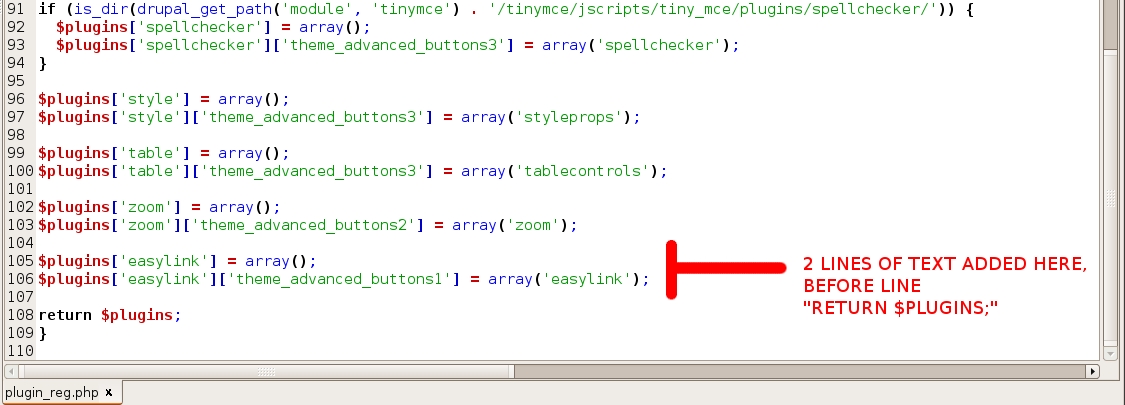
Nijip commentedI had the same problem. In my case, i realized that when following step 2 (shown below) i added the text at the bottom of the page when it should be placed before the last line that says "return $plugins;" I have attached an image showing this. Hope this helps
Step 2
Register the plugin with TinyMCE by adding the following lines to plugin_reg.php
$plugins['easylink'] = array();
$plugins['easylink']['theme_advanced_buttons1'] = array('easylink');
Comment #2
djorn commentedI also had the same issue as alexcunha. When I disabled the TinyMCE gzip processing the button appeared so this seems to be a bug in the plugin itself. I'm not familiar with TinyMCE so I am not sure how to debug this issue.