

Closed (fixed)
Project:
Authenticated User Page Caching (Authcache)
Version:
7.x-2.x-dev
Component:
Code
Priority:
Normal
Category:
Support request
Assigned:
Unassigned
Reporter:
Created:
21 Aug 2013 at 01:46 UTC
Updated:
17 Nov 2013 at 11:10 UTC
Jump to comment: Most recent, Most recent file

Comments
Comment #1
znerol commentedDo you realize that you need to customize your VCL? Please take a look at the files inside the modules/authcache_varnish/vcl directory.
Comment #2
neeravbm commentedYes, we are already customizing our VCL based on the code provided in the authcache_varnish module.
Comment #3
znerol commentedOh, I'm sorry, you already stated that in your original post. When looking at the HTML source (using the view-source function of your browser), do you see ESI tags (something like
<esi:include src=".../authcache_p13n/frontcontroller/index.php..."/>)?Also do you have a chance to look what's going on between varnish and the backend using the
varnishlogcommand, especially whether ESI requests are sent to the backend?On a side note, would it be possible for you to test whether ESI is working in your varnish installation. Perhaps you could use the examples given in the varnish wiki.
Comment #4
neeravbm commentedI tested this a little more. It seems that Drupal itself is not generating the ESI tags. I also see that the code does reach the theme function where ESI tags are supposed to be generated. So possibly this is the reason. I guess first I will have to find out why ESI tags are not being generated by Drupal. After that, if it still does not work, I can move on to debugging Drupal-Varnish interface.
BTW, have you ever encountered this problem where the ESI tags were not being generated?
Comment #5
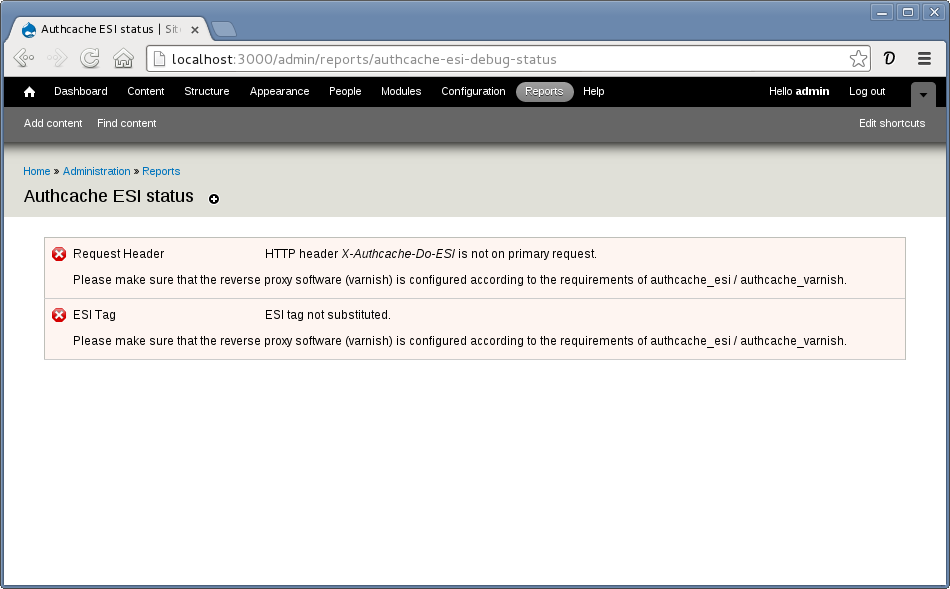
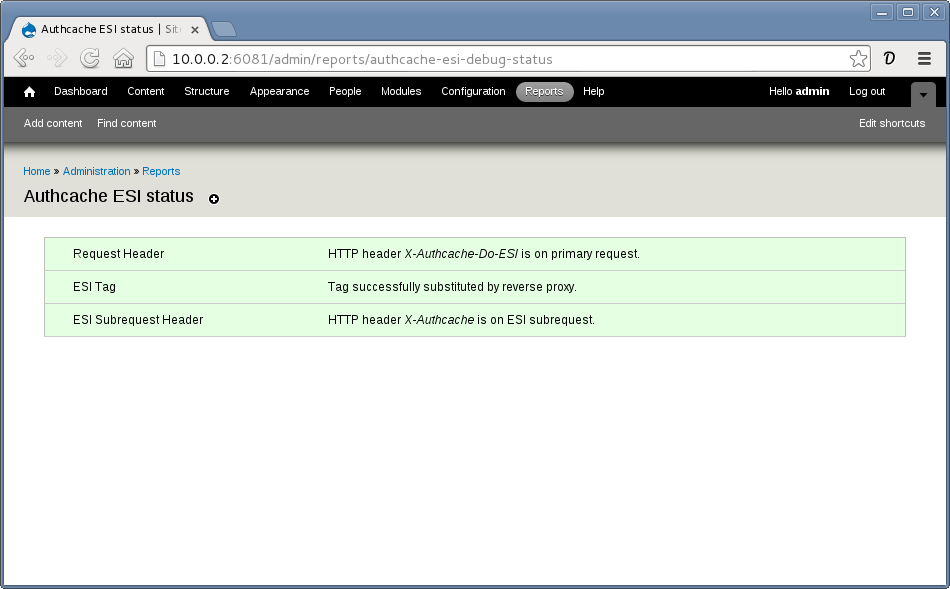
znerol commentedI just added a small new utility-module: Authcache ESI Debug. Enable it, and grant necessary permission to the roles you want to test with. Then navigate to Administration » Reports » Authcache ESI status to check whether the requests passed from varnish to drupal+authcache fulfill the expectations.
When things break:
When (hopefully) everything is fine:
Comment #6
znerol commentedClosing this. If you still have problems, please reopen.
Comment #7
vinmassaro commentedI'm reopening because I'm not having any luck getting ESI working with Authcache/Authcache Varnish/Authcache ESI. I'm using 7.x-2.0-alpha4. I first loaded in my VCL with the Authcache Varnish bits added and when I check the ESI status page, the statuses I get in the table are ERROR, GREEN, ERROR.
I figured I had a VCL misconfiguration, so I tried loading example.vcl directly, and get the same results on the status page. A block that has some PHP in it to display the logged in user ID does not load (I have 'Hide content' set for the block ESI config). When I load a page where the block is then look at watchdog, I see some entries like this:
Thanks.
Comment #8
znerol commentedOops, I see the same. Seems that I broke the status page with one of my recent updates :(
I suppose this might be due to the upgrade. Please try to edit the block and submit it once, this should trigger
authcache_p13n_request_router_rebuild();and then the message should go away.Comment #9
vinmassaro commentedHmm, no luck. I also tried creating a new block but get the same behavior and watchdog entries logged.
Comment #10
znerol commentedCould you please post the result of tho following SQL query:
drush sqlq 'select * from cache_authcache_p13n where cid like "%frag/block%"'Is it on a recent PHP or on an old installation?
Comment #11
vinmassaro commentedAfter logging in with a user who has access to that block, the block does not load. I then run the query and this is the result:
Comment #12
znerol commentedOk, that looks good. Could you please save the following PHP code into a file (e.g. rrdebug.php) and then run it using drush like so:
The contents of rrdebug.php:
Then please post the output of the command. It should look like this:
Comment #13
vinmassaro commentedI got that exact output from the debug script. The contents of the block are:
Comment #14
znerol commentedOk, that block is working over here.
What are the contents of the variable
authcache_p13n_default_request_router_routesin your installation?drush vget authcache_p13n_default_request_router_routesComment #15
vinmassaro commentedHere you go:
Comment #16
znerol commentedOMG, this is embarrassing. I just realized that the code generating the watchdog messages is wrong!
In modules/authcache_p13n/includes/AuthcacheP13nDefaultRequestRouter.inc you'll find the following horribly stupid lines:
The left side of the comparison expression is negated! That means when
$handlerand$generatorare valid, the left side of the expression will evaluate toFALSE. Therefore the watchdog message is only recorded when everything is okay :(Comment #17
znerol commentedComment #18
znerol commentedFigured it would be better to track that error separately. It is definitely serious enough: #2110531: Twisted logic in error checking code leads to bogus watchdog messages.
Comment #19
vinmassaro commentedOk, I applied 7.x-2.x-dev and those watchdog entries don't appear now, but I do see entries like this and the blocks still doesn't appear:
Comment #20
znerol commentedOk, in the dev-version there is a new settings-page. Navigate to Admin » Authcache » Personalization » Frontcontroller. There you find a list of routes and on the bottom of the page a button to rebuild the routes. In every row of the table towards the right side, there is a column indicating whether the route exists (Yes/No). Granted, all routes should exist and if they don't they should become existing after a rebuild.
Comment #21
vinmassaro commentedOk, I rebuilt the routes. I no longer see any errors in watchdog, butt he block still isn't loading for me. I have the example.vcl loaded from the Authcache Varnish module. The Personalization tab shows my block correctly, and the Frontcontroller page shows that the route exists for it. The Authcache ESI status page still shows the same status (Error, Green, Error).
Comment #22
znerol commentedOk, I went through configuring a fresh instance with 7.x-2.x-dev and it was not a pleasant experience:
drush en authcache_block authcache_form authcache_menu authcache_esi authcache_varnish authcache_debug phpreverse_proxyandreverse_proxy_addresses.varnishloguntil hitting suspicious entries like this one:14 RxHeader b Cache-Control: public, max-age=0I desperately hope that the problem you are fighting with is similar.
Comment #23
znerol commentedAs of commit b726bda the debug widget now points out potential problems with Cache-Control header when Authcache Varnish is enabled.
Comment #24
vinmassaro commentedMy setup is similar to yours in #22. I was originally running Varnish and Apache on 127.0.0.1 with Varnish on port 80, Apache on 8080, and setting
$conf['authcache_varnish_validate_reverse_proxy_address'] = FALSE;in settings.php.I just successfully got Varnish running on 10.0.0.2:80, connecting to Apache at 127.0.0.1:8080. I'm still having no luck. Here is a detailed report, so maybe you have an idea. I have these configs in settings.php:
Authcache ESI Debug is still reporting the same status for me (ERROR, GREEN, ERROR). Here is my process using example.vcl with these changes:
|cache_renderafternocacheProcess:
drush dl authcache --dev -y; drush updatedb -y;drush cc all; drush varnish-purge-allto flush Drupal and Varnish cache (need to rundrush varnish-purge-allwith --uri parameter for it to work)X-Varnish-Cache: HIT, and theX-Varnishheader has two XIDs.X-Varnish-Cache: HIT,X-Varnishheader contains two XIDs).Comment #25
znerol commentedFrom the screenshots, I gather that you are using a hostname to access the site (portal.dev). Is this hostname pointing to 10.0.0.2 or 127.0.0.1?
Yes, I still have to fix that. I think I have to move that out of /admin otherwise it will be excluded from caching by default. The VCL does not turn on ESI-replacement for authcache fragments anymore when a page hits a pass rule (or is hit-for-passed from within vcl_fetch).
This is due to the changes in a7db7e7. The
cache_rendercookie is not necessary anymore to detect hits/misses, it is only used to report page-build times by the builtin cache backend. However there is a new cookieaucdbgwhich changes its value after each page-request. The Authcache Debug module now compares the cookie value to the one stored with the information gathered during the initial page-build. If they match a "miss" is flagged, if they don't it must be a "hit". I've pushed an update to the example.vcl reflecting the new behavior: 8b259b9.Comment #26
znerol commentedCommit 2958698 should fix the ESI Debug module.
Comment #27
vinmassaro commentedThanks, I will try to test out the new version today.
The host name portal.dev points at 10.0.0.2 which is an alias that has been added locally to my wireless interface using:
ifconfig en1 alias 10.0.0.2portal.dev returns from Varnish, and portal.dev:8080 returns from Apache.
Comment #28
vinmassaro commentedSeeing same results after testing the latest 7.x-2.x-dev.
Comment #29
znerol commentedWould you please copy-paste your backend-config from the vcl. Mine looks like this;
Comment #30
znerol commentedJust found another little thing which could cause fragments not being rendered. In
modules/authcache_p13n/includes/frontcontroller.incthe calls toob_startandob_end_Xwere not balanced. Attached patch fixes that.Comment #33
znerol commentedComment #34
znerol commented#30: 2070445-balance-output-buffering.diff queued for re-testing.
Comment #35
znerol commentedRecent commits related to this issue:
With the newest version it should be possible to detect failure modes like #2124465: Find a way around Global Redirect when retrieving personalized fragments by inspecting watchdog log messages.
Comment #36
znerol commentedThe cause of the missing block has been tracked down to an incompatibility with the Global Redirect module. This issue has been fixed in 2.0-dev now and will be part of the next release (see #2124465: Find a way around Global Redirect when retrieving personalized fragments). Many thanks to @vinmassaro who dedicated great efforts to get this resolved!