
 The 2026 Drupal Business Survey is open. Your response will help shape the future of the Drupal business ecosystem.
Asset CCK
You are browsing documentation for an older version of Drupal, which is not supported any longer, and the information may not be correct. See current documentation for Contributed modules
There are a number of DIFFERENT ways that you could add "assets" to a node, this page describes adding an "asset field" to a node, not how to embed an asset in the body of a node.
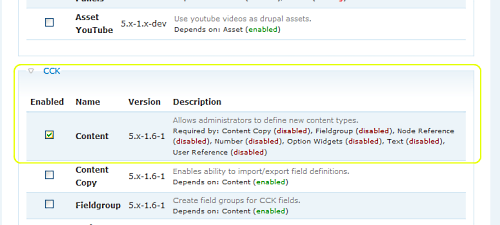
First make sure you have both asset (http://drupal.org/project/asset) and cck (http://drupal.org/project/cck) installed and activated.
Go to Home>Administer>Content management. Click on “Add content type”. Type in a name and content type (for example I type “Asset_Test” as name and “asset_test” as content type).
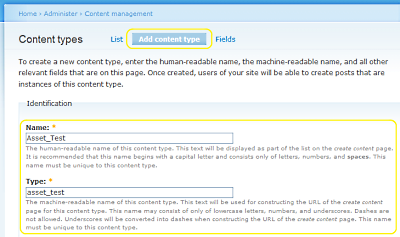
Then push “save content type”. Now on the main cck page click edit next to the content type you just made.

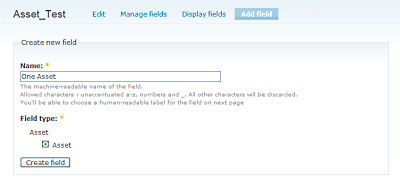
Now click “Add field”, type in a name for the field and select the “Asset” field type. Then click “Create field”. Now, if you want to be able to add multiple fields to one asset component check the “Multiple values” field. Push “Save field setting” to finish.
Go to “Create content” and click on “Asset_Test” or whatever you named your content type. You should see links to “Insert asset” and if you selected multiple values there should be a “More Assets” button you can push to add more assets.
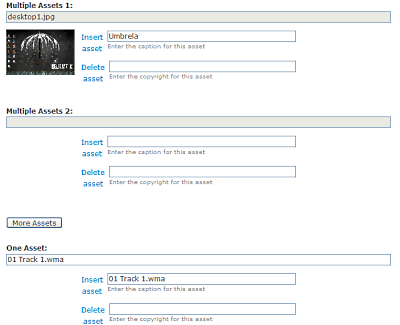
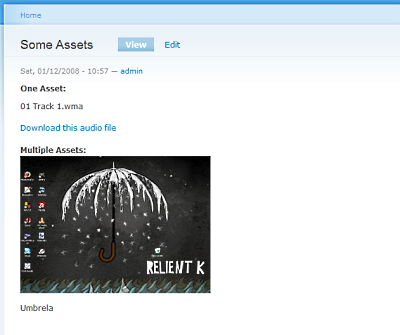
When you are done push “Submit” and view your new node with assets attached.
Help improve this page
You can:
- Log in, click Edit, and edit this page
- Log in, click Discuss, update the Page status value, and suggest an improvement
- Log in and create a Documentation issue with your suggestion
