
Views integration
First make sure you have both asset (http://drupal.org/project/asset) and views (http://drupal.org/project/views) installed and activated.

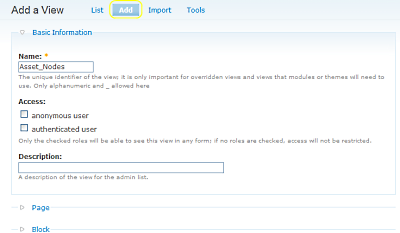
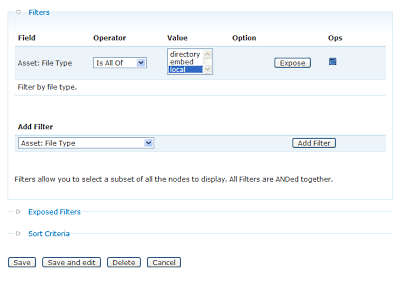
Now go to Administer>Site building>Views and click and type in a name. Check the box next to “Provide Page View” if you want the view to be shown on a page, else check the box next to “Provide Block” to use it as a block. Under “Filters” select how you want to filter your view. If you want to show assets from only certain folders add the “Asset: Directory” filter. If you want to show assets of certain file extensions add the “Asset: File Extension” filter. If you want to only show assets that are embedded, locally hosted, or from some directory then select the “Asset: File Type” filter. To only show assets with distinct values select the “Asset: Distinct” filter. For this example I’m going to use the “Asset: File Type” so I’ll select that push “Add Filter” select “local” from the value fields and then push “Save”. Then click on your newly created view to see it.
Help improve this page
You can:
- Log in, click Edit, and edit this page
- Log in, click Discuss, update the Page status value, and suggest an improvement
- Log in and create a Documentation issue with your suggestion
