Closed (fixed)
Project:
Views (for Drupal 7)
Version:
5.x-1.6
Component:
User interface
Priority:
Normal
Category:
Support request
Assigned:
Unassigned
Reporter:
Created:
14 Jan 2008 at 20:31 UTC
Updated:
29 Aug 2012 at 11:07 UTC


Hello,
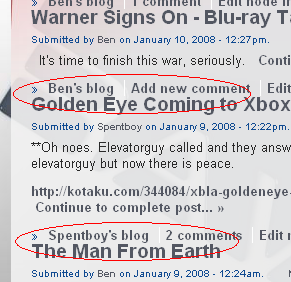
Using views (which I'm using in a panel), I'm having an issue where my latest content teasers are hugging one anotehr vertically. Is there an easy way I can add a one line break, or even add a horizontal line directly from views? I attached a screenshot of the issue at hand.
Thanks!
Ben
| Comment | File | Size | Author |
|---|---|---|---|
| sample.PNG | 38.09 KB | raiyne |

Comments
Comment #1
merlinofchaos commentedYou can control Views output through theming. You can override theme_views_view_teasers (see views.module for the code; it's pretty simple) and you can also override theme_views_view_teasers_VIEWNAME.
See the theming handbook for information on how to override theme functions.
Comment #2
raiyne commentedPardon for not fully understanding, instead of overriding a particular function can I just add a break or horizontal line at the end of the appropriate function? Or graphic perhaps? Something to break up my teaser lists a little farther apart.
I've been reading through the theming handbook and its all still confusing to be honest. I'm getting several different bits of information on what I should do:
In view.module I found: theme_views_view_teasers, but it's only 2 lines of code. Do I edit that by adding a variable (line break or graphic or horizontal line), if so is there a list of the variables I can use to put in there, I'm not fluent in the drupal syntax and need specific guidance.
I also read that I don't change the view.module, instead I put a similary named "function theme_views_view_teasers" in template.php?
Ugg I'm lost and the handbook is not relating to me so far :(
Comment #3
edpaff commentedHas anyone managed to solve this problem yet? I've been trying to figure it out all day...
Comment #4
catchstyle.css
firebug or view source will tell you what to use instead of view-something. Experiment with different values for margin as well.
or possibly .node .teaser instead depending on your theme
Marking as fixed. This is a very general css question that has very little to do with views by the way, but for some general information about theming lists views without php see here: http://groups.drupal.org/node/4161
Comment #5
Anonymous (not verified) commentedAutomatically closed -- issue fixed for two weeks with no activity.