I've been using 5.x-1.1 for months successfully and just downloaded 5.x-2.0-rc2 to test it out. Uploading and displaying an image works peachy. But when I click the "edit" tab (after uploading an image), the Imagefield form group appears in its default state -- there's nothing showing the image that was previously uploaded. I tried applying Imagefield to one of our custom content types (which is where I'm using the 5.x-1.1 version) and to the 'book' content type -- same result.
I'm surprised that no one else has reported this so maybe there's something unique in my environment (or I'm a doofus and forgot a setup step). As time permits I'll dig into the guts to figure out what's going on, but I wanted to get this in the queue since it's such a show stopper.
Drupal: 5.5
CCK: 5.x-1.6-1
Imagefield: 5.x-2.0-rc2
Permissions: 777
Download: public
Config: all checkboxes are unchecked; max res:0
Expected: when 'edit' tab is clicked, expect to see image previously uploaded (and delete checkbox) in Imagefield form group.
Unexpected: when 'edit' tab was clicked (after an image had been uploaded via Imagefield), the Imagefield form group was in its default state
Steps: add Imagefield to content type with default checkbox values, create a node and add image with Imagefield, submit node, click 'edit' tab


Comments
Comment #1
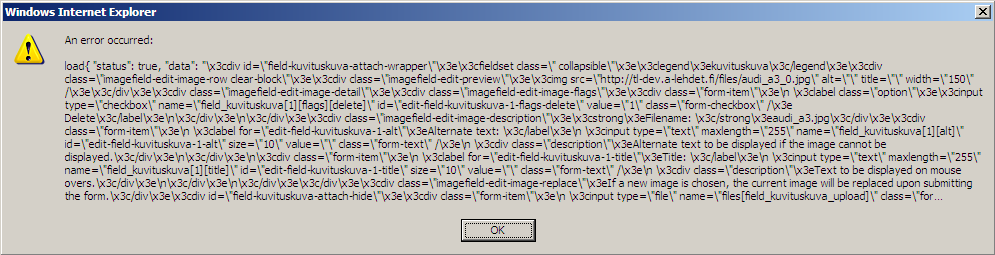
Janzki commentedI'm experiencing exactly the same behavior. The form is reseted to it's default state and additionally if I try to upload a new image it pops up with a javascript error (see attachment).
Drupal: 5.6
CCK: 5.x-1.6-1
Imagefield: 5.x-2.0-rc2 / 5.x-1.2-rc1
Permissions: 777
Download: public
Comment #2
jbrauer commentedI'm also seeing this. If, however, I upload a second image I see the first image with its title and alternate text until I submit the form. I haven't had a chance to set this up in a clean environment for testing. Image related modules installed:
ImageCache 5.x-2.0-beta
ImageField 5.x-2.0-rc2
CCK 5.x-1.6-1
Public Download and the file works fine otherwise but don't show up here and (possibly relatedly) don't trigger the view filter for "has image=yes"
Comment #3
jbrauer commentedClearing some duplicates and changing to a more common title.
Comment #4
jbrauer commentedComment #5
attiks commentedTemporary work-around (is working for me)
Inside _imagefield_widget_form the file properties don't get loaded, so I added this on line 620 (before "// @todo split following if block into its own function."):
Comment #6
jbrauer commentedThis seems to work for me and resolves the issue with the views filter detecting the image as well.
Comment #7
drupalprojects commentedI"m also had to add similar code to the _imagefied_widget_form to make it working
Comment #8
Janzki commentedThis did the trick to display the form. But the weird javascript error is still popping up after an upload. The upload seems to work fine regardless of the error message. I just have to save the article and edit it again to have the form display the image.
Anybody else getting the javascript error?
Comment #9
attiks commentedi don't get any javascript errors, is it possible you're using other modules that might interfere?
I also have to save to see the picture to see them
Comment #10
trevorleenc commentedthat's the ticket :)
thanks!
Comment #11
jbrauer commentedIn getting the right version from CVS to patch this I discovered this has been known and fixed.
http://drupal.org/node/204682
Here's the CVS command to get the current version as there isn't a release to get the current version anywhere (this checks the module out to a directory called imagefield in your current directory):
cvs -z6 -d:pserver:anonymous:anonymous@cvs.drupal.org:/cvs/drupal-contrib checkout -d imagefield -r DRUPAL-5--2 contributions/modules/imagefield