

 Come together with the global Drupal community in Rotterdam, 28 Sept – 1 Oct 2026. Sessions, contribution, connection, and Early Bird savings until 8 June.
By CandiceJarrett on
Hey! First, thank you so much to Deciphered and zeta-zoo who answered my last question, I really appreciate it so much, thank you!!!! :-)
I have two more questions: can users see a different theme than the administrator? if so, how do I make that happen? I was editing my site and I broke the links in the admin panel because the design isn't going to be the same for admin and users... now I'm at a stand still. (I'm not displaying the dynamic drupal nav to users, just a flash nav that is static and part of the header... but as admin, I need to see that nav to edit the site.)
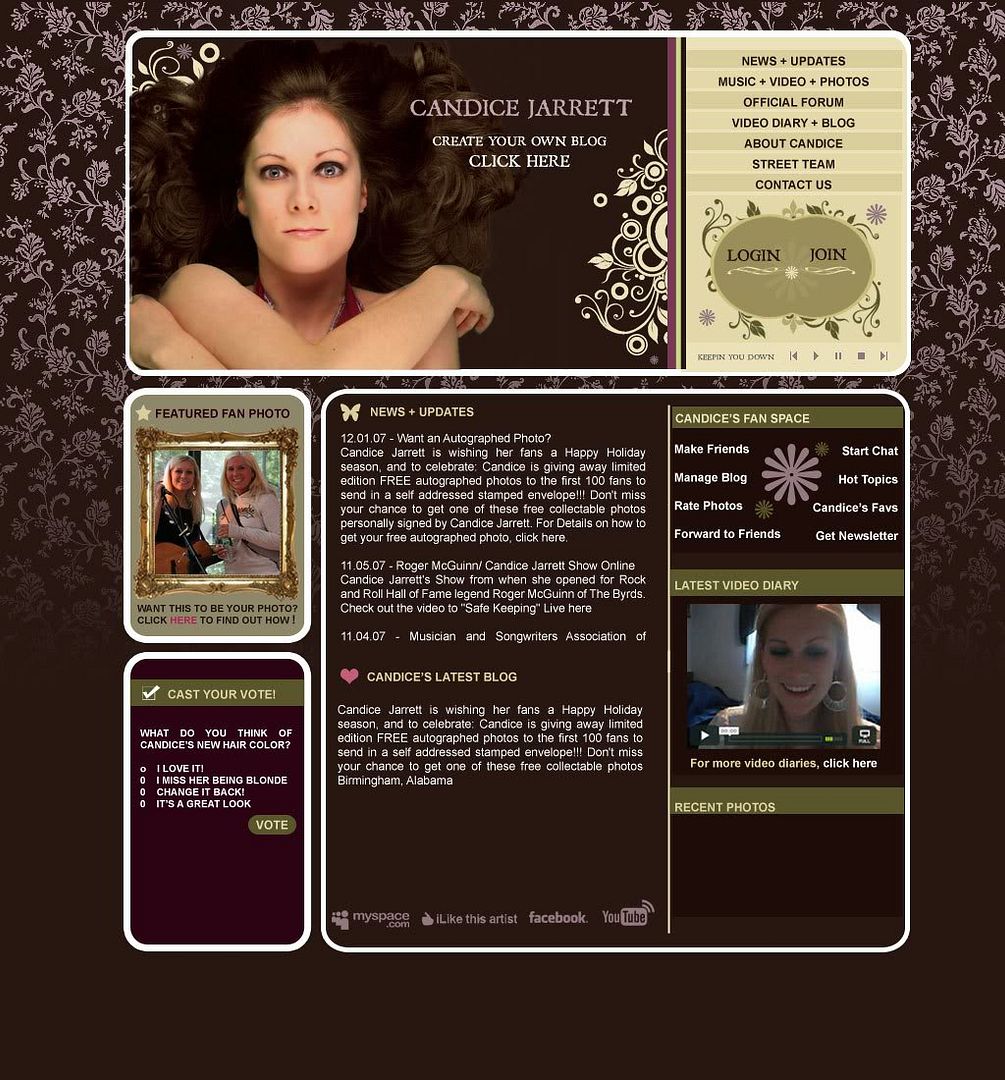
The other thing is that the design calls for two different sections to the left side bar: a top and a bottom. Can I assign things like a poll and a story to go in specific containers within the side bar?
Thank you so much again for taking the time to read this!!!!
Best wishes,
Candice
here's the testbed: www.CandiceJarrett.net
here's a screen shot: http://i83.photobucket.com/albums/j303/candicejarrett/PREVIEW_4.jpg - on the left side there are two boxes for content, that's what I need to separate into different containers. Thanks again!

Comments
WOW
I figured it out!!! (how to adjust the admin panel and make it different from the user panel) I couldn't find it before because I messed up the display... but problem solved! That's very exciting....
HOWEVER, I'm still having a problem with the left side bar and separating it into two sections... if anyone has got some advice for me on how to tackle that, I'd love to hear it!!! Thanks again!
C.
PS.
For someone reading this who has the same question about the admin theme vs user theme: you go to administer --> site configuration --> administration theme --->(select title of theme)
template.tpl.php
You want to create "regions" for your theme using the template.tpl.php file, doing something like this:
Then put things like:
in your page.tpl.php to output those regions. Once the blocks are assigned to their appropriate regions, they will show up as you wish. Hope that helps.
-Mike Goodwin
http://www.not2us.net
http://www.redleafmedia.com
Thanks Mike!
Thanks Mike! I'll give that a try!!!! I really appreciate it, thank you!
Cheers,
Candice