Closed (fixed)
Project:
Event
Version:
5.x-1.0
Component:
User interface
Priority:
Normal
Category:
Support request
Assigned:
Unassigned
Reporter:
Created:
17 Jan 2008 at 09:02 UTC
Updated:
30 Aug 2010 at 10:40 UTC


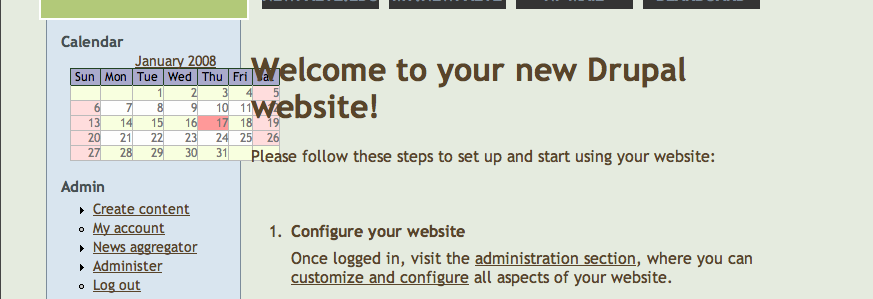
I am trying to include the calendar block on every page on my website, yet the block is too wide to work with the theme. The theme I'm using is My-Drupal
Tidy (http://drupal.org/project/MyDrupal-Tidy) and since it is to display on every page, I would like it to be in the left side bar above the navigation block, but it is too wide to fit. Attached is a screen shot of it. It is currently deactivated until I can resolve this issue.
I took a glance at the css, but couldn't figure out what change to make to that.
| Comment | File | Size | Author |
|---|---|---|---|
| MyWebsite.png | 50.69 KB | tnanek |

Comments
Comment #1
Extrix commentedI actually have the same issue, I designed a theme, in Firefox and Safari and such, it looks fine, but in Internet Exploder 6 and 7, the Events Calendar block is larger then it needs to be, which pushes the sidebar out to a larger width then the other sidebar which then makes the whole page look a bit wonky..
I'm not sure how to change it either... The day cells seem to have extra padding plastered on them from IE6 and 7 =(
Also, if I change the padding, it also changes the padding when you are in month view.
Edit: I can't believe I didn't think of this before, but you can actually change the padding or w/e you want on the calendar block with css, since the block uses a bit different classes then the main calendar view does..
I'll check in to it and try some stuff...
Edit 2:
Hi again, try using this in your stylesheet to change how big your calendar is,
I'm sure you can also sub in th instead of td to change how big the sun,mon,tues part is.
Also, if IE is giving you trouble, try putting that code into an IE conditional comment in your page. So put this in the head of your page if you'd like to change the style of the calendar for IE and not Firefox or Safari etc.
Edit 3:
One last edit, if you put the following in your page.tpl right before I think it'll help your problems, I did it for the site I was working on and it helped a lot with the padding issues in IE.
I know I'm a bit hard to understand but I hope this helps!
Comment #2
tnanek commented@Extix: You are not hard to understand at all, I can see the logic in what you sent in all of your edits; though I long since gave up on this specific site, and started anew with Drupal 6.x, though since then the organization the site was for had collapsed, thus the site no longer exists. Thereby, I'm marking this as fixed. Thanks for posting your solutions back here though, I for one appreciate it.