Hi,
I have 2 vocabularies. Their links are not correct. The first one is linking to the same place as the term 1 (but the vocabulary is not a term itself). The second is taking the link of the second term.
But, the funny thing, is that if you click them, they work: in the page, I can see the correct name of the vocabulary, and "There are currently no posts in this category". Also, the menu expands the vocabulary, and I can see all the root terms in there.
So, the functionality is fine, but the link is not.
thanks


Comments
Comment #1
brmassa commentedthanks for your report. fixed.
regards,
massa
Comment #2
ferrangil commentedSorry to activate again this issue, but I just downloaded your 1.02 version, and you said that this bug is resolved there... I'm still seeing it.
My vocabularies are getting an url alias, because taxonomy/term/1 exists in the url_alias table (but is pointing to the first term, not the first vocabulary).
The second vocabulary is using the url of the second term.
BTW, I deleted everything in my cache_menu table. Something else to remove??
Comment #3
brmassa commentedFerran,
this feature is not possible.
The menu module creates the hierarchy based on the path, so taxonomy/term/2, taxonomy/term/3 will never be considered as children from taxonomy/term/1 for example.
if you try to implement this feature, all terms will be listed in sequence on Navigation menu, with no hierarchy at all.
regards,
massa
Comment #4
jdotti commentedHi and Thanks for this very useful module ...
I'm just asking a question about this "The menu module creates the hierarchy based on the path " ...
Is it not possible to base the hierarchy on the database ?
regards
JD
Comment #5
ferrangil commentedI created this issue because the names of my vocabularies have a wrong link. If my explanation is not enough, just tell me, but please don't close again the issue while saying "Fixed".
Do you want an screenshot??
It seems you want to close all issues related with that module..
Comment #6
brmassa commentedJérémy,
nope. its the menu module that coordinates the menu creation. it uses the path to build the hierarchy. So, no chance to create them as "taxonomy/term/X" like the normal term page path.
Ferran,
1* Calm down. i thought i had answered your question.
2* I did closed several issues because they were all about the same or were too old. Some i closed by mistake, unfortunately
3* I will need more info, coz i didnt get the problem. thanks
regards,
massa
Comment #7
ferrangil commentedHi Bruno,
I had no intention to be rude. Your time with this module is greatly appreciated. We all know that you do this for free.
I created two screenshots to show you the "wrong" links in my vocabularies.
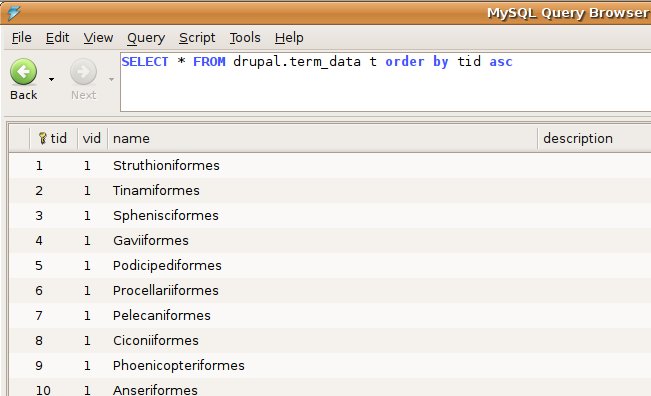
One of the screenshots is of the table term_node, where you can see the first terms in my vocabulary. In the other image, you will see two screenshots of what appears in the Status Bar when I have my cursor over the vocabularies. My vocabularies are called "IBC" and "Locations". As you can see, my vocabularies take the "link" from the term table!
Then, if I click the first vocabulary (IBC), the URL changes to localhost/struthioniformes (that means, the 1st term). BUT, in the content area, IBC is displayed (so, the name of the vocabulary). When I move the cursor over the first term of my vocabulary, the Status bar shows the link: localhost/taxonomy/term/1/1 , so it's fine. Of course I prefer to have here something like taxonomy/term/1 (aka taxonomy/term/tid), but I already understood that this is not possible, because the hierarchy is taken from here...
So, after explaining that, I think I found the "problem" myself... As I have a node for each term (initially there are lots of "empty" nodes, but here they are), I created a taxonomy redirect rule to convert the taxonomy/term/tid to the URL_alias. Could this be interfering in the menu, and it's replacing the vocabulary link? Because, I imagine that taxonomy_menu creates the first menu entry as taxonomy/term/1 and the second as taxonomy/term/2... so my redirect thinks this is a link to the first term and that's why it changes the URL link...
After all, it seems that it's not a taxonomy_menu problem...
I know we asked that lots of times, but there's no change at all to have the paths/links as taxonomy/term/tid ? Do you know if there's any other module to have the links as I "need"...
The point is to use the URL_alias all around, you know...
Please could you confirm that this is just a "problem" with my taxonomy redirect module.
Thanks!
Comment #8
brmassa commentedFerran,
i "think" i know what is going wrong. What did you put on "module page" field on Taxonomy Menu Admin page? "taxonomy/term"?
If so, thats the cause of the "bug". I think i will remove this field because its causing confusion. Its intended to be ONE word only, like "category", "categories", "style". I created it to not force the orirignal "taxonomy_menu/1/1" paths...
try to change this value and see what happens.
regards,
massa
Comment #9
ferrangil commentedYep, as you said, I wrote "taxonomy/menu".
Now I changed to "taxonomia" and the vocabulary names have a correct URL path: taxonomia/1 and taxonomia/2. And all other elements, taxonomia/1/1, ..ia/1/2, and so on.
I'll keep that value like this. Well, is not a bad idea, but as it is a common word for all the vocabularies, I think often is not really useful.
If my website talks about cars, and I just have one vocabulary, I'll write "cars" in here (and the path will look better, less technical),..
Well, I think you shouldn't remove that field, but the problem is that lot of people will try to use it as I did... I'll suggest to add a but more of explanation, and maybe check if the user has entered a slash / and then, warn it about that.
Thanks!
P.S: Will be difficult to have a field for each vocabulary??
Comment #10
Anonymous (not verified) commentedAutomatically closed -- issue fixed for two weeks with no activity.