Closed (fixed)
Project:
Drigg
Version:
5.x-1.9
Component:
Code
Priority:
Normal
Category:
Bug report
Assigned:
Reporter:
Created:
21 Jan 2008 at 00:40 UTC
Updated:
28 Aug 2008 at 16:44 UTC
Jump to comment: Most recent file


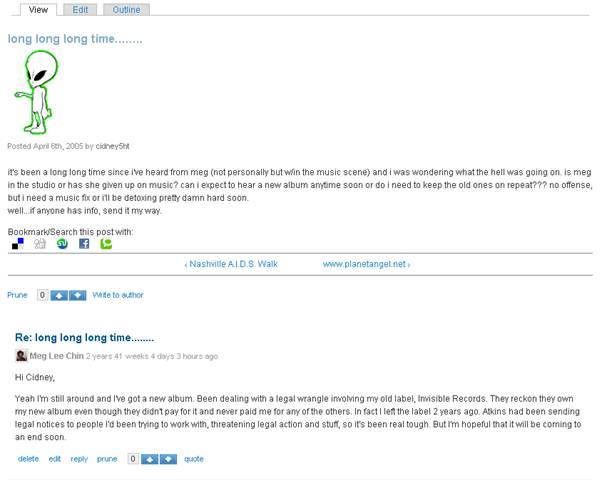
Though the avatar on the first post at the start of the thread is normal size, all the ones on the replies are teeny tiny.
| Comment | File | Size | Author |
|---|---|---|---|
| #5 | avatar size.patch | 1021 bytes | philbar |
| #2 | clip_image002.jpg | 29.88 KB | eggthing |

Comments
Comment #1
mercmobily commentedHi,
I am having a problem replicating this.
Can you please send us a screenshot, and (possibly) the online site where this is on so that I can see it and correct it?
Thanks!
Merc.
Comment #2
eggthing commentedThanks for the quick reply!
Here's a screenshot and the site is:
http://www.megleechin.com/music2/long-long-long-time
Comment #3
mercmobily commentedHi,
OK, nailed the problem. I also fixed a small problem in the theme.
Basically, it's a CSS issue. I passed this on to the graphic designer, who will fix the avatars when they are shown.
Alan is a little busy right now, it might take a couple of days.
(Thanks Alan!)
Bye,
Merc.
Comment #4
mercmobily commentedHi,
...Alan...?
At the same time, if anybody else has experience in CSS and is able to fix this... please do.
It's quite straightforward: just a matter of fixing the templates!
Bye,
Merc.
Comment #5
philbar commentedI copied the css from the node avatar to the comment avatar so both are the same. I haven't tested it because I don't use the forum for my installation.
Comment #6
mercmobily commentedHi,
Sorry, I won't commit untested patches.
Can somebody check that it works?
Merc.
Comment #7
cedricfontaine commentedComment #8
cedricfontaine commentedWho can tell me what I should setup to test this ? I'm unable to display avatar in comments. What did I miss ?
Comment #9
mercmobily commentedHi,
* Go to admin/user/settings , and enable "Picture support".
* Upload an avatar for admin ( go to user/1 , "edit", and upload the avatar)
* Enable the forum module
* Add a forum
* Add a forum by admin
* Add a comment from admin
That should do it!
Merc.
Comment #10
cedricfontaine commentedNo need to change as you proposed philbar. I've just committed a small change, with an avatar 30x30px now.
Comment #11
cedricfontaine commentedComment #12
mercmobily commented