
 Come together with the global Drupal community in Rotterdam, 28 Sept – 1 Oct 2026. Sessions, contribution, connection, and Early Bird savings until 8 June.
Asset Bonus
Last updated on
30 April 2025
Make sure you have the asset (http://drupal.org/project/asset) module installed and activated (Administer>Site building>Modules). Now go to http://mostrey.be/files/asset_bonus.zip to get the asset bonus files. Download the zip and extract the “audioplayer”, “swfheader”, and “swfobject” folders into the (already created) “asset_bonus” folder inside the asset module directory.

Go and activate the asset bonus module (Administer>Site building>Modules).
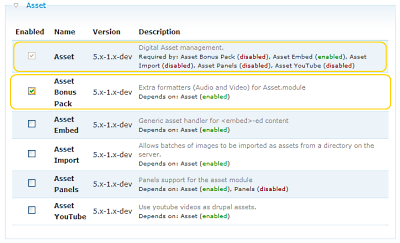
Now you can upload and use .swf, .flv and .mp3 files.

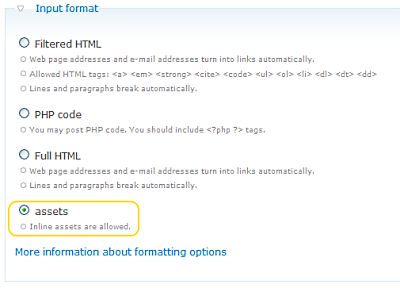
Don’t forget to select the correct input format (see asset handbook page for more info).
Help improve this page
Page status: Not set
You can:
You can:
- Log in, click Edit, and edit this page
- Log in, click Discuss, update the Page status value, and suggest an improvement
- Log in and create a Documentation issue with your suggestion
